
 資料結構
資料結構 網路
網路 關係型資料庫管理系統
 作業系統
作業系統 Java
Java MS Excel
 iOS
iOS HTML
HTML CSS
CSS Android
 Python
 C 程式設計
 C++
C++ C#
C# MongoDB
 MySQL
MySQL Javascript
 PHP
PHP 物理
物理 化學
化學 生物
生物 數學
數學 英語
英語 經濟學
經濟學 心理學
心理學 社會科學
社會科學 服裝研究
服裝研究 法律研究
法律研究使用 Selenium 滑鼠懸停操作從選單的子選單中選擇專案
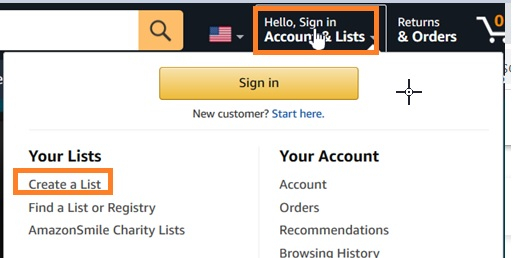
我們可以在 Selenium webdriver 中使用滑鼠懸停操作從選單的子選單中選擇一個專案,這是藉助操作類完成的。我們將建立一個操作類物件,然後對其應用移動到元素。
此方法將滑鼠移動到選單的中間,該選單在滑鼠懸停時顯示子選單。然後應用執行方法來實際執行此操作。在選單上懸停之後,我們將在點選方法的幫助下選擇一個子選單。
語法
WebElement n=driver.findElement(By.id("nav-link-accountList"));
Actions a = new Actions(driver);
a.moveToElement(n).perform();
讓我們懸停在頁面上下面突出顯示的選單上,然後選擇一個子選單——建立一個列表 −
示例
import org.openqa.selenium.By;
import org.openqa.selenium.WebDriver;
import org.openqa.selenium.WebElement;
import org.openqa.selenium.firefox.FirefoxDriver;
import java.util.concurrent.TimeUnit;
import org.openqa.selenium.interactions.Action;
import org.openqa.selenium.interactions.Actions;
public class SubMenuClick{
   public static void main(String[] args) {
      System.setProperty("webdriver.gecko.driver",
         "C:\Users\ghs6kor\Desktop\Java\geckodriver.exe");
      WebDriver driver = new FirefoxDriver();
      //implicit wait
      driver.manage().timeouts().implicitlyWait(5, TimeUnit.SECONDS);
      //URL launch
      driver.get("https://www.amazon.com/");
      //identify menu
      WebElement n=driver.findElement(By.id("nav-link-accountList"));
      // object of Actions with method moveToElement
      Actions a = new Actions(driver);
      a.moveToElement(n).perform();
      //identify sub-menu element
      WebElement m=driver.
      findElement(By.xpath("//*[text()='Create a List']"));
      //move to element and click
      a.moveToElement(m).click().perform();
      System.out.println("Page navigated to: " +driver.getTitle());
      driver.quit();
   }
}
輸出


更新時間: 07-Apr-2021
6K+ 瀏覽次數

廣告