
 資料結構
資料結構 網路
網路 關係型資料庫管理系統
 作業系統
作業系統 Java
Java MS Excel
 iOS
iOS HTML
HTML CSS
CSS Android
 Python
 C 程式設計
 C++
C++ C#
C# MongoDB
 MySQL
MySQL Javascript
 PHP
PHP 物理
物理 化學
化學 生物
生物 數學
數學 英語
英語 經濟
經濟 心理學
心理學 社會科學
社會科學 時尚研究
時尚研究 法學研究
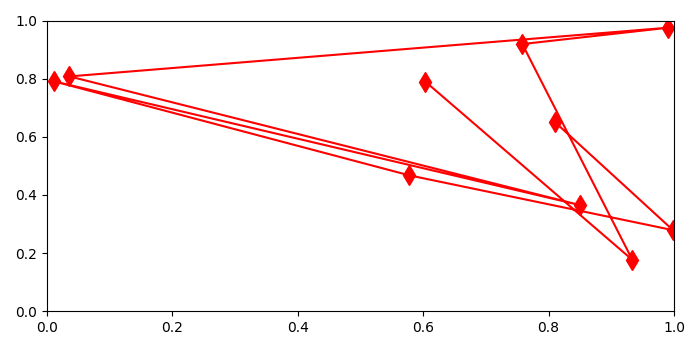
法學研究如何從 Matplotlib 圖表中檢索 XY 資料?
要從 matplotlib 圖表中檢索 XY 資料,我們可以使用 get_xdata() 和 get_ydata() 方法。
步驟
使用 numpy 建立 x 和 y 資料點。
使用 xlim() 和 ylim() 方法限制 X 和 Y 軸範圍。
使用 plot() 方法繪製 xs 和 ys 資料點,其中 marker=diamond,color=red 和 markersize=10,將返回的元組儲存在 line 中。
對 line 使用 get_xdata() 和 get_ydata() 方法來獲取 xy 資料。
要顯示圖表,請使用 show() 方法。
示例
import numpy as np
from matplotlib import pyplot as plt
plt.rcParams["figure.figsize"] = [7.00, 3.50]
plt.rcParams["figure.autolayout"] = True
xs = np.random.rand(10)
ys = np.random.rand(10)
plt.xlim(0, 1)
plt.ylim(0, 1)
line, = plt.plot(xs, ys, marker='d', c='red', markersize=10)
xdata = line.get_xdata()
ydata = line.get_ydata()
print("X-data of plot is: {}
Y-data for plot is: {}".format(xdata, ydata))
plt.show()
輸出
當我們執行程式碼時,它會顯示一個圖表,並在控制檯上列印其 XY 資料。
X-data of plot is: [0.80956382 0.99844606 0.57811592 0.01201992 0.85059459
0.03628843 0.99122502 0.7581602 0.93371784 0.60358098]
Y-data for plot is: [0.65190208 0.27895754 0.46742327 0.79049074 0.36485545
0.80771822 0.9753513 0.91897778 0.17651205 0.7898951 ]

更新日期:2021-05-08
5K+ 瀏覽

廣告