
 資料結構
資料結構 網路
網路 關係資料庫管理系統
 作業系統
作業系統 Java
Java MS Excel
 iOS
iOS HTML
HTML CSS
CSS Android
 Python
 C 程式設計
 C++
C++ C#
C# MongoDB
 MySQL
MySQL Javascript
 PHP
PHP 物理學
物理學 化學
化學 生物學
生物學 數學
數學 英語
英語 經濟學
經濟學 心理學
心理學 社會學
社會學 時尚研究
時尚研究 法律研究
法律研究如何在 Matplotlib 中使用 cycler 屬性繪製多色迴圈圖
Matplotlib 為所有圖形和繪圖提供了一個預設的顏色迴圈,但是,為了繪製具有多個顏色迴圈的繪圖,我們可以使用 Matplotlib 的 **cycler** **屬性**。它用於為軸繪製重複的模式。
首先,我們將使用面向物件的 API(例如 **pyplot**)來繪製特定的視覺化效果。
from cycler import cycler
import numpy as np
from matplotlib.backends.backend_agg import FigureCanvasAgg as FigureCanvas
from matplotlib.figure import Figure
from IPython.core.display import display
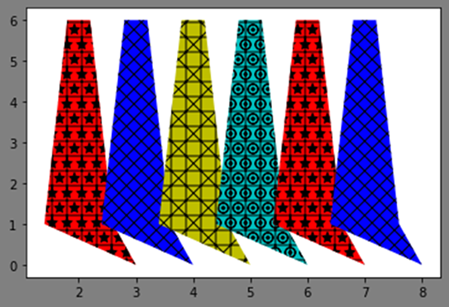
在此示例中,我們將建立兩個物件,它們將在每四個物件後重復迴圈。因此,在建立兩個物件後,最後兩個將是前兩個物件的重複。
fig = Figure()
FigureCanvas(fig)
設定軸的 facecolor、alpha 和 edgecolor,
fig.set(facecolor='grey', alpha=0.2, edgecolor='m')
ax = fig.add_subplot(111)
設定繪製圖形的資料,
x = np.array([0.4, 0.8, 1.2, 1.6, 2.0])
y = [1, 6, 6, 1, 0]
現在為顏色和陰影屬性定義自定義迴圈器,並將其設定為軸,
custom_cycler = cycler('color', ['g', 'blue', 'y', 'c']) + \
cycler('hatch', ['+*', 'xx', '+x', '+O.'])
ax.set_prop_cycle(custom_cycler)
繪製六個物件的圖形,
ax.fill(x+1, y)
ax.fill(x+2, y)
ax.fill(x+3, y)
ax.fill(x+4, y)
ax.fill(x+5, y)
ax.fill(x+6, y)
顯示繪圖,
display(fig)
輸出

更新於: 2021年2月23日
690 次瀏覽

廣告