
 資料結構
資料結構 網路
網路 關係型資料庫管理系統
 作業系統
作業系統 Java
Java MS Excel
 iOS
iOS HTML
HTML CSS
CSS Android
 Python
 C 程式設計
 C++
C++ C#
C# MongoDB
 MySQL
MySQL Javascript
 PHP
PHP 物理學
物理學 化學
化學 生物學
生物學 數學
數學 英語
英語 經濟學
經濟學 心理學
心理學 社會學
社會學 時尚研究
時尚研究 法律研究
法律研究在 Matplotlib 中繪製多條線
Python 提供了一個名為 Matplotlib 的強大庫,該庫以圖表和圖形的形式建立視覺表示。該庫的眾多功能之一是在單個圖形中繪製多條線的能力,這在比較資料集或視覺化隨時間推移的趨勢時非常有用。我們將探討名為“plot()”的內建方法,該方法用於在 Python Matplotlib 中繪製多條線。
Python 程式在 Matplotlib 中繪製多條線
在直接跳轉到程式之前,讓我們先熟悉一些 Python 的基本概念,這將有助於我們更好地理解程式碼。
plot() 方法
此方法用於建立各種型別的繪圖,並具有不同的樣式和格式。它接受一個或多個表示繪圖上 x 和 y 座標的對。預設情況下,它繪製從一個數據點到另一個數據點的線。但是,我們可以透過更改格式字串或使用其他引數(如顏色和線型)來繪製其他型別的繪圖,例如散點圖、條形圖和直方圖。
語法
plot(x, y)
這裡,x 和 y 指定 x 和 y 座標的資料點。
Numpy
它是 Numerical Python 的簡稱,用於執行科學計算。它提供對處理大型多維陣列和矩陣的支援。我們可以輕鬆地將其與其他使用陣列的 Python 庫(如 pandas 和 matplotlib)整合。
字典
它是一個無序且可變的元素集合。它以鍵值對的形式儲存其元素,其中每個鍵都與一個值相關聯。我們可以透過將元素放在花括號“{ }”中作為“鍵”:“值”來建立字典,並用逗號分隔每個鍵值對。
示例
Details = {"Tutor" : "Tutorialspoint", "Rank" : 01, "country" : "India"}
示例 1
以下示例說明了在繪製多條線時“plot()”方法的使用。
方法
使用資料點列表初始化三條線。
使用“plot()”方法繪製 x 座標的值與 y 座標的值。
然後,使用“title”、“legend”、“xlabel”和“ylabel”新增一些有關繪圖的資訊。
使用“show()”方法顯示結果並退出。
import matplotlib.pyplot as plt
# Data points of line 1
x1 = [1, 2, 3, 4, 5]
y1 = [2, 4, 6, 8, 10]
# Data points of line 2
x2 = [1, 2, 3, 4, 5]
y2 = [1, 3, 5, 7, 9]
# Data points of line 3
x3 = [1, 2, 3, 4, 5]
y3 = [5, 4, 3, 2, 1]
# Plotting all lines with specifying labels
plt.plot(x1, y1, label='Line 1')
plt.plot(x2, y2, label='Line 2')
plt.plot(x3, y3, label='Line 3')
# Adding legend, x and y labels, and titles for the lines
plt.legend()
plt.xlabel('X-axis')
plt.ylabel('Y-axis')
plt.title('Plotting Multiple Lines')
# Displaying the plot
plt.show()
輸出

示例 2
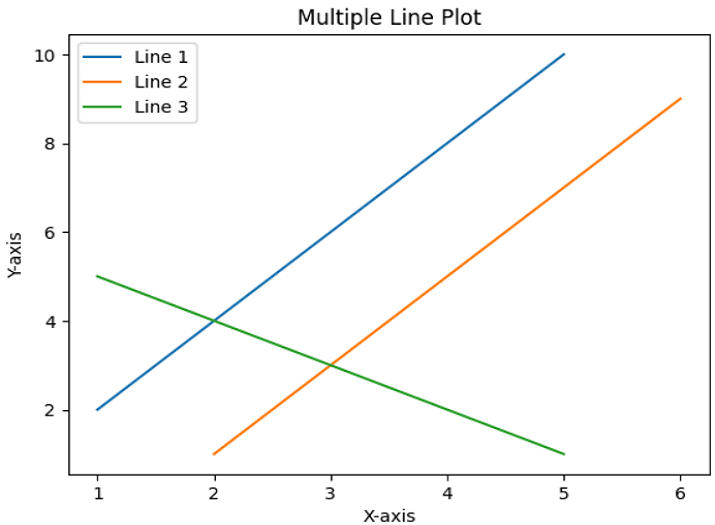
在此示例中,我們將藉助 numpy 和 plot() 方法繪製多條線。在前面示例的相同程式碼中,我們將使用 numpy 陣列而不是列表。
import numpy as np
import matplotlib.pyplot as plt
# Data points of line 1
x1 = np.array([1, 2, 3, 4, 5])
y1 = np.array([2, 4, 6, 8, 10])
# Data points of line 2
x2 = np.array([2, 3, 4, 5, 6])
y2 = np.array([1, 3, 5, 7, 9])
# Data points of line 3
x3 = np.array([1, 2, 3, 4, 5])
y3 = np.array([5, 4, 3, 2, 1])
# Plotting all lines with labels
plt.plot(x1, y1, label='Line 1')
plt.plot(x2, y2, label='Line 2')
plt.plot(x3, y3, label='Line 3')
# Adding legend, x and y labels, and title for the lines
plt.legend()
plt.xlabel('X-axis')
plt.ylabel('Y-axis')
plt.title('Multiple Line Plot')
# Displaying the plot
plt.show()
輸出
示例 3
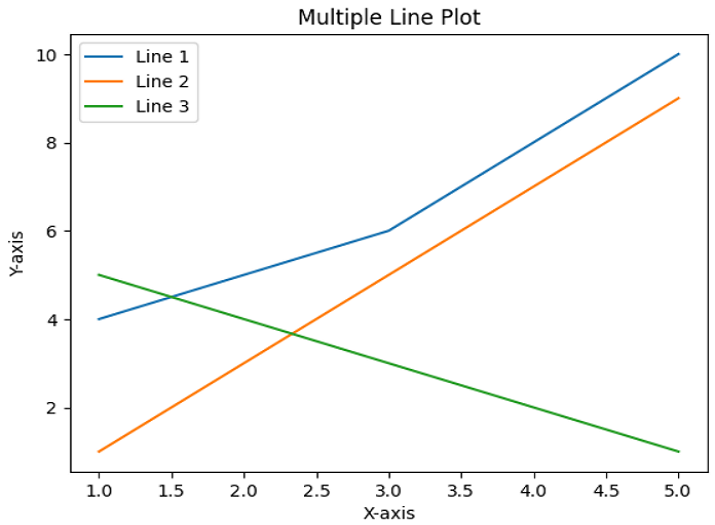
在以下示例中,我們將藉助字典和 plot() 方法繪製多條線。
import matplotlib.pyplot as plt
# Storing the data for line in a Dictionary
lines = {
   'Line 1': ([1, 2, 3, 4, 5], [4, 5, 6, 8, 10]),
   'Line 2': ([1, 2, 3, 4, 5], [1, 3, 5, 7, 9]),
   'Line 3': ([1, 2, 3, 4, 5], [5, 4, 3, 2, 1])
}
# Plotting the lines with labels
for label, (x, y) in lines.items():
   plt.plot(x, y, label = label)
# Adding legend, x and y labels, and title for the lines
plt.legend()
plt.xlabel('X-axis')
plt.ylabel('Y-axis')
plt.title('Multiple Line Plot')
# Displaying the plot
plt.show()
輸出
結論
我們從介紹 Python 的 Matplotlib 庫開始本文,並在後面的部分中學習了“plot()”、numpy 和字典的基本概念,以便更好地理解示例程式。使用這些概念,我們討論瞭如何在單個圖形中繪製多條線。

7K+ 瀏覽量
