
 資料結構
資料結構 網路
網路 關係資料庫管理系統 (RDBMS)
 作業系統
作業系統 Java
Java MS Excel
 iOS
iOS HTML
HTML CSS
CSS Android
 Python
 C 程式設計
 C++
C++ C#
C# MongoDB
 MySQL
MySQL Javascript
 PHP
PHP 物理
物理 化學
化學 生物
生物 數學
數學 英語
英語 經濟學
經濟學 心理學
心理學 社會學
社會學 服裝設計
服裝設計 法律研究
法律研究如何在 Tkinter 中獲取按下按鈕的網格資訊?
在使用 Tkinter 的 GUI 設計中,將部件組織到網格佈局是一個重要方面。在本教程中,我們將解釋如何獲取網格佈局中部件的行和列索引。
什麼是 Tkinter 網格佈局?
Tkinter 的網格幾何管理器廣泛用於將部件排列成行和列。當使用 grid 方法放置部件時,會為其分配特定的行和列索引。為了理解如何動態檢索此資訊,我們將首先深入瞭解 Tkinter 中網格佈局的基礎知識。
示例
import tkinter as tk

# Create the main Tkinter window
root = tk.Tk()
root.title("Tkinter Grid Information")
root.geometry("720x250")

# Create widgets and position them using the grid method
label1 = tk.Label(root, text="Label 1")
label1.grid(row=0, column=0)

label2 = tk.Label(root, text="Label 2")
label2.grid(row=0, column=1)

button = tk.Button(root, text="Press Me")
button.grid(row=1, column=0)

# Run the Tkinter event loop
root.mainloop()
在上例中,我們建立了一個簡單的 Tkinter 視窗,其中包含兩個標籤和一個按鈕,並使用 grid 方法進行定位。標籤位於第一行,按鈕位於第二行。現在,讓我們探索如何檢索按下按鈕的網格資訊。
輸出
執行此程式碼後,您將獲得以下輸出視窗:
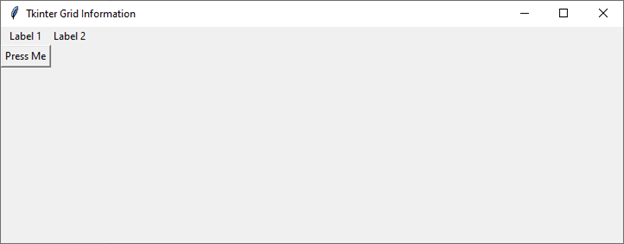
檢索按下按鈕的網格資訊
要動態檢索部件(例如按鈕)在按下時的網格資訊,我們可以使用 bind 方法將回調函式與特定事件(例如按鈕點選)關聯。
讓我們修改之前的示例,以包含一個列印按下按鈕的網格資訊的函式:
示例
import tkinter as tk

def button_pressed(event):
   # Get the widget that triggered the event
   widget = event.widget

   # Get the grid information of the widget
   grid_info = widget.grid_info()

   # Print the grid information
   print("Row:", grid_info['row'])
   print("Column:", grid_info['column'])

# Create the main Tkinter window
root = tk.Tk()
root.title("Grid information from pressed button")
root.geometry("720x250")

# Create a button and bind the button_pressed function to its command
button = tk.Button(root, text="Press Me")
button.grid(row=1, column=0)

# Bind the left mouse button click event
button.bind('<Button-1>', button_pressed)

# Run the Tkinter event loop
root.mainloop()
在這個例子中,我們添加了 `button_pressed` 函式,它接受一個事件作為引數。在函式內部,我們使用 `event.widget` 檢索觸發事件的部件。然後,我們使用 `grid_info()` 方法獲取部件的網格資訊,包括行和列索引。檢索到的資訊將列印到控制檯。
輸出
執行此程式碼後,您將獲得以下輸出視窗:
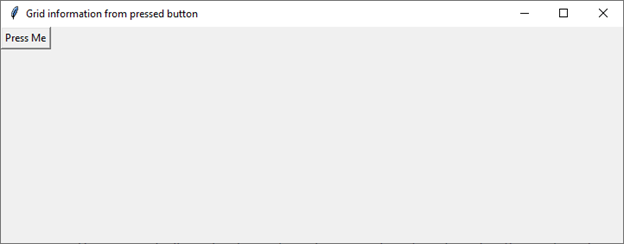
這種方法允許開發人員在與部件互動時,根據其在網格佈局中的位置執行特定操作。
實際用例
瞭解如何在 Tkinter 中檢索按下按鈕的網格資訊,為增強 GUI 應用程式的功能和使用者體驗提供了多種可能性。以下是一些實際用例:
動態佈局調整 - 通過了解按下按鈕的網格位置,開發人員可以根據使用者互動動態調整其他部件的佈局或外觀。例如,更改特定元素的顏色或可見性。
資料檢索和處理 - 在以網格狀結構顯示資料的應用程式中,點選特定單元格(由按鈕表示)可以觸發與該位置關聯的資料的檢索和處理。
遊戲開發 - 網格佈局在遊戲開發中很常見,尤其是在棋盤遊戲中。檢索按下按鈕的網格資訊允許開發人員根據使用者移動來實現遊戲邏輯,例如在棋盤上移動或在掃雷遊戲中顯示單元格。
表單導航 - 在資料錄入表單中,開發人員可以使用網格資訊在表單欄位之間導航或動態驗證使用者輸入。
結論
在 Tkinter 中檢索按下按鈕的網格資訊為開發人員提供了一個強大的工具,用於建立動態和互動式的 GUI 應用程式。瞭解部件在網格佈局中的位置為各種可能性打開了大門,從動態調整佈局到實現複雜的遊戲邏輯。

500 次瀏覽
