
 資料結構
資料結構 網路
網路 關係資料庫管理系統 (RDBMS)
 作業系統
作業系統 Java
Java MS Excel
 iOS
iOS HTML
HTML CSS
CSS Android
 Python
 C 程式設計
 C++
C++ C#
C# MongoDB
 MySQL
MySQL Javascript
 PHP
PHP 物理
物理 化學
化學 生物
生物 數學
數學 英語
英語 經濟學
經濟學 心理學
心理學 社會學
社會學 服裝設計
服裝設計 法學
法學如何使用 Python Scikit-learn 生成隨機迴歸問題?
Python Scikit-learn 提供了 `make_regression()` 函式,我們可以用它來生成隨機迴歸問題。在本教程中,我們將學習如何生成隨機迴歸問題和具有稀疏不相關設計的隨機迴歸問題。
隨機迴歸問題
要使用 Python Scikit-learn 生成隨機迴歸問題,我們可以按照以下步驟操作:
步驟 1 - 匯入執行程式所需的庫 `sklearn.datasets.make_regression` 和 `matplotlib`。
步驟 2 - 提供樣本數量和其他引數。
步驟 3 - 使用 matplotlib 庫設定輸出圖形的大小和樣式。
步驟 4 - 使用 matplotlib 繪製迴歸問題。
示例
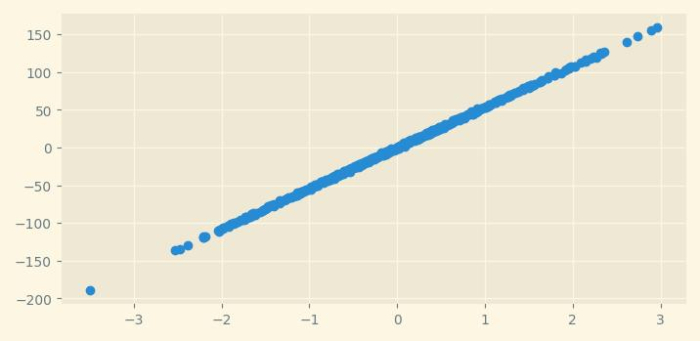
在下面的示例中,我們將生成具有 500 個樣本的迴歸問題。
# Importing libraries
from sklearn.datasets import make_regression
from matplotlib import pyplot as plt
from matplotlib import style
import seaborn as sns

# Set the figure size
plt.rcParams["figure.figsize"] = [7.50, 3.50]
plt.rcParams["figure.autolayout"] = True

# Creating and plotting the regression problem
style.use("Solarize_Light2")

r_data, r_values = make_regression(n_samples=500, n_features=1, n_informative=2, noise=1)

plt.scatter(r_data[:,0],r_values,cmap='rocket');
plt.show()
輸出
它將產生以下輸出:
具有稀疏不相關設計的隨機迴歸問題
Python Scikit-learn 提供了 `make_sparse_uncorrelated()` 函式,我們可以用它來生成具有不相關設計的隨機迴歸問題。
為此,我們可以採取以下步驟:
步驟 1 - 匯入執行程式所需的庫 `sklearn.datasets.make_sparse_uncorrelated` 和 `matplotlib`。
步驟 2 - 提供樣本數量和其他引數。
步驟 3 - 使用 matplotlib 庫設定輸出圖形的大小和樣式。
步驟 4 - 使用 matplotlib 繪製迴歸問題。
示例
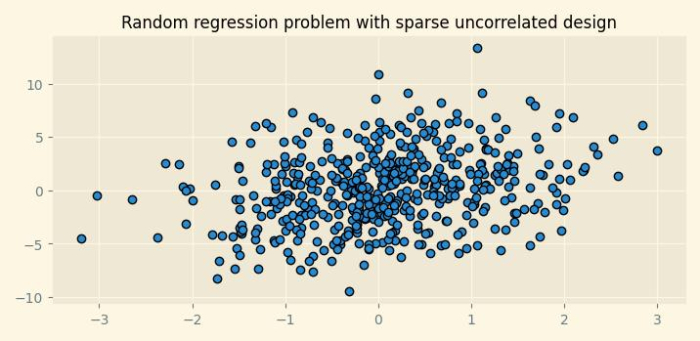
在下面的示例中,我們將生成具有 500 個樣本和 4 個特徵的迴歸問題。`n_features` 引數的預設值為 10。
# Importing libraries
from sklearn.datasets import make_sparse_uncorrelated
from matplotlib import pyplot as plt
from matplotlib import style

# Set the figure size
plt.rcParams["figure.figsize"] = [7.50, 3.50]
plt.rcParams["figure.autolayout"] = True

# Creating the regression problem with sparse uncorrelated design
X, y = make_sparse_uncorrelated(n_samples=500, n_features=4)

# Plotting the dataset
style.use("Solarize_Light2")
plt.figure(figsize=(7.50, 3.50))
plt.title("Random regression problem with sparse uncorrelated design", fontsize="12")
plt.scatter(X[:,0],y,edgecolor="k");
plt.show()
輸出
它將產生以下輸出:

更新於:2022年10月4日
953 次瀏覽

廣告