
 資料結構
資料結構 網路
網路 關係型資料庫管理
 作業系統
作業系統 Java
Java MS Excel
 iOS
iOS HTML
HTML CSS
CSS Android
 Python
 C 程式設計
 C++
C++ C#
C# MongoDB
 MySQL
MySQL JavaScript
 PHP
PHP 物理學
物理學 化學
化學 生物
生物 數學
數學 英語
英語 經濟學
經濟學 心理學
心理學 社會學
社會學 時尚研究
時尚研究 法律研究
法律研究如何用 JavaScript 在畫布上繪製
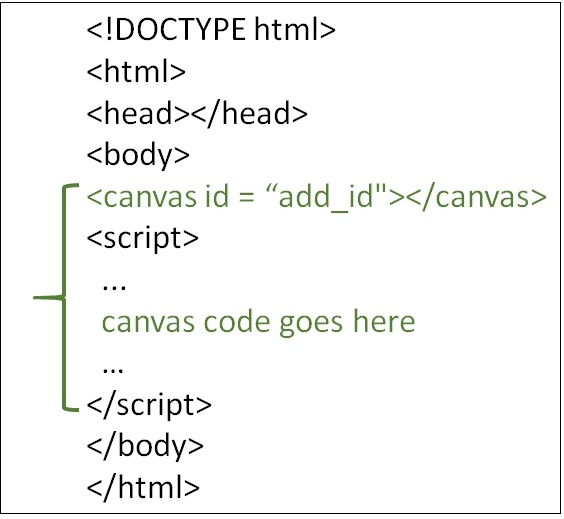
利用 JavaScript 在 HTML 畫布上繪製。使用 HTML DOM 方法 getElementById() 和 getContext(),然後才能在畫布上繪製。
為此,請按照以下步驟操作 -
- 需要使用 getElementById() 方法來查詢畫布元素。
- 使用 getContext(),它是畫布的繪圖物件。它提供了繪圖方法和屬性。
- 之後在畫布上繪製。
示例
可以嘗試執行以下程式碼,利用 JavaScript 在畫布上繪製 -
<!DOCTYPE html>
<html>
   <head>
      <title>HTML Canvas</title>
   </head>
   <body>
      <canvas id="newCanvas" width="400" height="250" style="border:2px solid #000000;"></canvas>
      <script>
         var canvas = document.getElementById("newCanvas");
         var ctxt = canvas.getContext("2d");
         ctxt.fillStyle = "#56A7E2";
         ctxt.fillRect(0,0,250,120);
      </script>
   </body>
</html>

更新日期:2020 年 6 月 15 日
575 次瀏覽

廣告