
 資料結構
資料結構 網路
網路 關係型資料庫管理系統
 作業系統
作業系統 Java
Java MS Excel
 iOS
iOS HTML
HTML CSS
CSS Android
 Python
 C 程式設計
 C++
C++ C#
C# MongoDB
 MySQL
MySQL Javascript
 PHP
PHP 物理學
物理學 化學
化學 生物學
生物學 數學
數學 英語
英語 經濟學
經濟學 心理學
心理學 社會學
社會學 時尚研究
時尚研究 法律研究
法律研究如何使用 Python 中的 Plotly 建立人口金字塔?
人口金字塔是人口年齡和性別分佈的圖形表示。它由兩個背靠背的條形圖組成,一個顯示男性的分佈,另一個顯示女性在不同年齡組中的分佈。人口金字塔是一種強大的視覺化工具,可以幫助我們瞭解人口的構成,並識別趨勢和模式。
在本文中,我們將探討如何使用 Python 中的 Plotly 建立人口金字塔。Plotly 是一個強大的視覺化庫,它允許我們在 Python 中建立互動式和動態圖表。
我們將使用 Plotly 建立一個顯示人口年齡和性別分佈的人口金字塔。我們將首先將資料載入到 pandas DataFrame 中,然後使用 Plotly 建立人口金字塔。
使用 Plotly Express
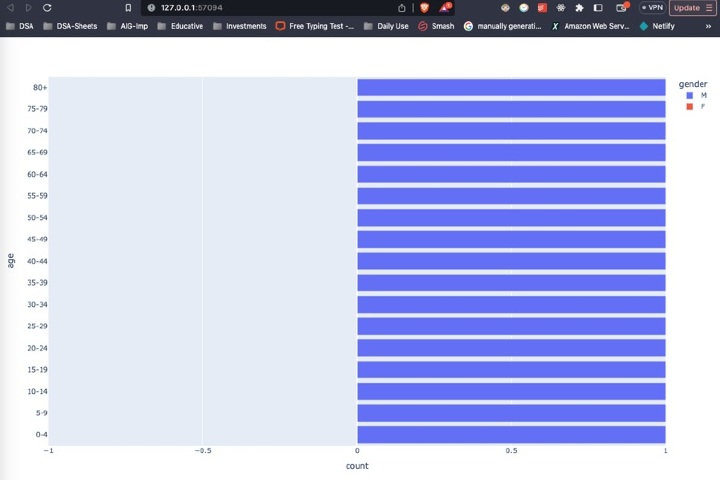
Plotly Express 是 Plotly 的高階 API,它可以輕鬆建立多種型別的圖表,包括人口金字塔。我們可以使用 px.bar() 函式建立構成人口金字塔的兩個背靠背的條形圖。
請考慮以下程式碼。
示例
import plotly.express as px
import pandas as pd

# Load the data into a pandas DataFrame
df = pd.read_csv("population_data.csv")

# Create the population pyramid using Plotly Express
fig = px.bar(df, x="count", y="age", orientation="h", color="gender",
         	barmode="relative", range_x=[-1, 1])

# Show the plot
fig.show()
解釋
我們首先匯入庫,包括用於建立圖表的 plotly.express 和用於將資料載入到 DataFrame 中的 pandas。
接下來,我們使用 read_csv() 函式將人口資料從 CSV 檔案載入到 pandas DataFrame 中。
然後,我們建立 px.bar() 函式,它將 DataFrame 作為第一個引數,以及其他幾個引數來指定圖表的佈局和樣式。
x 引數指定用於條形長度的變數,即每個年齡組中的人數。
y 引數指定用於條形高度的變數,即年齡組。
orientation 引數指定條形應為水平方向。
color 引數指定條形應按性別著色。
barmode 引數指定條形應彼此堆疊。
range_x 引數指定 x 軸的範圍,這決定了金字塔的大小。
最後,我們使用 show() 方法列印圖表。
輸出
使用 Plotly 圖形物件
Plotly 圖形物件是 Plotly 的低階 API,它提供了更多靈活性和對圖表佈局和樣式的控制。我們可以使用 Plotly 圖形物件透過建立兩個條形軌跡(一個用於男性,另一個用於女性),然後將它們組合成一個圖形來建立人口金字塔。
請考慮以下程式碼。
示例
import plotly.graph_objs as go
import pandas as pd

# Load the data into a pandas DataFrame
df = pd.read_csv("population_data.csv")

# Create the male and female bar traces
trace_male = go.Bar(x=df[df["gender"]=="M"]["count"],
                	y=df[df["gender"]=="M"]["age"],
                	orientation="h",
                	name="Male",
                	marker=dict(color="#1f77b4"))

trace_female = go.Bar(x=df[df["gender"]=="F"]["count"]*(-1),
                  	y=df[df["gender"]=="F"]["age"],
                  	orientation="h",
                  	name="Female",
                  	marker=dict(color="#d62728"))

# Create the layout
layout = go.Layout(title="Population Pyramid",
               	xaxis=dict(title="Count"),
               	yaxis=dict(title="Age"),
               	barmode="overlay",
               	bargap=0.1)

# Create the figure
fig = go.Figure(data=[trace_male, trace_female], layout=layout)

# Show the plot
fig.show()
解釋
第一步是匯入必要的模組:plotly.graph_objs 和 pandas。
資料使用 pd.read_csv 方法載入到 pandas DataFrame 中。
使用 go.Bar 方法為男性和女性人口建立兩個條形圖軌跡,分別使用計數和年齡組作為 x 和 y 值。方向設定為水平方向,每個軌跡使用 name 和 marker 引數分別指定名稱和顏色。
為圖表建立佈局,包括標題以及 x 軸和 y 軸的標籤。
使用 go.Figure 方法使用兩個軌跡和佈局建立圖形。
最後,使用 fig.show() 方法顯示圖表。
輸出

結論
在本文中,我們學習瞭如何使用 Python 中的 Plotly 建立人口金字塔。我們探索了兩種不同的方法來實現這一點,一種使用 pandas 透視表,另一種使用 Plotly 圖形物件。我們討論了每種方法的優缺點,並提供了每種方法中使用的程式碼的詳細解釋。
透過遵循本文中提供的步驟和示例,您可以使用 Python 中的 Plotly 建立自己的金字塔,並探索各種自定義和分析資料的方法。

790 次檢視
