
 資料結構
資料結構 網路
網路 RDBMS
RDBMS 作業系統
作業系統 Java
Java MS Excel
 iOS
iOS HTML
HTML CSS
CSS Android
 Python
 C 程式設計
 C++
C++ C#
C# MongoDB
 MySQL
MySQL Javascript
 PHP
PHP 物理
物理 化學
化學 生物
生物 數學
數學 英語
英語 經濟學
經濟學 心理學
心理學 社會學
社會學 時尚學
時尚學 法律學
法律學如何使用 JavaFX 建立日期選擇器?
通常,日期選擇器會顯示一個日曆,你可以用來瀏覽不同的月份並選擇一個日期。選定的日期會被格式化並輸入到系統中。
在 JavaFX 中,javafx.scene.control.DatePicker 類表示日期選擇器。它包含一個文字(日期)檔案和一個日期選擇器。你可以手動輸入日期,也可以使用日期選擇器選擇日期。
要在你的應用程式中建立日期選擇器,你需要例項化此類。你可以透過呼叫getValue() 方法從日期選擇器中獲取選定的日期。
示例
import javafx.application.Application;
import javafx.geometry.Insets;
import javafx.scene.Scene;
import javafx.scene.control.DatePicker;
import javafx.scene.layout.HBox;
import javafx.scene.paint.Color;
import javafx.scene.text.Font;
import javafx.scene.text.FontPosture;
import javafx.scene.text.FontWeight;
import javafx.scene.text.Text;
import javafx.stage.Stage;
public class DatePickerExample extends Application {
   public void start(Stage stage) {
      //Creating label
      Text dobLabel = new Text("Date Of Birth:");
      Font font = Font.font("verdana", FontWeight.BOLD, FontPosture.REGULAR, 12);
      dobLabel.setFont(font);
      //Creating a date picker
      DatePicker datePicker = new DatePicker();
      //Creating HBox
      HBox box = new HBox(5);
      box.setPadding(new Insets(15, 50, 50, 50));
      box.getChildren().addAll(dobLabel, datePicker);
      //Setting the stage
      Scene scene = new Scene(box, 595, 260, Color.BEIGE);
      stage.setTitle("Date Picker Example");
      stage.setScene(scene);
      stage.show();
   }
   public static void main(String args[]){
      launch(args);
   }
}
輸出
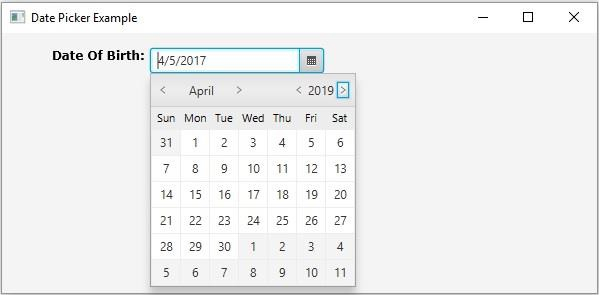

更新於:2020 年 5 月 18 日
331 次瀏覽

廣告