
 資料結構
資料結構 網路
網路 關係資料庫管理系統
 作業系統
作業系統 Java
Java MS Excel
 iOS
iOS HTML
HTML CSS
CSS Android
 Python
 C語言程式設計
 C++
C++ C#
C# MongoDB
 MySQL
MySQL Javascript
 PHP
PHP 物理學
物理學 化學
化學 生物學
生物學 數學
數學 英語
英語 經濟學
經濟學 心理學
心理學 社會學
社會學 時尚研究
時尚研究 法律研究
法律研究如何在Android中建立圓形確定性進度條?
Android中的圓形確定性進度條可以是一個視覺元件,它以圓形形式顯示任務的進度。與不斷更新但沒有顯示具體進度的不確定性ProgressBar不同,確定性ProgressBar會顯示一個確定的進度值。它通常由一個圓形和一個進度指示器組成,該指示器會根據任務的完成情況填充圓形。圓形確定性進度條為使用者提供了有關特定任務(例如下載檔案或上傳資料)進度的視覺反饋。透過以程式設計方式設定進度值,開發人員可以更新ProgressBar以反映正在進行的任務的實際進度,從而以視覺上吸引人的方式為使用者提供清晰的任務完成狀態指示。
使用的方法
手動實現
手動實現
手動實現是指透過程式碼自定義圓形確定性ProgressBar的行為和外觀來建立Android中圓形確定性ProgressBar的方法,而不是完全依賴預定義的元件或庫。它包括以程式設計方式定義和控制ProgressBar的進度,使開發人員能夠對其功能進行細粒度控制。透過手動實現圓形確定性ProgressBar,開發人員可以根據自己的特定需求自定義其大小、顏色、動畫和進度更新。這種方法提供了靈活性,並使開發人員能夠建立獨特且定製的進度指示器,這些指示器與他們的Android應用程式完美匹配。
演算法
建立一個包含以確定方式顯示ProgressBar元件的佈局檔案(XML)。設定必要的屬性,例如大小、顏色和可見性。
在您的Java類中,使用findViewById()獲取ProgressBar的引用,並將其分配給一個變數。
使用setMax()設定進度條的最大值。此值表示可以達到的最大進度。
根據應用程式的邏輯或任務進度確定當前進度值。此值應在步驟3中設定的最大值之間。
使用setProgress()設定當前進度值。
可以選擇使用setIndeterminateDrawable()、setProgressDrawable()或setProgressTintList()等方法自定義ProgressBar的外觀。
在需要時透過重複步驟4和5更新進度值。
示例
建立可繪製資原始檔
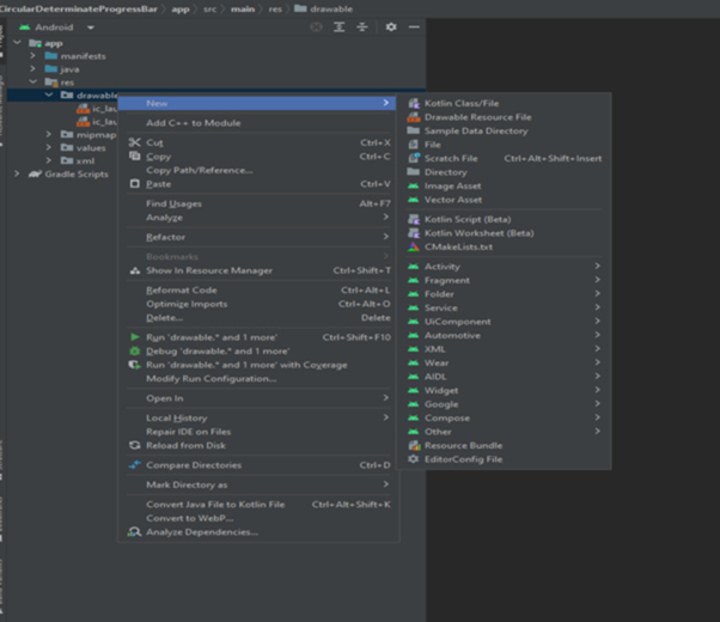
XML程式
<?xml version="1.0" encoding="utf-8"?>
<layer-list xmlns:android="http://schemas.android.com/apk/res/android">
   <!-- Adding the first item: A ring shape -->
	<item>
		<!-- Create a ring shape using the "ring" attribute.
		To make the ring appear with color code "#DDD", set android:useLevel="false". -->
		<shape
			android:shape="ring"
			android:thicknessRatio="16"
			android:useLevel="false">
			<solid android:color="#DDD" />
		</shape>
	</item>
	<!-- Adding the second item: A rotating ring -->
	<item>
		<!-- Rotate the ring from 270 degrees to 270 degrees -->
		<rotate
			android:fromDegrees="270"
			android:toDegrees="270">
			<!-- Use android:useLevel="true" in the shape tag to enable rotation.
			Add a gradient to set the startColor and endColor of the ring. -->
			<shape
				android:shape="ring"
				android:thicknessRatio="16"
				android:useLevel="true">
				<gradient
					android:endColor="@color/teal_700"
					android:startColor="@color/black"
					android:type="sweep" />
			</shape>
		</rotate>
	</item>
</layer-list>
輸出

主題的XML程式
<resources xmlns:tools="http://schemas.android.com/tools">
   <!-- Base application theme. -->
	<style name="Theme.ProgressBar" parent="Theme.MaterialComponents.DayNight.DarkActionBar">
		<!-- Primary brand color. -->
		<item name="colorPrimary">@color/green</item>
		<item name="colorPrimaryVariant">@color/green</item>
		<item name="colorOnPrimary">@color/white</item>
		<!-- Secondary brand color. -->
		<item name="colorSecondary">@color/teal_200</item>
		<item name="colorSecondaryVariant">@color/teal_700</item>
		<item name="colorOnSecondary">@color/black</item>
		<!-- Status bar color. -->
		<item name="android:statusBarColor" tools:targetApi="l">?attr/colorPrimaryVariant</item>
		<!-- Customize your theme here. -->
	</style>


	<!-- Style for Circular Determinate ProgressBar -->
	<style name="CircularDeterminateProgressBar">
		<item name="android:indeterminateOnly">false</item>
		<item name="android:progressDrawable">@drawable/circle</item>
	</style>

</resources>
主XML程式
<?xml version="1.0" encoding="utf-8"?>
<androidx.constraintlayout.widget.ConstraintLayout
   xmlns:android="http://schemas.android.com/apk/res/android"
   xmlns:app="http://schemas.android.com/apk/res-auto"
   xmlns:tools="http://schemas.android.com/tools"
   android:layout_width="match_parent"
   android:layout_height="match_parent"
   tools:context=".MainActivity">

   <!-- Add ProgressBar. The main attributes used here are:
      - style="@style/CircularDeterminateProgressBar" that
      references the style created in the theme.xml file above.
      - android:progressDrawable="@drawable/circle" that
      references the drawable created in the circle.xml file above.
   -->
   <ProgressBar
      android:id="@+id/progress_bar"
      style="@style/CircularDeterminateProgressBar"
      android:layout_width="200dp"
      android:layout_height="200dp"
      android:indeterminateOnly="false"
      android:progress="60"
      android:progressDrawable="@drawable/circle"
      android:rotation="-90"
      app:layout_constraintBottom_toBottomOf="parent"
      app:layout_constraintLeft_toLeftOf="parent"
      app:layout_constraintRight_toRightOf="parent"
      app:layout_constraintTop_toTopOf="parent"
      tools:progress="60" />

   <!-- TextView to display the progress percentage -->
   <TextView
      android:id="@+id/text_view_progress"
      android:layout_width="wrap_content"
      android:layout_height="wrap_content"
      android:textAppearance="@style/TextAppearance.AppCompat.Large"
      app:layout_constraintBottom_toBottomOf="@+id/progress_bar"
      app:layout_constraintEnd_toEndOf="@+id/progress_bar"
      app:layout_constraintStart_toStartOf="@+id/progress_bar"
      app:layout_constraintTop_toTopOf="@+id/progress_bar"
      tools:text="60%" />

   <!-- Decrement button that will decrease the progress by 10% -->
   <Button
      android:id="@+id/button_decr"
      android:layout_width="wrap_content"
      android:layout_height="wrap_content"
      android:text="- 10%"
      app:layout_constraintStart_toStartOf="@+id/progress_bar"
      app:layout_constraintTop_toBottomOf="@+id/progress_bar" />

   <!-- Increment button that will increase the progress by 10% -->
   <Button
      android:id="@+id/button_incr"
      android:layout_width="wrap_content"
      android:layout_height="wrap_content"
      android:text="+ 10%"
      app:layout_constraintEnd_toEndOf="@+id/progress_bar"
      app:layout_constraintTop_toBottomOf="@+id/progress_bar" />

</androidx.constraintlayout.widget.ConstraintLayout>
主XML程式
<?xml version="1.0" encoding="utf-8"?>
<androidx.constraintlayout.widget.ConstraintLayout
   xmlns:android="http://schemas.android.com/apk/res/android"
   xmlns:app="http://schemas.android.com/apk/res-auto"
   xmlns:tools="http://schemas.android.com/tools"
   android:layout_width="match_parent"
   android:layout_height="match_parent"
   tools:context=".MainActivity">

   <ProgressBar
      android:id="@+id/progress_bar"
      style="@style/CircularDeterminateProgressBar"
      android:layout_width="250dp"
      android:layout_height="250dp"
      android:progress="60"
      android:rotation="-90"
      app:layout_constraintBottom_toBottomOf="parent"
      app:layout_constraintLeft_toLeftOf="parent"
      app:layout_constraintRight_toRightOf="parent"
      app:layout_constraintTop_toTopOf="parent"
      tools:progress="60" />

   <TextView
      android:id="@+id/text_view_progress"
      android:layout_width="wrap_content"
      android:layout_height="wrap_content"
      android:textAppearance="@style/TextAppearance.AppCompat.Large"
      app:layout_constraintBottom_toBottomOf="@+id/progress_bar"
      app:layout_constraintEnd_toEndOf="@+id/progress_bar"
      app:layout_constraintStart_toStartOf="@+id/progress_bar"
      app:layout_constraintTop_toTopOf="@+id/progress_bar"
      tools:text="60%" />

   <Button
      android:id="@+id/button_decr"
      android:layout_width="100dp"
      android:layout_height="wrap_content"
      android:text="- 10%"
      app:layout_constraintStart_toStartOf="@+id/progress_bar"
      app:layout_constraintTop_toBottomOf="@+id/progress_bar"
      android:onClick="decrementProgress" />

   <Button
      android:id="@+id/button_incr"
      android:layout_width="100dp"
      android:layout_height="wrap_content"
      android:text="+ 10%"
      app:layout_constraintEnd_toEndOf="@+id/progress_bar"
      app:layout_constraintTop_toBottomOf="@+id/progress_bar"
      android:onClick="incrementProgress" />

</androidx.constraintlayout.widget.ConstraintLayout>
輸出
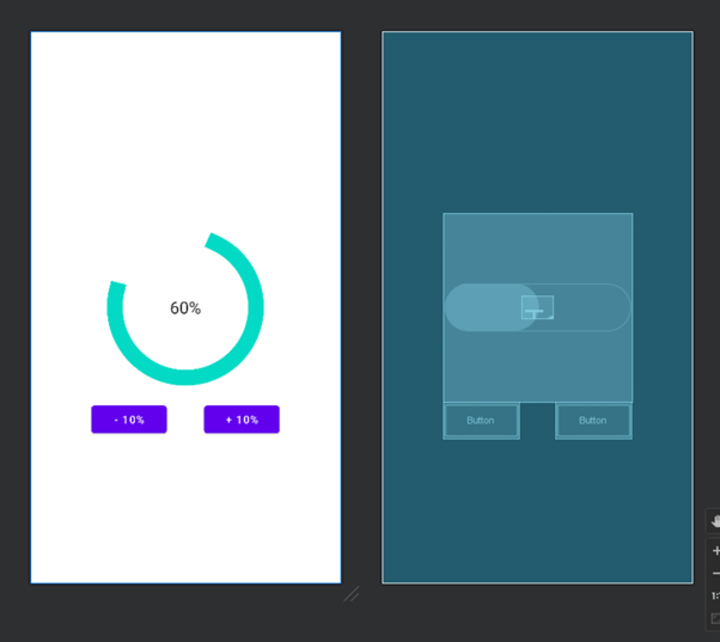
import android.os.Bundle;
import android.view.View;
import android.widget.Button;
import android.widget.ProgressBar;
import android.widget.TextView;

import androidx.appcompat.app.AppCompatActivity;

public class MainActivity extends AppCompatActivity {
   private ProgressBar progressBar;
   private TextView textViewProgress;
   private Button buttonDecr;
   private Button buttonIncr;

   private int progress;

   @Override
   protected void onCreate(Bundle savedInstanceState) {
      super.onCreate(savedInstanceState);
      setContentView(R.layout.activity_main);

      progressBar = findViewById(R.id.progress_bar);
      textViewProgress = findViewById(R.id.text_view_progress);
      buttonDecr = findViewById(R.id.button_decr);
      buttonIncr = findViewById(R.id.button_incr);

      progress = 60;

      buttonDecr.setOnClickListener(new View.OnClickListener() {
         @Override
         public void onClick(View v) {
            decrementProgress();
         }
      });

      buttonIncr.setOnClickListener(new View.OnClickListener() {
         @Override
         public void onClick(View v) {
            incrementProgress();
         }
      });
   }

   private void decrementProgress() {
      if (progress > 0) {
         progress -= 10;
         progressBar.setProgress(progress);
         textViewProgress.setText(progress + "%");
      }
   }

   private void incrementProgress() {
      if (progress < 100) {
         progress += 10;
         progressBar.setProgress(progress);
         textViewProgress.setText(progress + "%");
      }
   }
}
輸出

結論
本文提供了一個關於在Android中建立圓形確定性進度條的簡單教程。它解釋了圓形確定性進度條是一個視覺元件,它以圓形形式顯示任務的進度。與不確定的ProgressBar不同,確定性版本會顯示一個確定的進度值。本文概述了手動實現此ProgressBar的步驟,包括建立XML佈局檔案並透過Java程式碼自定義其行為。它還提供了示例XML和Java程式碼片段以供參考。總的來說,本文旨在幫助開發人員在Android應用程式中建立視覺上吸引人且資訊豐富的進度指示器。

707 次瀏覽
