
 資料結構
資料結構 網路
網路 關係資料庫管理系統 (RDBMS)
 作業系統
作業系統 Java
Java MS Excel
 iOS
iOS HTML
HTML CSS
CSS Android
 Python
 C語言程式設計
 C++
C++ C#
C# MongoDB
 MySQL
MySQL Javascript
 PHP
PHP 物理學
物理學 化學
化學 生物學
生物學 數學
數學 英語
英語 經濟學
經濟學 心理學
心理學 社會學
社會學 服裝設計
服裝設計 法律研究
法律研究如何使用PowerShell複製NTFS許可權?
要使用 PowerShell 更改、新增或刪除檔案或資料夾的安全許可權,可以使用 **Set-Acl** 命令。如果您需要在目標路徑上設定相同的許可權,最佳方法是從另一個檔案或資料夾複製許可權。
例如,我想將原始檔夾 **C:\Shared\** 的相同資料夾許可權複製到目標資料夾路徑 **c:\shared1** 路徑。您可以使用任何目標路徑,它可以是遠端共享的 UNC 路徑。
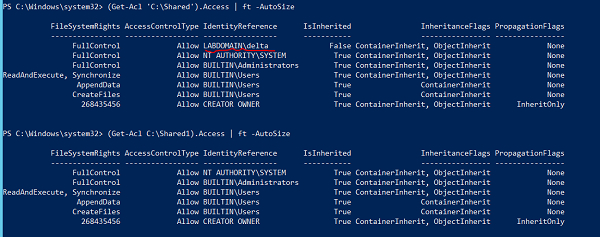
檢視上面安全許可權的差異,名為 Shared 的資料夾分配了一個額外的許可權 (LABDOMAIN\Delta)。我們將使用源的 Get-ACL 和目標路徑的 Set-ACL 透過管道將許可權從一個資料夾複製到另一個資料夾。
Get-ACL C:\Shared | Set-Acl C:\Shared1
完成上述操作後,您可以檢查目標路徑的許可權。
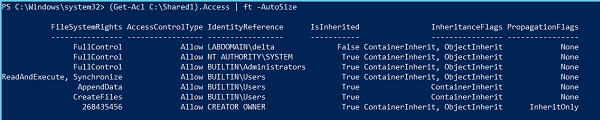
您可以看到添加了 Delta 使用者許可權,並且還複製了其他許可權。如果使用者已存在於源和目標位置,則目標使用者的許可權將被源使用者的許可權覆蓋。
您還可以將源物件的 Get-ACL 輸出儲存到變數中,並將其分配給目標物件的 Set-ACL。Set-ACL 使用 -AclObject 引數來接收許可權輸入。
示例
$perm = Get-Acl C:\Shared Set-Acl C:\Shared1 -AclObject $perm
如果您需要在多個資料夾或檔案或子資料夾上應用許可權,則可以使用 **Get-ChildItem** 檢索檔案和資料夾,並按上述方式使用 Set-ACL 命令。
例如,我們有參考資料夾 **C:\shared** 的許可權需要應用於目標物件。首先,我們將使用 Get-Acl 命令複製許可權。
$perm = Get-Acl C:\Shared
其次,我們將使用 Get-ChildItem 檢索檔案/資料夾,然後在管道後使用 Set-ACL 命令。
示例
Get-ChildItem C:\Temp -Recurse | Set-Acl -AclObject $perm
在您為多個檔案和資料夾設定許可權之前,始終建議您使用 -**WhatIf** 引數來了解正在為哪些檔案或資料夾應用許可權。
示例
PS C:\> Get-ChildItem C:\Temp -Recurse | Set-Acl -AclObject $perm -WhatIf
What if: Performing the operation "Set-Acl" on target "Microsoft.PowerShell.Core\FileSystem::C:\Temp\Scripts".
What if: Performing the operation "Set-Acl" on target "Microsoft.PowerShell.Core\FileSystem::C:\Temp\vcredist_x64.exe".
What if: Performing the operation "Set-Acl" on target "Microsoft.PowerShell.Core\FileSystem::C:\Temp\W2K12-KB3191565-x64.msu".
What if: Performing the operation "Set-Acl" on target "Microsoft.PowerShell.Core\FileSystem::C:\Temp\WindowsSensor.exe".
What if: Performing the operation "Set-Acl" on target "Microsoft.PowerShell.Core\FileSystem::C:\Temp\WindowsSensor_7E3A9735FA064249A7005E9BE8CDD
What if: Performing the operation "Set-Acl" on target "Microsoft.PowerShell.Core\FileSystem::C:\Temp\Scripts\MyModules".
What if: Performing the operation "Set-Acl" on target "Microsoft.PowerShell.Core\FileSystem::C:\Temp\Scripts\MyModules\MyModules.psm1".

更新於:2020年9月28日
9K+ 次瀏覽

廣告