
 資料結構
資料結構 網路
網路 關係資料庫管理系統
 作業系統
作業系統 Java
Java MS Excel
 iOS
iOS HTML
HTML CSS
CSS Android
 Python
 C 程式設計
 C++
C++ C#
C# MongoDB
 MySQL
MySQL Javascript
 PHP
PHP 物理
物理 化學
化學 生物
生物 數學
數學 英語
英語 經濟學
經濟學 心理學
心理學 社會學
社會學 時尚研究
時尚研究 法律研究
法律研究如何在 Pandas DataFrame 中連線列值?
Pandas 是一個功能強大的 Python 資料處理和分析庫。它提供各種用於處理和轉換資料的函式和工具,包括連線 Pandas DataFrame 中列值的功能。
在 Pandas DataFrame 中,列表示資料的變數或特徵。連線列值涉及將兩列或多列的值組合成一列。這對於建立新變數、合併來自不同來源的資料或格式化用於分析的資料很有用。
要連線 Pandas DataFrame 中的列值,可以使用 pd.Series.str.cat() 方法。此方法沿特定軸使用指定的間隔符連線兩個或多個序列。str.cat() 方法可以與 apply() 函式一起使用,將其應用於 DataFrame 的每一行。
Pandas 中還有其他幾種方法和函式可用於連線列值,包括 pd.concat() 函式、pd.Series.str.join() 方法以及使用不同分隔符或字串的 pd.Series.str.cat() 方法。每種方法都有其自身的優缺點,具體取決於具體的用例。
在本教程中,我們將探討 Pandas 中可用於連線 DataFrame 中列值的各種方法和函式。我們將為每種方法提供分步說明和程式碼示例,以及對每種方法的優缺點進行討論。在本教程結束時,您將全面瞭解如何在 Pandas DataFrame 中連線列值,以及哪種方法最適合您的特定用例。
現在讓我們考慮兩種可以在 Panda 資料框中連線列值的方法。
使用 pd.Series.str.cat() 方法連線列值
在您的 DataFrame 中建立一個新列來儲存連線的值。
使用 pd.Series.str.cat() 方法連線要組合的列的值。
使用“sep”引數指定要在連線的值之間使用的分隔符。
使用 apply() 方法將連線函式應用於 DataFrame 的每一行。
現在我們已經用要點討論了這種方法,讓我們在程式碼中使用它。
示例
請考慮以下所示的程式碼。
import pandas as pd
from tabulate import tabulate

# Create a sample DataFrame
df = pd.DataFrame({
   'Name': ['John', 'Jane', 'Bob'],
   'Age': [25, 30, 35],
   'Country': ['USA', 'Canada', 'Mexico']
})

# Create a new column for concatenated values
df['Name_Age_Country'] = ''

# Define a function to concatenate the columns
def concatenate_columns(row):
   """
   Concatenate the values in the 'Name', 'Age',
   and 'Country' columns with a separator of '|'.
   """
   return row['Name'] + '|' + str(row['Age']) + '|' + row['Country']

# Apply the function to each row of the DataFrame
df['Name_Age_Country'] = df.apply(concatenate_columns, axis=1)

# Print the original DataFrame and the concatenated DataFrame
print('Original DataFrame:\n')
print(tabulate(df[['Name', 'Age', 'Country']], headers='keys', tablefmt='psql'))
print('\nConcatenated DataFrame:\n')
print(tabulate(df[['Name_Age_Country']], headers='keys', tablefmt='psql'))
輸出
執行此程式碼後,您將獲得以下輸出 -
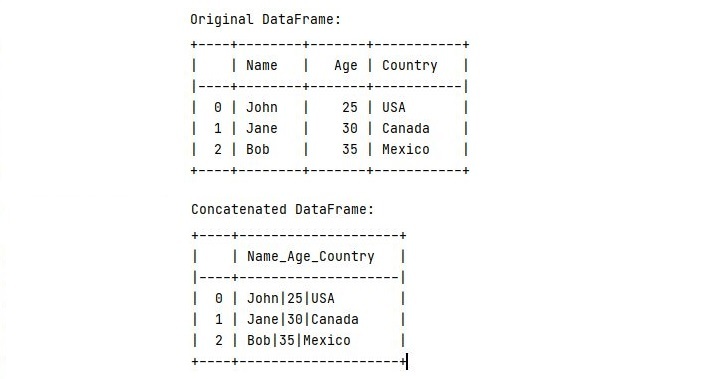
觀察原始資料框以及我們連線列後的外觀。現在讓我們考慮第二種方法。
使用 pd.concat() 方法連線列值
首先建立一個要連線的列列表。
使用 pd.concat() 函式沿您選擇的軸(即列或行)連線列。
使用 sep 引數指定要在連線的值之間使用的分隔符。
使用 rename() 方法重新命名新的連線列。
使用 drop() 方法刪除最初連線的列。
示例
請考慮以下所示的程式碼。
import pandas as pd
from tabulate import  tabulate

# Create a sample DataFrame
df = pd.DataFrame({
   'Name': ['John', 'Jane', 'Bob'],
   'Age': [25, 30, 35],
   'Country': ['USA', 'Canada', 'Mexico']
})
print("\nOriginal Dataframe:")
print(tabulate(df, headers='keys', tablefmt='psql'))

# Concatenate the columns using the pd.concat() function
concatenated_cols = pd.concat(
   [df['Name'], df['Age'], df['Country']],
   axis=1, keys=['Name', 'Age', 'Country']
)
concatenated_cols['Name_Age_Country'] = concatenated_cols['Name'] + '|' + concatenated_cols['Age'].astype(str) + '|' + concatenated_cols['Country']

# Rename the concatenated column and drop the original columns
df = pd.concat([df, concatenated_cols['Name_Age_Country']], axis=1)
df = df.rename(columns={'Name_Age_Country': 'Name|Age|Country'})
df = df.drop(columns=['Name', 'Age', 'Country'])

# Print the original DataFrame and the concatenated DataFrame
print('\nConcatenated Dataframe:')
print(tabulate(df, headers='keys', tablefmt='psql'))
輸出
執行此程式碼後,您將獲得以下輸出 -
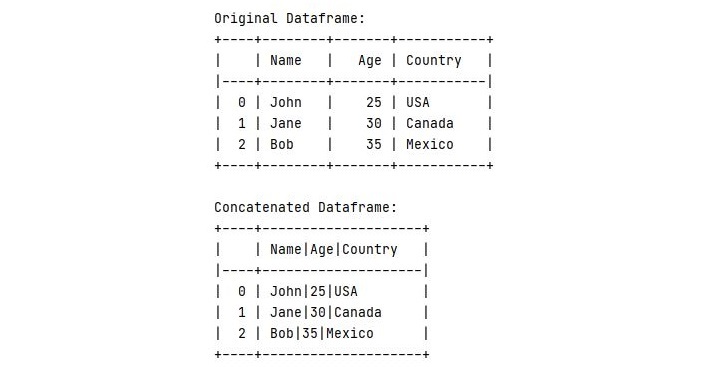
結論
總之,Pandas 提供了幾種連線 DataFrame 中列值的方法。在本教程中討論了兩種方法:使用 pd.Series.str.cat() 方法和使用 pd.concat() 函式。
根據您的具體用例,其中一種方法可能比另一種方法更合適。透過利用 Pandas 的靈活性和強大功能,您可以輕鬆地操作和轉換資料以滿足您的需求。

6K+ 次檢視
