
 資料結構
資料結構 網路
網路 關係資料庫管理系統 (RDBMS)
 作業系統
作業系統 Java
Java MS Excel
 iOS
iOS HTML
HTML CSS
CSS Android
 Python
 C語言程式設計
 C++
C++ C#
C# MongoDB
 MySQL
MySQL Javascript
 PHP
PHP 物理學
物理學 化學
化學 生物學
生物學 數學
數學 英語
英語 經濟學
經濟學 心理學
心理學 社會研究
社會研究 服裝研究
服裝研究 法律研究
法律研究如何使用C++在OpenCV中更改影像亮度?
更改亮度意味著更改畫素值。這意味著為每個畫素的當前值新增或減去某個整數值。當您為每個畫素新增某個整數值時,意味著您正在使影像更亮。當您從所有畫素中減去某個常數值時,您正在降低亮度。首先,我們將學習如何增加亮度,其次我們將學習如何降低亮度。
增加亮度
使用OpenCV增加亮度非常容易。要增加亮度,請為每個通道新增一些附加值,亮度就會增加。例如,BRG影像具有三個通道:藍色 (B)、綠色 (G) 和紅色 (R)。這意味著畫素的當前值將為 (B, G, R)。要增加亮度,我們必須用某個標量數將其相加,例如 (B, G, R) + (10, 10, 10) 或 (B, G, R) + (20, 20, 20),或者您想要的任何數字。
以下示例執行影像增亮 -
示例
#include<iostream>
#include<opencv2/highgui/highgui.hpp>
using namespace cv;
using namespace std;
int main() {
   Mat original;//Declaring a matrix to load the original image//
   Mat brighter;//Declaring a matrix to load the image after changing the brightness//
   namedWindow("Original");//Declaring window to show the original image//
   namedWindow("Brighter");//Declaring window to show the brighter image//
   original = imread("bright.jpg");
   brighter = original + Scalar(80, 80, 80);//adding integer value to change the brightness//
   imshow("Original", original);//showing original image//
   imshow("Brighter", brighter);//showing brighter image//
   waitKey(0);//wait for keystroke//
   return(0);
}
輸出
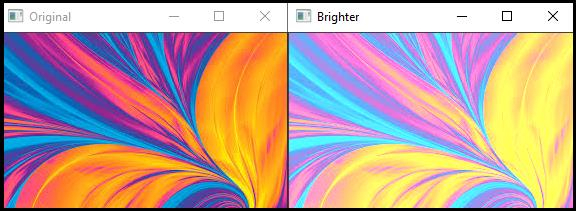

更新於:2021年3月10日
2K+ 次瀏覽

廣告