
 資料結構
資料結構 網路
網路 關係資料庫管理系統 (RDBMS)
 作業系統
作業系統 Java
Java MS Excel
 iOS
iOS HTML
HTML CSS
CSS Android
 Python
 C語言程式設計
 C++
C++ C#
C# MongoDB
 MySQL
MySQL Javascript
 PHP
PHP 物理學
物理學 化學
化學 生物學
生物學 數學
數學 英語
英語 經濟學
經濟學 心理學
心理學 社會學
社會學 服裝設計
服裝設計 法學
法學如何使用TensorFlow和estimators視覺化泰坦尼克號資料集?
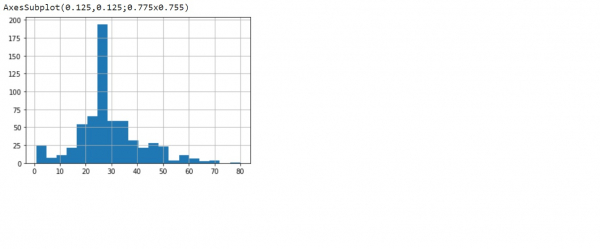
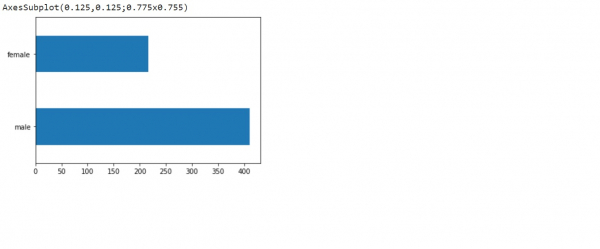
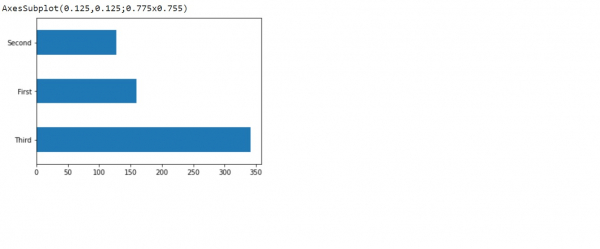
可以使用“hist”方法視覺化泰坦尼克號資料集,該方法會顯示直方圖。透過將圖形型別指定為“barh”,可以生成水平條形圖。
閱讀更多: 什麼是TensorFlow以及Keras如何與TensorFlow一起建立神經網路?
我們將使用Keras Sequential API,它有助於構建順序模型,用於處理簡單的層堆疊,其中每一層只有一個輸入張量和一個輸出張量。
TensorFlow Text包含一系列與文字相關的類和操作,可用於TensorFlow 2.0。TensorFlow Text可用於預處理序列建模。
我們使用Google Colaboratory執行以下程式碼。Google Colab或Colaboratory有助於在瀏覽器上執行Python程式碼,無需任何配置,並可免費訪問GPU(圖形處理單元)。Colaboratory是基於Jupyter Notebook構建的。
Estimator是TensorFlow對完整模型的高階表示。它旨在實現輕鬆擴充套件和非同步訓練。我們將使用tf.estimator API訓練邏輯迴歸模型。該模型用作其他演算法的基線。我們使用泰坦尼克號資料集,目標是根據性別、年齡、等級等特徵預測乘客的生存情況。
示例
print("Visualizing the data")
print(dftrain.age.hist(bins=20))
print(dftrain.sex.value_counts().plot(kind='barh'))
print(dftrain['class'].value_counts().plot(kind='barh'))
pd.concat([dftrain, y_train], axis=1).groupby('sex').survived.mean().plot(kind='barh').set_xlabel('% survive')
程式碼來源 −https://www.tensorflow.org/tutorials/estimator/linear
輸出
Visualizing the data
解釋
- 視覺化泰坦尼克號資料集的各種特徵列。
- 它們使用“plot”方法繪製。

更新於:2021年2月22日
63次瀏覽

廣告