
- GitHub Copilot 教程
- GitHub Copilot - 首頁
- GitHub Copilot - 簡介
- GitHub Copilot - 基本用法
- GitHub Copilot - 註冊
- GitHub Copilot - 設定
- GitHub Copilot - 功能
- GitHub Copilot - 自定義
- GitHub Copilot 高階主題
- GitHub Copilot - 協同編碼
- GitHub Copilot - 程式碼補全
- GitHub Copilot - 與CI/CD管道的整合
- GitHub Copilot - 倫理考量
- GitHub Copilot - 效能最佳化
- GitHub Copilot - 學習與發展
- GitHub Copilot - 版本控制整合
- GitHub Copilot - 行業應用
- GitHub Copilot - 程式碼審查
- GitHub Copilot - 結對程式設計
- GitHub Copilot - 不同IDE
GitHub Copilot - 不同IDE
GitHub Copilot 可用於流行的 IDE,例如 Visual Studio Code、Jetbrains 和 Azure Data Studio。Copilot 提供各種功能,具體取決於您使用的 IDE。在本節中,我們將探討如何在不同的 IDE 中使用 GitHub Copilot。
Copilot IDE 支援
GitHub Copilot 目前可在以下 IDE 中使用:
- Visual Studio Code
- Azure Data Studio
- Visual Studio
- Jetbrains IDE,例如 WebStorm、PyCharm、IntelliJ IDEA 等
在 VSCode 中使用 GitHub Copilot
- GitHub Copilot 作為 Visual Studio Code (VS Code) 的擴充套件提供。
- 在 VS Code 中,您可以使用 Copilot 生成程式碼片段、尋求編碼任務的幫助並獲得程式碼建議。
- VS Code 中有一個專用的聊天介面,可以使用自然語言與 Copilot 進行互動。
- 如果您忘記如何在使用 VS Code 終端時執行特定命令,可以向 GitHub Copilot 的 @terminal 代理尋求幫助。生成響應後,您可以單擊“插入到終端”按鈕直接執行建議的命令。
- 請閱讀有關在 VS Code 中設定 Copilot 的文章,瞭解如何在 VS Code 中設定 Copilot。

在 Azure Data Studio 中使用 GitHub Copilot
- 與 VS Code 類似,GitHub Copilot 也作為 Azure Data Studio 的擴充套件在市場上提供。
- 在使用 SQL 資料庫時,可以在 Azure Data Studio 中使用 GitHub Copilot 生成程式碼片段並獲取查詢建議。
- 使用 Copilot,您可以使用自然語言編寫 SQL 查詢並獲得相應的建議。
- GitHub Copilot 可以與 Azure 服務整合,以增強您的資料管理和分析工作流程。
- 請閱讀有關在 Azure Data Studio 中設定 Copilot 的文章,瞭解如何在 Azure Data Studio 中設定 Copilot。

在 Jetbrains IDE 中使用 GitHub Copilot
- GitHub Copilot 也適用於 JetBrains IDE,例如 WebStorm、PyCharm、IntelliJ IDEA 等。
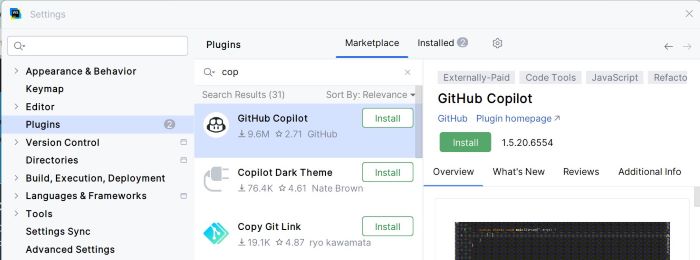
- 您可以透過從 JetBrains 市場安裝 Copilot 外掛來在 JetBrains IDE 中設定 GitHub Copilot。
- 請閱讀有關在 JetBrains IDE 中設定 Copilot 的文章,瞭解如何在 JetBrains IDE 中設定 Copilot。
廣告