
- Drools 教程
- Drools - 首頁
- Drools - 簡介
- Drools - Eclipse 外掛
- Drools - 執行時
- Drools - 建立 Drools 程式
- Drools - 常用術語
- Drools - 規則編寫
- Drools - 規則語法
- Drools - Drools 程式示例
- Drools - 除錯
- Drools 有用資源
- Drools - 快速指南
- Drools - 有用資源
- Drools - 討論
Drools - 除錯
除錯 Drools 專案有多種方法。在這裡,我們將編寫一個實用程式類,讓您知道哪些規則正在觸發或被執行。
透過這種方法,您可以檢查 Drools 專案中所有觸發的規則。以下是我們的實用程式類
Utility.java
package com.sample;
import org.drools.spi.KnowledgeHelper;

public class Utility {
   public static void help(final KnowledgeHelper drools, final String message){
      System.out.println(message);
      System.out.println("\nrule triggered: " + drools.getRule().getName());
   }
   public static void helper(final KnowledgeHelper drools){
      System.out.println("\nrule triggered: " + drools.getRule().getName());
   }
}
第一個方法help列印觸發的規則以及您可以透過 DRL 檔案作為字串傳遞的一些額外資訊。
第二個規則helper列印特定規則是否被觸發。
我們在每個 DRL 檔案中添加了一個實用程式方法。我們還在 DRL 檔案(Pune.drl)中添加了匯入函式。在規則的then部分,我們添加了實用程式函式呼叫。修改後的 Pune.drl 如下所示。更改部分以藍色突出顯示。
修改後的 Pune.drl
//created on: Dec 24, 2014
package droolsexample

//list any import classes here.
import com.sample.ItemCity;
import java.math.BigDecimal;
import com.sample.HelloCity;
import function com.sample.Utility.helper;

// declare any global variables here
dialect "java"
rule "Pune Medicine Item"
   when
      item : ItemCity(purchaseCity == ItemCity.City.PUNE,
         typeofItem == ItemCity.Type.MEDICINES)

   then
      BigDecimal tax = new BigDecimal(0.0);
      item.setLocalTax(tax.multiply(item.getSellPrice()));
      HelloCity.writeHello(item.getPurchaseCity().toString());
      helper(drools);
end

rule "Pune Groceries Item"
   when
      item : ItemCity(purchaseCity == ItemCity.City.PUNE,
         typeofItem == ItemCity.Type.GROCERIES)
   then
      BigDecimal tax = new BigDecimal(2.0);
      item.setLocalTax(tax.multiply(item.getSellPrice()));
      helper(drools);
end
類似地,我們在第二個 DRL 檔案(Nagpur.drl)中添加了另一個實用程式函式。以下是修改後的程式碼 -
修改後的 Nagpur.drl
// created on: Dec 26, 2014
package droolsexample

// list any import classes here.
import com.sample.ItemCity;
import java.math.BigDecimal;
import function com.sample.Utility.help;

//declare any global variables here
dialect "java"

rule "Nagpur Medicine Item"
   when
      item : ItemCity(purchaseCity == ItemCity.City.NAGPUR,
         typeofItem == ItemCity.Type.MEDICINES)

   then
      BigDecimal tax = new BigDecimal(0.0);
      item.setLocalTax(tax.multiply(item.getSellPrice()));
      help(drools,"added info");
end

rule "Nagpur Groceries Item"
   when
      item : ItemCity(purchaseCity == ItemCity.City.NAGPUR,
         typeofItem == ItemCity.Type.GROCERIES)
   then
      BigDecimal tax = new BigDecimal(1.0);
      item.setLocalTax(tax.multiply(item.getSellPrice()));
      help(drools,"info");
end
再次執行程式,它應該產生以下輸出 -
info

rule triggered: Nagpur Groceries Item
added info

rule triggered: Nagpur Medicine Item

rule triggered: Pune Groceries Item
HELLO PUNE!!!!!!

rule triggered: Pune Medicine Item
PUNE 0
PUNE 20
NAGPUR 0
NAGPUR 10
兩個實用程式函式都被呼叫,並且顯示了特定規則是否被呼叫。在上面的示例中,所有規則都被呼叫,但在企業應用程式中,此實用程式函式對於除錯和查詢特定規則是否被執行非常有用。
在 Eclipse 中使用除錯透檢視
您可以在 Drools 應用程式執行期間除錯規則。您可以在規則的結果部分新增斷點,並在規則執行期間遇到斷點時,執行將暫時停止。然後,您可以像在 Java 應用程式中一樣檢查此時已知的變數,並使用 Eclipse 中提供的正常除錯選項。
要在 DRL 檔案中建立斷點,只需雙擊要在其中建立斷點的行即可。請記住,您只能在規則的then部分建立斷點。可以透過雙擊 DRL 編輯器中的斷點來刪除斷點。
應用斷點後,您需要將應用程式作為 Drools 應用程式進行除錯。Drools 斷點(DRL 檔案中的斷點)僅在將應用程式作為 Drools 應用程式除錯時才有效。以下是執行此操作的方法 -
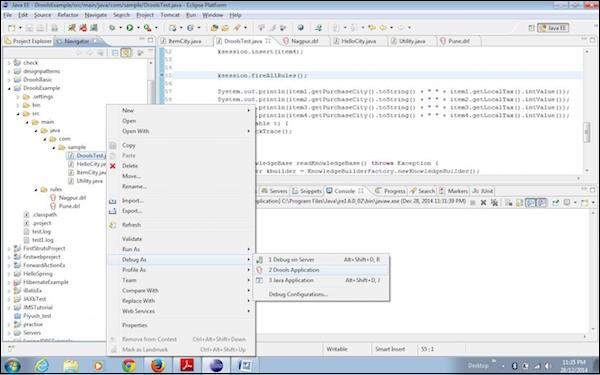
將應用程式作為 Drools 應用程式除錯後,您將在 DRL 檔案上看到如下所示的控制 -
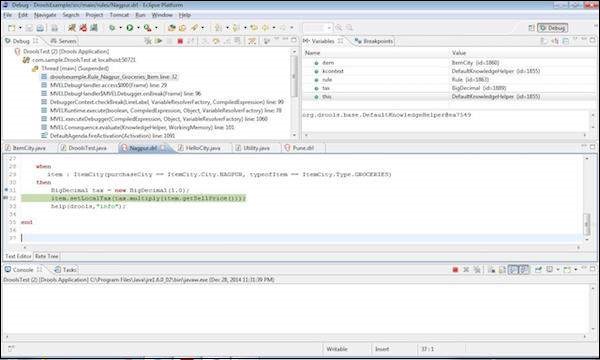
您可以看到變數以及該除錯點處物件的當前值。此處也適用 F6 移動到下一行和 F8 跳到下一個除錯點的相同控制。透過這種方式,您可以除錯 Drools 應用程式。
注意 - Drools 應用程式中的除錯透檢視僅在方言為 MVEL(直到 Drools 5.x)時才有效。