
 資料結構
資料結構 網路
網路 關係資料庫管理系統
 作業系統
作業系統 Java
Java MS Excel
 iOS
iOS HTML
HTML CSS
CSS Android
 Python
 C語言程式設計
 C++
C++ C#
C# MongoDB
 MySQL
MySQL Javascript
 PHP
PHP 物理學
物理學 化學
化學 生物學
生物學 數學
數學 英語
英語 經濟學
經濟學 心理學
心理學 社會學
社會學 時尚研究
時尚研究 法律研究
法律研究C++程式查詢圖中的超級頂點
假設我們得到一個具有n個頂點的圖。頂點編號從1到n,它們由陣列'edges'中給定的邊連線。每個頂點在陣列'values'中都有一個從1到n的數字'x'值。現在,我們必須找出圖中的超級頂點。當從頂點1到頂點i的最短路徑不包含與第i個頂點具有相同'x'值的頂點時,頂點i稱為“超級頂點”。我們打印出滿足此條件的所有頂點。
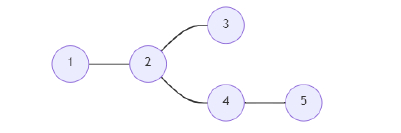
因此,如果輸入類似於n = 5,values = {1, 2, 2, 1, 3},edges = {{1, 2}, {2, 3}, {2, 3}, {2, 4}, {4, 5}},則輸出將為1 3 4 5。
除了頂點2之外的每個頂點都滿足條件。因此,排除頂點2。
步驟
為了解決這個問題,我們將遵循以下步驟:
Define arrays vertexVal, frq, and chk of size: 100005.
Define an array vcti of size 200005.
Define a function dfs(), this will take j, k,
   if frq[vertexVal[j]] is same as 0, then:
      chk[j] := 1
   (increase frq[vertexVal[j]] by 1)
   for each value a in vcti[j], do:
      if a is not equal to k, then:
         dfs(a, j)
   (decrease frq[vertexVal[j]] by 1)
for initialize i := 0, when i < n, update (increase i by 1), do:
   vertexVal[i] := values[i]
for initialize i := 0, when i < n, update (increase i by 1), do:
a := first value of edges[i]
b := second value of edges[i]
insert b at the end of vcti[a]
insert a at the end of vcti[b]
dfs(1, 0)
for initialize i := 1, when i <= n, update (increase i by 1), do:
if chk[i] is non-zero, then:
print(i)
示例
讓我們看看以下實現以更好地理解:
#include <bits/stdc++.h>
using namespace std;

int n;
int vertexVal[100005], frq[100005], chk[100005];
vector<int> vcti[200005];

void dfs(int j, int k){
   if (frq[vertexVal[j]] == 0)
      chk[j] = 1;
   frq[vertexVal[j]]++;
   for (auto a : vcti[j]) {
      if (a != k)
         dfs(a, j);
   }
   frq[vertexVal[j]]--;
}
void solve(int values[], vector<pair<int, int>> edges){
   for (int i = 0; i < n; i++)
      vertexVal[i] = values[i];
   for (int i = 0; i < n; i++){
      int a, b;
      a = edges[i].first;
      b = edges[i].second;
      vcti[a].push_back(b);
      vcti[b].push_back(a);
   }
   dfs(1, 0);
   for (int i = 1;i <= n; i++){
      if (chk[i]) cout<< i <<endl;
   }
}
int main() {
   n = 5;
   int values[] = {1, 2, 2, 1, 3}; vector<pair<int, int>> edges = {{1, 2}, {2, 3}, {2, 3}, {2, 4}, {4, 5}};
   solve(values, edges);
   return 0;
}
輸入
5, {1, 2, 2, 1, 3}, {{1, 2}, {2, 3}, {2, 3}, {2, 4}, {4, 5}}輸出
1
3
4
5

更新於: 2022年3月2日
203 次瀏覽

廣告