
- Concordion 教程
- Concordion - 首頁
- Concordion - 概述
- Concordion - 環境搭建
- Concordion - 第一個應用
- Concordion - set 命令
- assertEquals 命令
- Concordion - assertTrue 命令
- Concordion - assertFalse 命令
- Concordion - execute 命令
- Concordion - 返回物件
- Concordion - 返回 Map
- 返回多值結果
- Concordion - 在表格上執行
- Concordion - 在列表上執行
- Concordion - verifyRows 命令
- Concordion - run 命令
- Concordion 有用資源
- Concordion - 快速指南
- Concordion - 有用資源
- Concordion - 討論
Concordion - 第一個應用
讓我們開始使用 Concordion 進行程式設計。在開始編寫您的第一個 Concordion 示例之前,您必須確保已正確設定 Concordion 環境,如Concordion - 環境搭建教程中所述。我們還假設您對 Eclipse IDE 有基本的工作知識。
因此,讓我們繼續編寫一個簡單的 Concordion 應用程式,它將列印以下驗收測試:
Example
When Robert logs in the system, a greeting "Hello Robert!" is displayed.
步驟 1 - 建立 Java 專案
第一步是使用 Eclipse IDE 建立一個簡單的 Java 專案。按照以下步驟操作:檔案 → 新建 → 專案,最後從嚮導列表中選擇Java 專案嚮導。現在使用嚮導視窗將您的專案命名為Concordion,如下所示:

專案成功建立後,您的專案資源管理器中將包含以下內容:

步驟 2 - 新增所需的庫
讓我們在專案中新增 concordion 及其依賴項。為此,右鍵單擊您的專案名稱concordion,然後按照上下文選單中提供的選項操作:構建路徑 → 配置構建路徑,以顯示 Java 構建路徑視窗,如下所示:
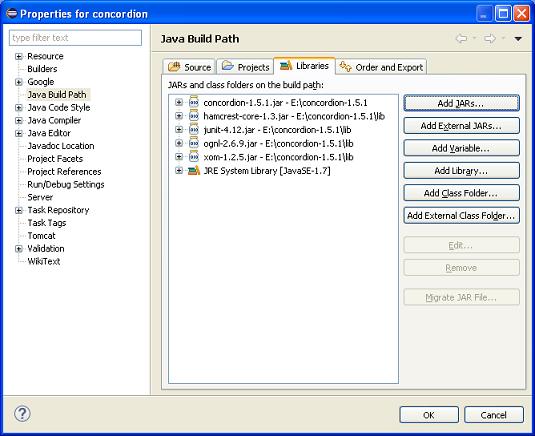
現在使用庫選項卡下提供的新增外部 JAR按鈕,從 Concordion 資料夾新增以下核心 JAR。
- concordion-1.5.1
- hamcrest-core-1.3
- junit-4.12
- ognl-2.6.9
- xom-1.2.5
步驟 3 - 建立原始檔
現在讓我們在concordion專案下建立實際的原始檔。首先,我們需要建立一個名為com.tutorialspoint的包。為此,右鍵單擊包資源管理器部分中的src,然後選擇:新建 → 包。
接下來,我們將在 com.tutorialspoint 包下建立 System .java 檔案。
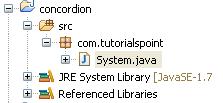
以下是System.java檔案的內容:
package com.tutorialspoint;

public class System {
   public String getGreeting(String userName){
      return "Hello " + userName + "!";
   }
}
步驟 4 - 建立規範檔案
現在讓我們在concordion專案下建立實際的規範檔案。首先,我們需要建立一個名為specs的新原始檔夾。此資料夾將包含規範檔案,如 JUnitFixture 或測試執行程式以及用作規範的 html 檔案。現在我們需要建立一個名為specs.tutorialspoint的包。為此,右鍵單擊包資源管理器部分中的spec,然後選擇:新建 → 包。
接下來,我們將在 specs.tutorialspoint 包下建立System.html和SystemFixture.java檔案。之後,我們將在 specs 原始檔夾下新增concordion.css。
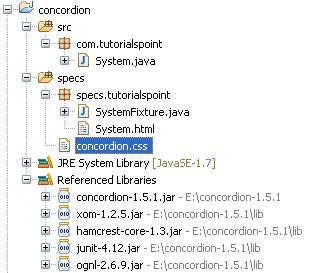
以下是System.html檔案的內容:
<html xmlns:concordion = "http://www.concordion.org/2007/concordion">
   <head>
      <link href = "../concordion.css" rel = "stylesheet" type="text/css" />
   </head>

   <body>
      <h1>System Specifications</h1>
      <p>We are building specifications for our online order tracking application.</p>
      <p>Following is the requirement to show greeting to logged in user:</p>
      <div class = "example">
         <h3>Example</h3>
         <p>When <span concordion:set = "#userName">Robert</span>
            logs in the system, a greeting "<span concordion:assertEquals = "getGreeting(#userName)">
            Hello Robert!</span>" is displayed.</p>
      </div>
   </body>

</html>
以下是SystemFixture.java檔案的內容:
package specs.tutorialspoint;

import com.tutorialspoint.System;
import org.concordion.integration.junit4.ConcordionRunner;
import org.junit.runner.RunWith;

@RunWith(ConcordionRunner.class)

public class SystemFixture {

   System system = new System();

   public String getGreeting(String userName){
      return system.getGreeting(userName);
   }
}
以下是concordion.css檔案的內容:
* {
   font-family: Arial;
}

body {
   padding: 32px;
}

pre {
   padding: 6px 28px 6px 28px;
   background-color: #E8EEF7;
}

pre, pre *, code, code *, kbd {
   font-family: Courier New, Courier;
   font-size: 10pt;
}

h1, h1 * {
   font-size: 24pt;
}

p, td, th, li, .breadcrumbs {
   font-size: 10pt;
}

p, li {
   line-height: 140%;
}

table {
   border-collapse: collapse;
   empty-cells: show;
   margin: 8px 0px 8px 0px;
}

th, td {
   border: 1px solid black;
   padding: 3px;
}

td {
   background-color: white;
   vertical-align: top;
}

th {
   background-color: #C3D9FF;
}

li {
   margin-top: 6px;
   margin-bottom: 6px;
}

.example {
   padding: 6px 16px 6px 16px;
   border: 1px solid #D7D7D7;
   margin: 6px 0px 28px 0px;
   background-color: #F7F7F7;
}

.example h3 {
   margin-top: 8px;
   margin-bottom: 8px;
   font-size: 12pt;
}

.special {
  font-style: italic;
}

.idea {
  font-size: 9pt;
  color: #888;
  font-style: italic;
}

.tight li {
  margin-top: 1px;
  margin-bottom: 1px;
}

.commentary {
  float: right;
  width: 200px;
  background-color: #ffffd0;
  padding:8px;
  border: 3px solid #eeeeb0;
  margin: 10px 0px 10px 10px;
}

.commentary, .commentary * {
  font-size: 8pt;
}
關於規範 html 檔案和測試夾具,需要注意兩點:
System.html 是使用 concordion 名稱空間的規範 html 檔案。
<html xmlns:concordion="http://www.concordion.org/2007/concordion">
System.html 使用 concordion:set 命令將臨時變數 userName 的值設定為 Robert。這裡,userName 是要傳遞給 System 夾具的 getGreeting 方法的引數。
When <span concordion:set="#userName">Robert</span> logs in the system
System.html 使用 concordion:assertEquals 命令檢查 getGreeting(userName) 函式的輸出是否為 Hello Robert!。
a greeting "<span concordion:assertEquals="getGreeting(#userName)">
Hello Robert!</span>" is displayed.
SystemFixture 是用 ConcordionRunner.class 註釋的 JUnit 測試夾具。
@RunWith(ConcordionRunner.class)
public class SystemFixture {}
SystemFixture 有一個 getGreeting 方法,該方法向用戶返回問候語。
public String getGreeting(String userName){
   return system.getGreeting(userName);
}
步驟 5 - 執行程式
右鍵單擊 SystemFixture 的內容區域,然後選擇以...方式執行>JUnit 測試用例。您將看到以下帶有 junit 成功訊息的輸出。
C:\DOCUME~1\ADMINI~1\LOCALS~1\Temp\concordion\specs\tutorialspoint\System.html
Successes: 1, Failures: 0
System.html 是 Concordion 測試執行的輸出。
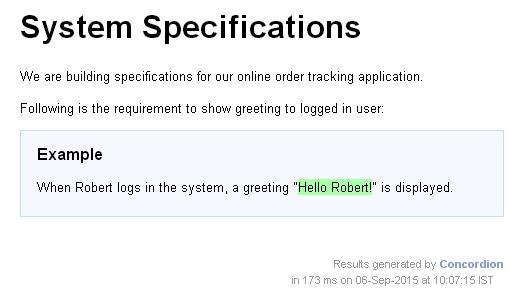
恭喜您,您已成功建立了第一個 Concordion 驗收測試。接下來,讓我們在接下來的幾章中開始做一些更有趣的事情。