
- CherryPy 教程
- CherryPy - 首頁
- CherryPy - 簡介
- CherryPy - 環境設定
- CherryPy - 詞彙表
- 內建HTTP伺服器
- CherryPy - 工具箱
- CherryPy - 一個可執行的應用程式
- CherryPy - Web服務
- CherryPy - 表現層
- CherryPy - Ajax的使用
- CherryPy - 演示應用程式
- CherryPy - 測試
- 應用程式部署
- CherryPy 有用資源
- CherryPy - 快速指南
- CherryPy - 有用資源
- CherryPy - 討論
CherryPy - 一個可執行的應用程式
全棧應用程式提供了一種透過某些命令或檔案執行來建立新應用程式的功能。
考慮一下像web2py框架這樣的Python應用程式;整個專案/應用程式都是根據MVC框架建立的。同樣,CherryPy允許使用者根據自己的需求設定和配置程式碼的佈局。
在本章中,我們將詳細學習如何建立CherryPy應用程式並執行它。
檔案系統
應用程式的檔案系統如下面的螢幕截圖所示:
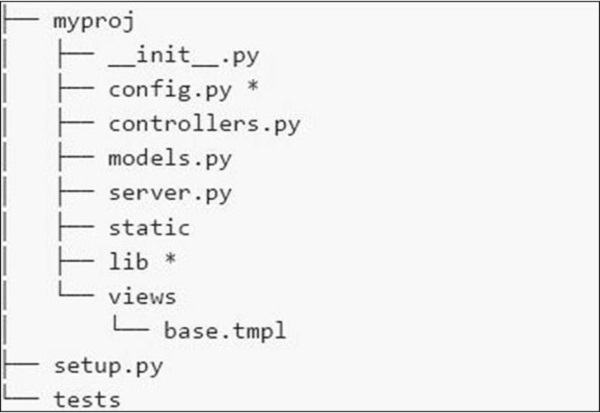
以下是我們檔案系統中各種檔案的簡要說明:
config.py - 每個應用程式都需要一個配置檔案和一種載入它的方法。此功能可以在config.py中定義。
controllers.py - MVC是一種流行的設計模式,使用者遵循該模式。controllers.py是所有將在cherrypy.tree上掛載的物件實現的地方。
models.py - 此檔案直接與資料庫互動以提供某些服務或儲存永續性資料。
server.py - 此檔案與生產就緒的Web伺服器互動,該伺服器可以與負載均衡代理正常工作。
Static - 它包含所有CSS和影像檔案。
Views - 它包含給定應用程式的所有模板檔案。
示例
讓我們詳細瞭解建立CherryPy應用程式的步驟。
步驟1 - 建立一個應該包含應用程式的應用程式目錄。
步驟2 - 在目錄內,建立一個與專案對應的Python包。建立gedit目錄並在其中包含_init_.py檔案。
步驟3 - 在包內,包含controllers.py檔案,內容如下:
#!/usr/bin/env python

import cherrypy

class Root(object):

   def __init__(self, data):
      self.data = data

   @cherrypy.expose
   def index(self):
      return 'Hi! Welcome to your application'

def main(filename):
   data = {} # will be replaced with proper functionality later

   # configuration file
   cherrypy.config.update({
      'tools.encode.on': True, 'tools.encode.encoding': 'utf-8',
      'tools.decode.on': True,
      'tools.trailing_slash.on': True,
      'tools.staticdir.root': os.path.abspath(os.path.dirname(__file__)),
   })

   cherrypy.quickstart(Root(data), '/', {
      '/media': {
         'tools.staticdir.on': True,
         'tools.staticdir.dir': 'static'
      }
   })

if __name__ == '__main__':
main(sys.argv[1])
步驟4 - 考慮一個使用者透過表單輸入值的應用程式。讓我們在應用程式中包含兩個表單——index.html和submit.html。
步驟5 - 在上面controllers的程式碼中,我們有index(),這是一個預設函式,如果呼叫特定控制器,則首先載入。
步驟6 - index()方法的實現可以按以下方式更改:
@cherrypy.expose
   def index(self):
      tmpl = loader.load('index.html')

      return tmpl.generate(title='Sample').render('html', doctype='html')
步驟7 - 這將在啟動給定應用程式時載入index.html並將其定向到給定的輸出流。index.html檔案如下:
index.html
<!DOCTYPE html >
<html>
   <head>
      <title>Sample</title>
   </head>

   <body class = "index">
      <div id = "header">
         <h1>Sample Application</h1>
      </div>

      <p>Welcome!</p>

      <div id = "footer">
         <hr>
      </div>

   </body>

</html>
步驟8 - 如果要建立接受名稱和標題等值的表單,則必須在controller.py中的Root類中新增一個方法。
@cherrypy.expose
   def submit(self, cancel = False, **value):

      if cherrypy.request.method == 'POST':
         if cancel:
            raise cherrypy.HTTPRedirect('/') # to cancel the action
         link = Link(**value)
         self.data[link.id] = link
         raise cherrypy.HTTPRedirect('/')
      tmp = loader.load('submit.html')
      streamValue = tmp.generate()

      return streamValue.render('html', doctype='html')
步驟9 - 要包含在submit.html中的程式碼如下:
<!DOCTYPE html>
   <head>
      <title>Input the new link</title>
   </head>

   <body class = "submit">
      <div id = " header">
         <h1>Submit new link</h1>
      </div>

      <form action = "" method = "post">
         <table summary = "">
            <tr>
               <th><label for = " username">Your name:</label></th>
               <td><input type = " text" id = " username" name = " username" /></td>
            </tr>

            <tr>
               <th><label for = " url">Link URL:</label></th>
               <td><input type = " text" id=" url" name= " url" /></td>
            </tr>

            <tr>
               <th><label for = " title">Title:</label></th>
               <td><input type = " text" name = " title" /></td>
            </tr>

            <tr>
               <td></td>
               <td>
                  <input type = " submit" value = " Submit" />
                  <input type = " submit" name = " cancel" value = "Cancel" />
               </td>
            </tr>

         </table>

      </form>
      <div id = "footer">
      </div>

   </body>

</html>
步驟10 - 您將收到以下輸出:
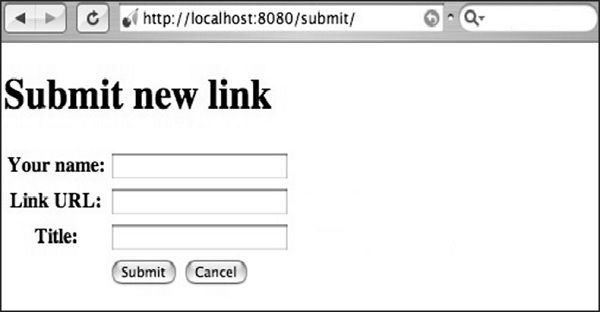
此處,方法名稱定義為“POST”。始終務必交叉驗證檔案中指定的方法。如果方法包含“POST”方法,則應在適當的欄位中重新檢查資料庫中的值。
如果方法包含“GET”方法,則要儲存的值將顯示在URL中。