
AppML - 架構
AppML 使用 MVC 架構。以下是 MVC 架構的簡要介紹。
模型-檢視-控制器 (MVC) 是一種架構模式,它將應用程式分離成三個主要的邏輯元件:模型、檢視和控制器。每個元件都構建用於處理應用程式的特定開發方面。MVC 是最常用的行業標準 Web 開發框架之一,用於建立可擴充套件和可伸縮的專案。
MVC 元件
以下是 MVC 的元件:
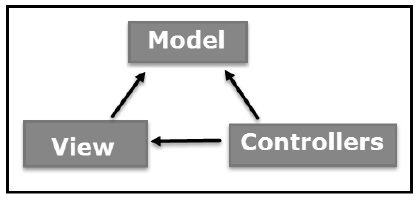
模型
模型元件對應於使用者使用到的所有與資料相關的邏輯。這可以表示檢視和控制器元件之間傳輸的資料,或者任何其他與業務邏輯相關的資料。例如,客戶物件將從資料庫中檢索客戶資訊,操作它並將資料更新回資料庫,或使用它來呈現資料。
檢視
檢視元件用於應用程式的所有 UI 邏輯。例如,客戶檢視將包括終端使用者互動的所有 UI 元件,例如文字框、下拉列表等。
控制器
控制器充當模型和檢視元件之間的介面,以處理所有業務邏輯和傳入請求,使用模型元件操作資料並與檢視互動以呈現最終輸出。例如,客戶控制器將處理來自客戶檢視的所有互動和輸入,並使用客戶模型更新資料庫。同一個控制器將用於檢視客戶資料。
AppML 模型
AppML 將模型定義為 JSON,用於描述應用程式。由於它是基於純文字的,因此模型與平臺無關,並且獨立於任何表示邏輯或使用者介面。以下是一個 AppML 模型示例。
{
"rowsperpage" : 10,
"database" : {
   "connection" : "localsql",
   "sql" : "SELECT studentName, class, section FROM Students",
   "orderby" : "StudentName"
},
"filteritems" : [
   {"item" : "studentName", "label" : "Student"},
   {"item" : "class"},
   {"item" : "section"}
],
"sortitems" : [
   {"item" : "studentName", "label" : "Student"},
   {"item" : "class"},
   {"item" : "section"}
]
}
AppML 檢視
AppML 檢視是簡單的 HTML,用於顯示由 CSS 樣式設定樣式的 UI。appml-data 屬性用於引用模型。以下是一個 AppML 檢視示例。
<!DOCTYPE html>
<html lang="en-US">
   <title>Students</title>
   <style>
      table {
         border-collapse: collapse;
         width: 100%;
      }
      th, td {
         text-align: left;
         padding: 8px;
      }
      tr:nth-child(even) {background-color: #f2f2f2;}
   </style>
   <script src="https://w3schools.tw/appml/2.0.3/appml.js"></script>
<body>
<div class="w3-container" appml-data="local?model=model_students">
<h1>Customers</h1>
<table class="w3-table-all">
   <tr>
      <th>Student</th>
      <th>Class</th>
      <th>Section</th>
</tr>
<tr appml-repeat="records">
   <td>{{studentName}}</td>
   <td>{{class}}</td>
   <td>{{section}}</td>
</tr>
</table>
</div>
</body>
</html>
AppML 控制器
AppML 控制器是簡單的 JavaScript 函式,用於控制 UI 資料。AppML 控制器可以是客戶端指令碼函式或伺服器端函式。appml-controller 屬性用於表示控制器函式。以下是一個 AppML 控制器示例。
<!DOCTYPE html>
<html lang="en-US">
   <title>Students</title>
   <style>
      table {
         border-collapse: collapse;
         width: 100%;
      }
      th, td {
         text-align: left;
         padding: 8px;
      }
      tr:nth-child(even) {background-color: #f2f2f2;}
   </style>
   <script src="https://w3schools.tw/appml/2.0.3/appml.js"></script>
<body>
<div appml-data="local?model=model_students" appml-controller="studentController">
<h1>Customers</h1>
<table>
   <tr>
      <th>Student</th>
      <th>Class</th>
      <th>Section</th>
</tr>
<tr appml-repeat="records">
   <td>{{studentName}}</td>
   <td>{{class}}</td>
   <td>{{section}}</td>
</tr>
</table>
<script>
function studentController($appml) {
   if ($appml.message == "display") {
      if ($appml.display.name == "studentName") {
         $appml.display.value = $appml.display.value.toUpperCase();
      }
   }
}
</script>
</div>
</body>
</html>
廣告