
- Apache POI Word 教程
- Apache POI Word - 主頁
- Apache POI Word - 概述
- Apache POI Word - 安裝
- Apache POI Word - 核心類
- Apache POI Word - 文件
- Apache POI Word - 段落
- Apache POI Word - 邊界
- Apache POI Word - 表格
- Apache POI Word - 字型和對齊
- Apache POI Word - 文字提取
- Apache POI Word 資源
- Apache POI Word - 快速指南
- Apache POI Word - 實用資源
- Apache POI Word - 討論
Apache POI Word - 字型和對齊
本章節介紹如何使用 Java 在 Word 文件中應用不同的字型樣式和對齊。一般來說,字型樣式包含:字型大小、型別、粗體、斜體和下劃線。而對齊分為左對齊、居中、右對齊和兩端對齊。
字型樣式
以下程式碼用於設定不同樣式的字型 -
import java.io.File;
import java.io.FileOutputStream;

import org.apache.poi.xwpf.usermodel.VerticalAlign;
import org.apache.poi.xwpf.usermodel.XWPFDocument;
import org.apache.poi.xwpf.usermodel.XWPFParagraph;
import org.apache.poi.xwpf.usermodel.XWPFRun;

public class FontStyle {

   public static void main(String[] args)throws Exception {

      //Blank Document
      XWPFDocument document = new XWPFDocument();

      //Write the Document in file system
      FileOutputStream out = new FileOutputStream(new File("fontstyle.docx"));

      //create paragraph
      XWPFParagraph paragraph = document.createParagraph();

      //Set Bold an Italic
      XWPFRun paragraphOneRunOne = paragraph.createRun();
      paragraphOneRunOne.setBold(true);
      paragraphOneRunOne.setItalic(true);
      paragraphOneRunOne.setText("Font Style");
      paragraphOneRunOne.addBreak();

      //Set text Position
      XWPFRun paragraphOneRunTwo = paragraph.createRun();
      paragraphOneRunTwo.setText("Font Style two");
      paragraphOneRunTwo.setTextPosition(100);

      //Set Strike through and Font Size and Subscript
      XWPFRun paragraphOneRunThree = paragraph.createRun();
      paragraphOneRunThree.setStrike(true);
      paragraphOneRunThree.setFontSize(20);
      paragraphOneRunThree.setSubscript(VerticalAlign.SUBSCRIPT);
      paragraphOneRunThree.setText(" Different Font Styles");

      document.write(out);
      out.close();
      System.out.println("fontstyle.docx written successully");
   }
}
將以上程式碼另存為 FontStyle.java,然後從命令提示符編譯並執行,如下所示 -
$javac FontStyle.java
$java FontStyle
它將在當前目錄中生成一個名為 fontstyle.docx 的 Word 檔案,並在命令提示符上顯示以下輸出 -
fontstyle.docx written successfully
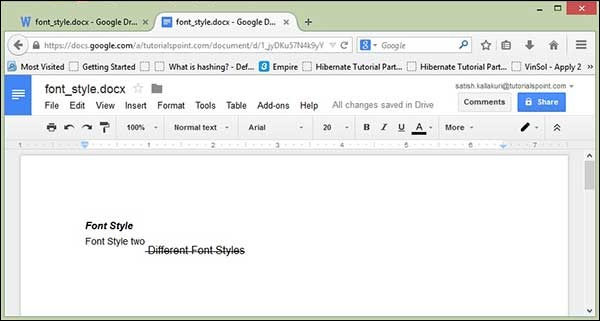
fontstyle.docx 檔案如下所示。
對齊
以下程式碼用於設定對齊方式以符合段落文字 -
import java.io.File;
import java.io.FileOutputStream;
import org.apache.poi.xwpf.usermodel.ParagraphAlignment;
import org.apache.poi.xwpf.usermodel.XWPFDocument;
import org.apache.poi.xwpf.usermodel.XWPFParagraph;
import org.apache.poi.xwpf.usermodel.XWPFRun;

public class AlignParagraph {

   public static void main(String[] args)throws Exception {

      //Blank Document
      XWPFDocument document = new XWPFDocument();

      //Write the Document in file system
      FileOutputStream out = new FileOutputStream(
      new File("alignparagraph.docx"));

      //create paragraph
      XWPFParagraph paragraph = document.createParagraph();

      //Set alignment paragraph to RIGHT
      paragraph.setAlignment(ParagraphAlignment.RIGHT);
      XWPFRun run = paragraph.createRun();
      run.setText("At tutorialspoint.com, we strive hard to " +
         "provide quality tutorials for self-learning " +
         "purpose in the domains of Academics, Information " +
         "Technology, Management and Computer Programming " +
         "Languages.");

      //Create Another paragraph
      paragraph = document.createParagraph();

      //Set alignment paragraph to CENTER
      paragraph.setAlignment(ParagraphAlignment.CENTER);
      run = paragraph.createRun();
      run.setText("The endeavour started by Mohtashim, an AMU " +
         "alumni, who is the founder and the managing director " +
         "of Tutorials Point (I) Pvt. Ltd. He came up with the " +
         "website tutorialspoint.com in year 2006 with the help" +
         "of handpicked freelancers, with an array of tutorials" +
         " for computer programming languages. ");

      document.write(out);
      out.close();
      System.out.println("alignparagraph.docx written successfully");
   }
}
將以上程式碼另存為 AlignParagraph.java,然後從命令提示符編譯並執行,如下所示 -
$javac AlignParagraph.java
$java AlignParagraph
它將在當前目錄中生成一個名為 alignparagraph.docx 的 Word 檔案,並在命令提示符上顯示以下輸出 -
alignparagraph.docx written successfully
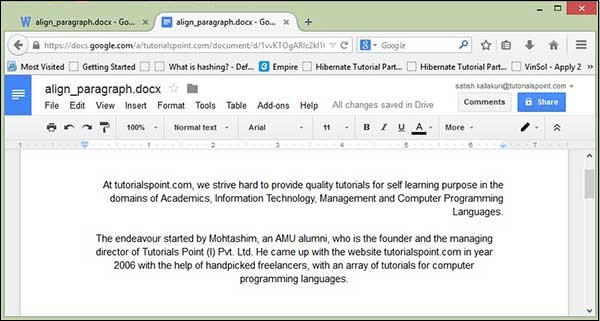
alignparagraph.docx 檔案如下所示 -
廣告