
- Apache Ivy 教程
- Apache Ivy - 首頁
- Apache Ivy - 概述
- Apache Ivy - 環境設定
- Apache Ivy - 術語表
- Apache Ivy - 設定檔案
- Apache Ivy - Eclipse Ivy 外掛
- Ant Ivy 任務
- Apache Ivy - resolve 命令
- Apache Ivy - install 命令
- Apache Ivy - retrieve 命令
- Apache Ivy - cachepath 命令
- Apache Ivy - publish 命令
- Apache Ivy - info 命令
- 倉庫
- Apache Ivy - 解析器
- Apache Ivy - 本地倉庫
- Apache Ivy - 共享倉庫
- Apache Ivy - 公共倉庫
- Apache Ivy 有用資源
- Apache Ivy 快速指南
- Apache Ivy - 有用資源
- Apache Ivy - 討論
Apache Ivy 快速指南
Apache Ivy - 概述
Apache Ivy是一個非常流行且功能強大的依賴管理工具,用於管理基於Ant的專案中的依賴關係,其方式與Apache Maven管理依賴關係的方式相同。
Apache Ivy基於Apache Ant,遵循相同的設計原則,是Apache Ant的一個子專案,並由Apache Ant社群積極管理和支援。
特性
以下是Apache Ivy的重要特性。
基於Ant − Apache Ivy為基於Ant的專案提供依賴管理功能。它也非常易於使用。
依賴報告 − Apache Ivy提供選項以HTML和報告格式列印依賴關係圖。
非侵入式 − Apache Ivy不會強加任何必須作為發行版一部分的限制。即使構建檔案也不依賴於Apache Ivy。
高度靈活 − Apache Ivy提供了許多預設配置,並且可以很容易地根據需要進行配置。
可擴充套件 − Apache Ivy易於擴充套件。您可以定義自己的倉庫、衝突解析器和最新策略。
效能 − Apache Ivy構建的目標是效能。它保留已下載庫的快取。首先檢視本地倉庫以解析依賴項,然後再檢視其他倉庫。
傳遞依賴 − 如果一個專案或庫依賴於另一個可能需要另一個庫的庫,Apache Ivy會自動管理傳遞依賴項。
Maven倉庫 − Apache Ivy遵循類似於Maven倉庫的約定。Apache Ivy可以使用Maven全域性倉庫來解析依賴項。
Maven 2 POMs − Apache Ivy可以讀取Maven 2 POMs作為模組描述符,可以將ivy設定為模組描述符。因此,它可以輕鬆地將現有專案遷移到Ivy管理的專案。
釋出 − Apache Ivy提供支援以釋出您的專案,並簡化多專案環境的部署過程。
免費使用 − Apache Ivy是開源的,可以免費使用。
文件 − Apache Ivy擁有非常詳細的文件和教程可供學習。
Apache Ivy - 環境設定
Apache Ivy只需要在您的機器上安裝Java和Ant。
Apache Ant根據Apache軟體許可證(一個由開源倡議認證的成熟的開源許可證)發行。
最新的Apache Ant版本(包括其完整的原始碼、類檔案和文件)可以在http://ant.apache.org找到。
安裝Apache Ant
假設您已經在計算機上下載並安裝了Java開發工具包(JDK)。如果沒有,請按照這裡的說明操作。
確保已將JAVA_HOME環境變數設定為JDK安裝的資料夾。
從https://ant.apache.org下載二進位制檔案
使用Winzip、winRAR、7-zip或類似工具將zip檔案解壓縮到方便的位置c:\folder。
建立一個名為ANT_HOME的新環境變數,指向Ant安裝資料夾,在本例中為c:\apache-ant-1.10.12-bin資料夾。
將Apache Ant批處理檔案的路徑新增到PATH環境變數。在本例中,這是c:\apache-ant-1.10.12-bin\bin資料夾。
驗證Apache Ant安裝
要在您的計算機上驗證Apache Ant的安裝是否成功,請在命令提示符中鍵入ant。
您應該看到類似於以下的輸出:
C:\>ant -version
Apache Ant(TM) version 1.10.12 compiled on October 13 2021
如果看不到上述輸出,請驗證您是否正確地按照安裝步驟操作。
安裝Apache Ivy
從https://ant.apache.org/ivy下載二進位制檔案
使用Winzip、winRAR、7-zip或類似工具將zip檔案解壓縮到方便的位置c:\folder。
將ivy-2.5.0.jar複製到c:\apache-ant-1.10.12-bin/lib資料夾。
驗證Apache Ivy安裝
要在您的計算機上驗證Apache Ivy的安裝是否成功,請在E: > ivy資料夾中建立一個以下構建檔案。
<project name="test ivy installation"
   default="test" xmlns:ivy="antlib:org.apache.ivy.ant">
   <target name="test" description="Test ivy installation">
      <ivy:settings />
   </target>
</project>
您應該看到類似於以下的輸出:
C:\>ant
Buildfile: E:\ivy\build.xml

test:

BUILD SUCCESSFUL
Total time: 2 seconds
安裝Eclipse
本教程還介紹了Ant與Eclipse IDE的整合。因此,如果您尚未安裝Eclipse,請下載並安裝Eclipse
安裝Eclipse:
從www.eclipse.org下載最新的Eclipse二進位制檔案
將Eclipse二進位制檔案解壓縮到方便的位置,例如c:\folder
從c:\eclipse\eclipse.exe執行Eclipse
Apache Ivy - 術語表
考慮以下示例ivy.xml以瞭解Ivy術語。
<?xml version="1.0" encoding="ISO-8859-1"?>
<ivy-module version="2.0"
   xmlns:xsi="http://www.w3.org/2001/XMLSchema-instance"
   xsi:noNamespaceSchemaLocation="http://ant.apache.org/ivy/schemas/ivy.xsd">
   <info organisation="com.tutorialspoint" module="ivy-test" status="integration">
   </info>
   <dependencies>
      <dependency org="commons-lang" name="commons-lang" rev="2.6" />
   </dependencies>
</ivy-module>
Ivy術語
以下是Ivy生態系統中的重要術語。
組織 −顧名思義,它指的是建立專案或庫的公司、個人開發者或團隊的名稱。例如,com.tutorialspoint。
模組 −顧名思義,它指的是可重用的單元或模組。模組通常帶有與其關聯的版本。例如commons-lang或ivy-test等。
模組描述符 −模組描述符指的是描述模組的ivy.xml檔案。模組描述符包含識別符號(組織、名稱、分支和版本)、釋出的工件、配置和依賴項。
工件 −工件指的是作為可交付成果的單個檔案。例如,jar檔案。工件可以是zip、gz等型別。Jar、源Jar、Javadoc Jar是模組的各種工件。
型別 −型別標識工件類別,例如jar、war、src、doc等。
工件檔名副檔名 −工件副檔名,例如.jar、.zip、.gz等。
模組版本 −模組的唯一版本號或其版本號。
版本的狀態 −版本的狀態指示版本的穩定性。以下是狀態的重要值:
integration −表示持續開發、夜間構建等。
milestone −表示一個發行版,但尚未最終確定。
release −表示經過測試並完成,一個主要版本。
倉庫 −類似於Maven倉庫,倉庫表示一個分發站點,Ivy可以在其中搜索庫、工件、模組等。倉庫可以是公共的、私有的或共享的。
Ivy設定 −Apache Ivy遵循Maven原則,並附帶許多預設配置。可以透過定義ivysettings.xml檔案來覆蓋預設設定。
Apache Ivy - 設定檔案
Apache Ivy遵循Maven原則,並附帶許多預設配置。可以透過定義ivysettings.xml檔案來覆蓋預設設定。
<ivysettings>
   <properties file="${ivy.settings.dir}/ivysettings-file.properties" />
   <settings defaultCache="${cache.dir}" defaultResolver="ibiblio" checkUpToDate="false" />
   <resolvers>
      <ibiblio name="ibiblio" />
      <filesystem name="internal">
         <ivy pattern="${repository.dir}/[module]/ivy-[revision].xml" />
         <artifact pattern="${repository.dir}/[module]/[artifact]-[revision].[ext]" />
      </filesystem>
   </resolvers>
   <modules>
      <module organisation="tutorialspoint" name=".*" resolver="internal" />
   </modules>
</ivysettings>
Ivy設定檔案的標籤
以下是Ivy設定檔案的重要標籤。
property −設定Ivy變數。基數:0..n
properties −使用屬性檔案設定Ivy變數。基數:0..n
settings −使用預設值配置Ivy。基數:0..1
include −包含另一個設定檔案。基數:0..n
classpath −將位置新增到用於載入外掛的類路徑中。基數:0..n
typedef −在Ivy中定義新型別。基數:0..n
lock-strategies −定義鎖定策略。基數:0..1
caches −定義倉庫快取管理器。基數:0..1
latest-strategies −定義最新策略。基數:0..1
parsers −定義模組描述符解析器。基數:0..1
version-matchers −定義新的版本匹配器。基數:0..1
triggers −在Ivy事件上註冊觸發器。基數:0..1
namespaces −定義新的名稱空間。基數:0..1
macrodef −定義新的宏解析器。基數:0..n
resolvers −定義依賴項解析器。基數:0..1
conflict-managers −定義衝突管理器。基數:0..1
modules −定義模組和依賴項解析器之間的規則。基數:0..1
outputters −定義可用報表輸出器的列表。基數:0..1
statuses −定義可用狀態的列表。基數:0..1
Apache Ivy - Eclipse Ivy 外掛
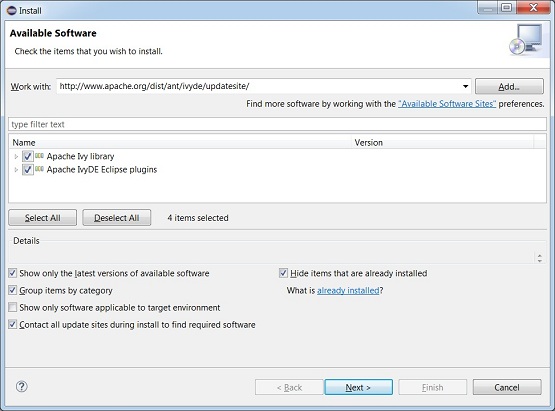
IvyDE是Apache提供的Eclipse外掛。要安裝IvyDE,請啟動Eclipse並導航到幫助 > 安裝新軟體。它將顯示“可用軟體”視窗。輸入IvyDE更新站點http://www.apache.org/dist/ant/ivyde/updatesite/並按Enter鍵。它將顯示以下外掛。
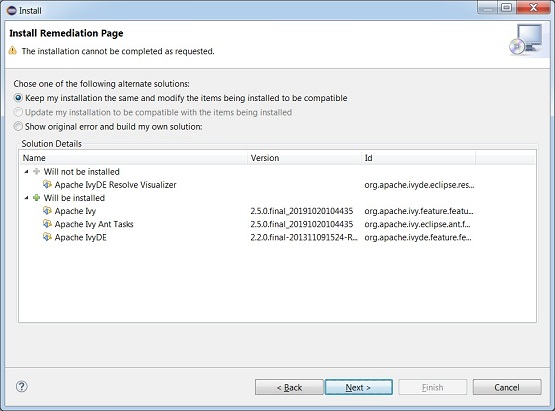
單擊“下一步”,您將看到以下螢幕。
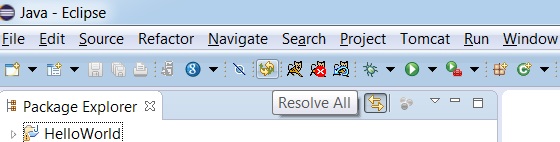
如果在安裝外掛時遇到任何錯誤,只需重新啟動該過程即可。成功安裝後,您將在eclipe中看到該外掛。
現在您可以使用Eclipse和Ivy進行依賴管理。
Apache Ivy - Resolve 任務
Resolve任務用於解析ivy.xml中描述的依賴項,下載並將它們放入Ivy快取。
讓我們首先在E: > ivy > src > com > tutorialspoint資料夾中建立一個java檔案Tester.java,它將充當ant專案的原始檔夾。
Application.java
package com.tutorialspoint;
import org.apache.commons.lang.StringUtils;
public class Application {
   public static void main(String[] args) {
      String string = StringUtils.upperCase("Ivy Beginner Guide");
      System.out.println(string);
   }
}
上面的類使用apache commons lang庫來使用其類StringUtils。Ivy應該下載此庫,因此它應該在ivy.xml的dependencies部分中定義。以下是E: > ivy資料夾中建立的ivy.xml。
ivy.xml
<?xml version="1.0" encoding="ISO-8859-1"?>
<ivy-module version="2.0" xmlns:xsi="http://www.w3.org/2001/XMLSchema-instance"
   xsi:noNamespaceSchemaLocation="http://ant.apache.org/ivy/schemas/ivy.xsd">
   <info
      organisation="com.tutorialspoint"
      module="test"
      status="integration">
   </info>
   <dependencies>
      <dependency org="org.apache.commons" name="commons-lang3" rev="3.9"/>
   </dependencies>
</ivy-module>
以下是重要的術語。
ivy-module −根元素,用於標識Ivy版本、名稱空間等。
info −元素,用於將專案標識為唯一實體。
organisation −組織的名稱
module −模組的名稱
status −狀態,例如release、integration或milestone。
dependencies −元素,包含專案依賴項作為dependency標籤,它具有以下屬性。
org −依賴項組織的名稱
name −依賴項的名稱。
rev −依賴項的版本。
build.xml
<project name="test" default="resolve" xmlns:ivy="antlib:org.apache.ivy.ant">
   <target name="resolve" description="resolve dependencies">
      <ivy:resolve />
   </target>
</project<
以下是重要的術語。
project −根元素,用於標識專案名稱、Ivy的預設任務名稱空間等。
target −target元素,用於建立一個新任務及其描述。這包含一個ivy resolve任務。當ant構建專案時,它將執行ivy resolve任務,然後使用ivy解析依賴項。
構建專案
由於我們已經準備好所有檔案。只需轉到控制檯。導航到E: > ivy資料夾並執行ant命令。
E:\ivy > ant
Ivy將開始執行,解析依賴項,您將看到以下結果。
Buildfile: E:\ivy\build.xml
resolve:
[ivy:resolve] :: Apache Ivy 2.5.0 - 20191020104435 :: https://ant.apache.org/ivy
/ ::
[ivy:resolve] :: loading settings :: url = jar:file:/E:/Apache/apache-ant-1.9.14
/lib/ivy-2.5.0.jar!/org/apache/ivy/core/settings/ivysettings.xml
[ivy:resolve] :: resolving dependencies :: com.tutorialspoint#test;working@Acer-
PC
[ivy:resolve]   confs: [default]
[ivy:resolve]   found commons-lang#commons-lang;2.6 in public
[ivy:resolve]   found junit#junit;3.8.1 in public
[ivy:resolve] :: resolution report :: resolve 375ms :: artifacts dl 79ms
      ---------------------------------------------------------------------
      |                  |            modules            ||   artifacts   |
      |       conf       | number| search|dwnlded|evicted|| number|dwnlded|
      ---------------------------------------------------------------------
      |      default     |   2   |   2   |   0   |   0   ||   4   |   0   |
      ---------------------------------------------------------------------
[ivy:retrieve] :: retrieving :: com.tutorialspoint#test [sync]
[ivy:retrieve]  confs: [default]
[ivy:retrieve]  0 artifacts copied, 2 already retrieved (0kB/101ms)
BUILD SUCCESSFUL
Total time: 1 second
E:\ivy>
Resolve輸出
以下是重要的術語。
conf −配置,在本例中,我們使用預設配置。
modules −指示模組總數、下載的模組等。
artifacts −指示工件總數、下載的工件等。
您可以在Ivy快取的預設位置${ivy.default.ivy.user.dir} > .ivy2 > cache資料夾中驗證下載的檔案。而${ivy.default.ivy.user.dir}預設情況下是使用者主目錄:$HOME。
Apache Ivy - Install 任務
Install任務用於在解析器中安裝模組及其依賴項。當要下載公共工件並在私有倉庫中使用時,可以使用它。預設情況下,使用者的本地倉庫是其私有倉庫,位於${ivy.default.ivy.user.dir}/local。
讓我們建立Tester.java、build.xml和ivy.xml,如Ivy - Resolve任務章節中所述。
更新build.xml以使用ivy install任務。
build.xml
<project name="test" default="resolve" xmlns:ivy="antlib:org.apache.ivy.ant">
   <target name="resolve" description="resolve dependencies">
      <ivy:resolve />
   </target>
   <target name="install" description="install dependencies">
      <ivy:install organisation="commons-lang" module="commons-lang"
         revision="2.6" transitive="true" overwrite="false"
         from="public" to="local" />
   </target>
</project>
以下是重要的術語。
組織機構 − 組織機構的名稱。
模組 − 專案的模組名稱。
版本 − 專案的版本。
來源 − 原始碼倉庫型別。
目標 − 目的碼倉庫型別。
構建專案
由於我們已經準備好所有檔案。只需轉到控制檯。導航到E: > ivy資料夾並執行ant命令。
E:\ivy > ant install
Ivy將開始執行,解析依賴項,您將看到以下結果。
E:\ivy > ant install
Buildfile: E:\ivy\build.xml
install:
[ivy:install] :: Apache Ivy 2.5.0 - 20191020104435 :: https://ant.apache.org/ivy
/ ::
[ivy:install] :: loading settings :: url = jar:file:/E:/Apache/apache-ant-1.9.14
/lib/ivy-2.5.0.jar!/org/apache/ivy/core/settings/ivysettings.xml
[ivy:install] :: installing commons-lang#commons-lang;2.6 ::
[ivy:install] :: resolving dependencies ::
[ivy:install]   found commons-lang#commons-lang;2.6 in public
[ivy:install]   found junit#junit;3.8.1 in public
[ivy:install] :: downloading artifacts to cache ::
[ivy:install] :: installing in local ::
[ivy:install]   published commons-lang to C:\Users\Acer\.ivy2\local\commons-lang
\commons-lang\2.6.part\sources\commons-lang.jar
[ivy:install]   published commons-lang to C:\Users\Acer\.ivy2\local\commons-lang
\commons-lang\2.6.part\jars\commons-lang.jar
[ivy:install]   published commons-lang to C:\Users\Acer\.ivy2\local\commons-lang
\commons-lang\2.6.part\javadocs\commons-lang.jar
[ivy:install]   published ivy to C:\Users\Acer\.ivy2\local\commons-lang\commons-
lang\2.6.part\ivys\ivy.xml
[ivy:install]   publish committed: moved C:\Users\Acer\.ivy2\local\commons-lang\
commons-lang\2.6.part
[ivy:install]           to C:\Users\Acer\.ivy2\local\commons-lang\commons-lang\2
.6
[ivy:install]   published junit to C:\Users\Acer\.ivy2\local\junit\junit\3.8.1.p
art\jars\junit.jar
[ivy:install]   published ivy to C:\Users\Acer\.ivy2\local\junit\junit\3.8.1.par
t\ivys\ivy.xml
[ivy:install]   publish committed: moved C:\Users\Acer\.ivy2\local\junit\junit\3
.8.1.part
[ivy:install]           to C:\Users\Acer\.ivy2\local\junit\junit\3.8.1
[ivy:install] :: install resolution report ::
[ivy:install] :: resolution report :: resolve 0ms :: artifacts dl 21ms
      ---------------------------------------------------------------------
      |                  |            modules            ||   artifacts   |
      |       conf       | number| search|dwnlded|evicted|| number|dwnlded|
      ---------------------------------------------------------------------
      |      default     |   2   |   0   |   0   |   0   ||   4   |   0   |
      ---------------------------------------------------------------------
BUILD SUCCESSFUL
Total time: 43 seconds
您可以驗證Ivy快取預設本地倉庫位置${ivy.default.ivy.user.dir} > .ivy2 > local目錄下的已下載檔案。
Apache Ivy - 獲取任務
獲取任務用於將依賴項解析到專案工作區中的指定位置。
讓我們建立Tester.java、build.xml和ivy.xml,如Ivy - Resolve任務章節中所述。
更新build.xml以使用Ivy獲取任務。
build.xml
<project name="test" default="resolve" xmlns:ivy="antlib:org.apache.ivy.ant">
   <target name="resolve" description="resolve dependencies">
      <ivy:resolve />
      <ivy:retrieve sync="true" type="jar" />
   </target>
</project>
以下是重要的術語。
sync − 將sync設定為true可確保lib目錄是最新的,並且任何多餘的檔案都會被刪除。
type − type指示Ivy僅複製指定型別的構件,例如jar。源jar、javadoc jar將被忽略。源jar的型別為src或source,javadoc jar的型別為doc或bundle。
獲取任務預設情況下將解析的依賴項複製到專案的lib目錄中,並且可以使用pattern屬性進行更改。
構建專案
由於我們已經準備好所有檔案。只需轉到控制檯。導航到E: > ivy資料夾並執行ant命令。
E:\ivy > ant
Ivy將開始執行,解析依賴項,您將看到以下結果。
Buildfile: E:\ivy\build.xml
resolve:
[ivy:resolve] :: Apache Ivy 2.5.0 - 20191020104435 :: https://ant.apache.org/ivy
/ ::
[ivy:resolve] :: loading settings :: url = jar:file:/E:/Apache/apache-ant-1.9.14
/lib/ivy-2.5.0.jar!/org/apache/ivy/core/settings/ivysettings.xml
[ivy:resolve] :: resolving dependencies :: com.tutorialspoint#test;working@Acer-
PC
[ivy:resolve]   confs: [default]
[ivy:resolve]   found commons-lang#commons-lang;2.6 in public
[ivy:resolve]   found junit#junit;3.8.1 in public
[ivy:resolve] :: resolution report :: resolve 316ms :: artifacts dl 18ms
      ---------------------------------------------------------------------
      |                  |            modules            ||   artifacts   |
      |       conf       | number| search|dwnlded|evicted|| number|dwnlded|
      ---------------------------------------------------------------------
      |      default     |   2   |   2   |   0   |   0   ||   4   |   0   |
      ---------------------------------------------------------------------
[ivy:retrieve] :: retrieving :: com.tutorialspoint#test [sync]
[ivy:retrieve]  confs: [default]
[ivy:retrieve]  0 artifacts copied, 2 already retrieved (0kB/2756ms)
BUILD SUCCESSFUL
Total time: 31 seconds
您可以在專案lib目錄中驗證已下載的檔案。
Apache Ivy - Cachepath任務
cachepath任務用於使用快取中存在的已解析構件建立ANT類路徑。由於ANT需要將jar新增到類路徑才能編譯Java檔案,因此Ivy cachepath構建類路徑。
讓我們像在Ivy - 解析任務章節中所述的那樣,建立Tester.java、build.xml和ivy.xml。
更新build.xml以使用Ivy獲取任務。
build.xml
<project name="test" default="resolve" xmlns:ivy="antlib:org.apache.ivy.ant">
   <target name="resolve" description="resolve dependencies">
      <ivy:resolve />
      <ivy:cachepath pathid="new.classpath" />
   </target>
   <target name="compile" depends="resolve" description="Compile">
      <mkdir dir="build/classes" />
      <javac srcdir="src" destdir="build/classes">
         <classpath refid="new.classpath" />
      </javac>
   </target>
</project>
以下是重要的術語。
pathid − 快取的jar所在的類路徑的ID。
獲取任務預設情況下將解析的依賴項複製到專案的lib目錄中,並且可以使用pattern屬性進行更改。
構建專案
由於我們已經準備好所有檔案。只需轉到控制檯。導航到E: > ivy資料夾並執行ant命令。
E:\ivy > ant compile
Ivy將開始執行,解析依賴項,您將看到以下結果。
Buildfile: E:\ivy\build.xml
resolve:
[ivy:resolve] :: Apache Ivy 2.5.0 - 20191020104435 :: https://ant.apache.org/ivy
/ ::
[ivy:resolve] :: loading settings :: url = jar:file:/E:/Apache/apache-ant-1.9.14
/lib/ivy-2.5.0.jar!/org/apache/ivy/core/settings/ivysettings.xml
[ivy:resolve] :: resolving dependencies :: com.tutorialspoint#test;working@Acer-
PC
[ivy:resolve]   confs: [default]
[ivy:resolve]   found commons-lang#commons-lang;2.6 in public
[ivy:resolve]   found junit#junit;3.8.1 in public
[ivy:resolve] :: resolution report :: resolve 2314ms :: artifacts dl 15ms
      ---------------------------------------------------------------------
      |                  |            modules            ||   artifacts   |
      |       conf       | number| search|dwnlded|evicted|| number|dwnlded|
      ---------------------------------------------------------------------
      |      default     |   2   |   2   |   0   |   0   ||   4   |   0   |
      ---------------------------------------------------------------------
compile:
   [javac] E:\ivy\build.xml:13: warning: 'includeantruntime' was not set, defau
lting to build.sysclasspath=last; set to false for repeatable builds
   [javac] Compiling 1 source file to E:\ivy\build\classes
BUILD SUCCESSFUL
Total time: 3 seconds
您可以在專案build目錄中驗證已編譯的類檔案。
Apache Ivy - 釋出任務
釋出任務用於將當前構件及其解析的描述符檔案釋出到指定的倉庫。
讓我們像在Ivy - 解析任務章節中所述的那樣,建立Tester.java、build.xml和ivy.xml。
更新build.xml以使用Ivy釋出任務。首先,我們將建立一個jar檔案,然後釋出它。
build.xml
<project name="test" default="resolve" xmlns:ivy="antlib:org.apache.ivy.ant">
   <property name = "build.dir" value = "build"/>
   <target name="resolve" description="resolve dependencies">
      <ivy:resolve />
   </target>
   <target name = "jar">
      <jar destfile = "${build.dir}/lib/application.jar"
         basedir = "${build.dir}/classes">
         <manifest>
            <attribute name = "Main-Class" value = "com.tutorialspoint.Application"/>
         </manifest>
      </jar>
   </target>
   <target name="publish" depends="jar">
      <ivy:resolve />
      <ivy:publish resolver="local" pubrevision="1.0" overwrite="true">
         <artifacts pattern="${build.dir}/lib/[artifact].[ext]" />
      </ivy:publish>
   </target>
</project>
以下是重要的術語。
resolver − 用於釋出的解析器。
pattern − 定位構件的模式。
此處,釋出任務首先構建jar,然後解析依賴項,設定資訊,然後將構件釋出到本地倉庫。
構建專案
由於我們已經準備好所有檔案。只需轉到控制檯。導航到E: > ivy資料夾並執行ant命令。
E:\ivy > ant publish
Ivy將開始執行,解析依賴項,您將看到以下結果。
E:\ivy > ant publish
Buildfile: E:\ivy\build.xml
jar:
publish:
[ivy:resolve] :: Apache Ivy 2.5.0 - 20191020104435 :: https://ant.apache.org/ivy
/ ::
[ivy:resolve] :: loading settings :: url = jar:file:/E:/Apache/apache-ant-1.9.14
/lib/ivy-2.5.0.jar!/org/apache/ivy/core/settings/ivysettings.xml
[ivy:resolve] :: resolving dependencies :: com.tutorialspoint#test;1.0.0
[ivy:resolve]   confs: [default]
[ivy:resolve]   found commons-lang#commons-lang;2.6 in public
[ivy:resolve]   found junit#junit;3.8.1 in public
[ivy:resolve] :: resolution report :: resolve 121ms :: artifacts dl 15ms
      ---------------------------------------------------------------------
      |                  |            modules            ||   artifacts   |
      |       conf       | number| search|dwnlded|evicted|| number|dwnlded|
      ---------------------------------------------------------------------
      |      default     |   2   |   2   |   0   |   0   ||   4   |   0   |
      ---------------------------------------------------------------------
[ivy:publish] :: publishing :: com.tutorialspoint#test
[ivy:publish]   published application to C:\Users\Acer\.ivy2\local\com.tutorials
point\test\1.0\jars\application.jar
[ivy:publish]   published ivy to C:\Users\Acer\.ivy2\local\com.tutorialspoint\te
st\1.0\ivys\ivy.xml
BUILD SUCCESSFUL
Total time: 1 second
您可以在本地倉庫中驗證已釋出的Ivy構件。
Apache Ivy - Info任務
info任務用於在檔案中設定Ivy特定資訊,並且可以在沒有依賴項解析的情況下使用。
讓我們建立Tester.java、build.xml和ivy.xml,如Ivy - Resolve任務章節中所述。
更新build.xml以使用Ivy釋出任務。首先,我們將建立一個jar檔案,然後釋出它。在釋出任務之前,我們使用info任務設定了所需的Ivy資訊。
build.xml
<project name="test" default="resolve" xmlns:ivy="antlib:org.apache.ivy.ant">
   <property name = "build.dir" value = "build"/>
   <target name="resolve" description="resolve dependencies">
      <ivy:resolve />
   </target>
   <target name = "jar">
      <jar destfile = "${build.dir}/lib/application.jar"
         basedir = "${build.dir}/classes">
         <manifest>
            <attribute name = "Main-Class" value = "com.tutorialspoint.Application"/>
         </manifest>
      </jar>
   </target>
   <target name="publish" depends="jar">
      <ivy:info file="ivy.xml" />
      <ivy:publish resolver="local" pubrevision="1.0" overwrite="true">
         <artifacts pattern="${build.dir}/lib/[artifact].[ext]" />
      </ivy:publish>
   </target>
</project>
此處,釋出任務首先構建jar,然後使用ivy:info任務設定資訊,然後將構件釋出到本地倉庫。
構建專案
由於我們已經準備好所有檔案。只需轉到控制檯。導航到E: > ivy資料夾並執行ant命令。
E:\ivy > ant publish
Ivy將開始執行,解析依賴項,您將看到以下結果。
Buildfile: E:\ivy\build.xml
jar:
publish:
 [ivy:info] :: Apache Ivy 2.5.0 - 20191020104435 :: https://ant.apache.org/ivy/
::
 [ivy:info] :: loading settings :: url = jar:file:/E:/Apache/apache-ant-1.9.14/l
ib/ivy-2.5.0.jar!/org/apache/ivy/core/settings/ivysettings.xml
[ivy:publish] :: publishing :: com.tutorialspoint#test
[ivy:publish]   published application to C:\Users\Acer\.ivy2\local\com.tutorials
point\test\1.0\jars\application.jar
[ivy:publish]   published ivy to C:\Users\Acer\.ivy2\local\com.tutorialspoint\te
st\1.0\ivys\ivy.xml
BUILD SUCCESSFUL
Total time: 0 seconds
如果我們不使用info任務,則釋出任務將無法工作。使用下面修改後的build.xml,檢視缺少組織機構屬性等的錯誤。
build.xml
<project name="test" default="resolve" xmlns:ivy="antlib:org.apache.ivy.ant">
   <property name = "build.dir" value = "build"/>
   <target name="resolve" description="resolve dependencies">
      <ivy:resolve />
   </target>
   <target name = "jar">
      <jar destfile = "${build.dir}/lib/application.jar"
         basedir = "${build.dir}/classes">
         <manifest>
            <attribute name = "Main-Class" value = "com.tutorialspoint.Application"/>
         </manifest>
      </jar>
   </target>
   <target name="publish" depends="jar">
      <ivy:publish resolver="local" pubrevision="1.0" overwrite="true">
         <artifacts pattern="${build.dir}/lib/[artifact].[ext]" />
      </ivy:publish>
   </target>
</project>
導航到E: > ivy資料夾並執行ant命令。
E:\ivy > ant publish
Ivy將開始執行,解析依賴項,您將看到以下結果。
Buildfile: E:\ivy\build.xml
jar:
publish:
[ivy:publish] :: Apache Ivy 2.5.0 - 20191020104435 :: https://ant.apache.org/ivy
/ ::
[ivy:publish] :: loading settings :: url = jar:file:/E:/Apache/apache-ant-1.9.14
/lib/ivy-2.5.0.jar!/org/apache/ivy/core/settings/ivysettings.xml
BUILD FAILED
E:\ivy\build.xml:28: no organisation provided for ivy publish task: It can eithe
r be set explicitly via the attribute 'organisation' or via 'ivy.organisation' p
roperty or a prior call to <resolve/>
Total time: 3 seconds
Apache Ivy - 解析器
解析器用於查詢要從中下載庫的位置。依賴項解析器還處理常見任務。Ivy提供兩種型別的解析器。
組合型 − 使用其他解析器來執行其任務的解析器。
標準型 − 執行所需任務的解析器。
標準解析器
下表列出了標準解析器及其用法。
| 序號 | 名稱(型別)和描述 |
|---|---|
| 1 | IvyRep (標準型) 在ivyrep上查詢Ivy檔案,在ibiblio上查詢構件。 |
| 2 | IBiblio (標準型) 在ibiblio上查詢構件。 |
| 3 | BinTray (標準型) 在bintray上查詢構件。 |
| 4 | Packager (標準型) 透過URL查詢Ivy檔案和打包說明,使用說明建立構件。 |
| 5 | FileSystem (標準型) 在本地檔案系統上查詢Ivy檔案和構件。 |
| 6 | URL (標準型) 在可以使用URL訪問的倉庫上查詢Ivy檔案和構件。 |
| 7 | MirroredURL (標準型) 在可以使用URL從映象列表訪問的倉庫上查詢Ivy檔案和構件。 |
| 8 | VFS (標準型) 在可以使用Apache Commons VFS訪問的倉庫上查詢Ivy檔案和構件。 |
| 9 | SSH (標準型) 在可以使用SSH訪問的倉庫上查詢Ivy檔案和構件。 |
| 10 | SFTP (標準型) 在可以使用SFTP訪問的倉庫上查詢Ivy檔案和構件。 |
| 11 | Jar (標準型) 在jar內的倉庫中查詢Ivy檔案和構件。 |
| 12 | Chain (組合型) 將搜尋委託給一系列子解析器。 |
| 13 | Dual (組合型) 將搜尋委託給一個解析器,將構件委託給另一個解析器。 |
| 14 | OBR (標準型) 將模組解析為OSGi obr.xml列出的OSGi捆綁包。 |
| 15 | Eclipse updatesite (標準型) 將模組解析為託管在Eclipse更新站點上的OSGi捆綁包。 |
| 16 | OSGi-agg (組合型) 將搜尋委託給一系列支援OSGi捆綁包的子解析器。 |
讓我們在E: > ivy2資料夾下建立一個新專案,並在其中建立Tester.java、build.xml和ivy.xml,類似於Ivy - 解析任務章節中所述。在E: > ivy2下建立一個settings資料夾。在settings資料夾中建立ivysettings.xml。
build.xml
<project name="test" default="resolve" xmlns:ivy="antlib:org.apache.ivy.ant">
   <property name = "build.dir" value = "build"/>
   <property name = "base.dir" value = ""/>
   <target name="resolve" description="resolve dependencies">
      <ivy:resolve />
   </target>
   <target name="compile" depends="resolve" description="Compile">
      <mkdir dir="build/classes" />
      <javac srcdir="src" destdir="build/classes">
         <classpath refid="new.classpath" />
      </javac>
   </target>
</project>
ivy.xml
<?xml version="1.0" encoding="ISO-8859-1"?>
<ivy-module version="2.0" xmlns:xsi="http://www.w3.org/2001/XMLSchema-instance"
   xsi:noNamespaceSchemaLocation="http://ant.apache.org/ivy/schemas/ivy.xsd">
   <info organisation="org.apache" module="chained-resolvers"/>
   <dependencies>
      <dependency org="commons-lang" name="commons-lang" rev="2.6" conf="default"/>
      <dependency org="com.tutorialspoint" name="test" rev="1.0"/>
   </dependencies>
</ivy-module>
在這裡,我們添加了兩個依賴項,一個是commons-lang庫,另一個是我們Ivy - 釋出任務章節中釋出的測試依賴項。
ivysettings.xml
<ivysettings>
   <settings defaultResolver="multiresolver"/>
   <resolvers>
      <chain name="multiresolver">
         <filesystem name="libraries">
            <artifact pattern="${ivy.settings.dir}/repository/[artifact]-[revision].[ext]"/>
         </filesystem>
         <ibiblio name="ibiblio" m2compatible="true"/>
      </chain>
   </resolvers>
</ivysettings>
在這裡,我們使用chain解析器建立了一個組合型解析器,它有兩個解析器,一個名為libraries,用於在本地倉庫中查詢庫,另一個名為ibiblio,用於在Maven公共倉庫中查詢庫。
構建專案
由於我們已經準備好了所有檔案。只需轉到控制檯。導航到E: > ivy2資料夾並執行ant命令。
E:\ivy > ant
Ivy將開始執行,解析依賴項,您將看到以下結果。
Buildfile: E:\ivy2\build.xml
resolve:
[ivy:resolve] :: Apache Ivy 2.5.0 - 20191020104435 :: https://ant.apache.org/ivy
/ ::
[ivy:resolve] :: loading settings :: url = jar:file:/E:/Apache/apache-ant-1.9.14
/lib/ivy-2.5.0.jar!/org/apache/ivy/core/settings/ivysettings.xml
[ivy:resolve] :: resolving dependencies :: org.apache#chained-resolvers;working@
Acer-PC
[ivy:resolve]   confs: [default]
[ivy:resolve]   found commons-lang#commons-lang;2.6 in public
[ivy:resolve]   found com.tutorialspoint#test;1.0 in local
[ivy:resolve]   found junit#junit;3.8.1 in public
[ivy:resolve] downloading C:\Users\Acer\.ivy2\local\com.tutorialspoint\test\1.0\
jars\application.jar ...
[ivy:resolve] .. (1kB)
[ivy:resolve] .. (0kB)
[ivy:resolve]   [SUCCESSFUL ] com.tutorialspoint#test;1.0!application.jar (13ms)
[ivy:resolve] :: resolution report :: resolve 1085ms :: artifacts dl 22ms
      ---------------------------------------------------------------------
      |                  |            modules            ||   artifacts   |
      |       conf       | number| search|dwnlded|evicted|| number|dwnlded|
      ---------------------------------------------------------------------
      |      default     |   3   |   3   |   1   |   0   ||   5   |   1   |
      ---------------------------------------------------------------------
BUILD SUCCESSFUL
Total time: 9 seconds
在日誌中,您可以驗證我們使用了本地和公共倉庫解析器。
Apache Ivy - 本地倉庫
本地倉庫是使用者的私有倉庫。如果使用者使用的庫在其他地方的版本已更改並且存在重大更改,則它非常有用。對於本地倉庫,如果找到,Ivy將使用本地庫中存在的庫,並且不會查詢公共或共享倉庫。
預設位置
預設情況下,本地倉庫位於${ivy.default.ivy.user.dir}/local資料夾中。如果要更改它,請在ant檔案中使用ivy.local.default.root變數。
build.xml
<target name="resolve">
   <property name="ivy.local.default.root" value="/opt/ivy/repository/local"/>
   <ivy:resolve />
</target>
其他屬性,如Ivy模式和構件模式,也可以如下自定義:
build.xml
<target name="resolve">
   <property name="ivy.local.default.root" value="/opt/ivy/repository/local"/>
   <property name="ivy.local.default.ivy.pattern" value="[module]/[revision]/ivy.xml"/>
   <property name="ivy.local.default.artifact.pattern" value="[module]/[revision]/[artifact].[ext]"/>
   <ivy:resolve />
</target>
覆蓋ivysettings預設值
預設情況下,Ivy在其ivy.jar中存在的ivysettings.xml中具有其配置。
ivysettings.xml
<ivysettings>
   <settings defaultResolver="default"/>
   <include url="${ivy.default.settings.dir}/ivysettings-public.xml"/>
   <include url="${ivy.default.settings.dir}/ivysettings-shared.xml"/>
   <include url="${ivy.default.settings.dir}/ivysettings-local.xml"/>
   <include url="${ivy.default.settings.dir}/ivysettings-main-chain.xml"/>
   <include url="${ivy.default.settings.dir}/ivysettings-default-chain.xml"/>
</ivysettings>
要覆蓋本地倉庫設定,請更新ivysettings-local.xml的內容。
ivysettings-local.xml
<ivysettings>
   <property name="ivy.local.default.root" value="${ivy.default.ivy.user.dir}/local" override="false"/>
   <property name="ivy.local.default.ivy.pattern" value="[organisation]/[module]/[revision]/[type]s/[artifact].[ext]" override="false"/>
   <property name="ivy.local.default.artifact.pattern" value="[organisation]/[module]/[revision]/[type]s/[artifact].[ext]" override="false"/>
   <resolvers>
      <filesystem name="local">
         <ivy pattern="${ivy.local.default.root}/${ivy.local.default.ivy.pattern}" />
         <artifact pattern="${ivy.local.default.root}/${ivy.local.default.artifact.pattern}" />
      </filesystem>
   </resolvers>
</ivysettings>
Apache Ivy - 共享倉庫
共享倉庫是團隊級別的共享倉庫。在組織中被覆蓋是很常見的。
預設位置
預設情況下,共享倉庫位於${ivy.default.ivy.user.dir}/shared資料夾中。如果要更改它,請在ant檔案中使用ivy.shared.default.root變數。
build.xml
<target name="resolve">
   <property name="ivy.shared.default.root" value="/opt/ivy/repository/shared"/>
   <ivy:resolve />
</target>
其他屬性,如Ivy模式和構件模式,也可以如下自定義:
build.xml
<target name="resolve">
   <property name="ivy.shared.default.root" value="/opt/ivy/repository/shared"/>
   <property name="ivy.shared.default.ivy.pattern" value="[organisation]/[module]/[revision]/ivy.xml"/>
   <property name="ivy.shared.default.artifact.pattern" value="[organisation]/[module]/[revision]/[artifact].[ext]"/>
   <ivy:resolve />
</target>
覆蓋ivysettings預設值
預設情況下,Ivy在其ivy.jar中存在的ivysettings.xml中具有其配置。
ivysettings.xml
<ivysettings>
   <settings defaultResolver="default"/>
   <include url="${ivy.default.settings.dir}/ivysettings-public.xml"/>
   <include url="${ivy.default.settings.dir}/ivysettings-shared.xml"/>
   <include url="${ivy.default.settings.dir}/ivysettings-local.xml"/>
   <include url="${ivy.default.settings.dir}/ivysettings-main-chain.xml"/>
   <include url="${ivy.default.settings.dir}/ivysettings-default-chain.xml"/>
</ivysettings>
要覆蓋共享倉庫設定,請更新ivysettings-shared.xml的內容。
ivysettings-shared.xml
<ivysettings>
   <property name="ivy.shared.default.root" value="${ivy.default.ivy.user.dir}/shared" override="false"/>
   <property name="ivy.shared.default.ivy.pattern" value="[organisation]/[module]/[revision]/[type]s/[artifact].[ext]" override="false"/>
   <property name="ivy.shared.default.artifact.pattern" value="[organisation]/[module]/[revision]/[type]s/[artifact].[ext]" override="false"/>
   <resolvers>
      <filesystem name="shared">
         <ivy pattern="${ivy.shared.default.root}/${ivy.shared.default.ivy.pattern}" />
         <artifact pattern="${ivy.shared.default.root}/${ivy.shared.default.artifact.pattern}" />
      </filesystem>
   </resolvers>
</ivysettings>
Apache Ivy - 公共倉庫
公共倉庫是可以使用網際網路訪問的倉庫,並且包含第三方模組。預設情況下,以m2相容模式的ibiblio是公共倉庫。它也稱為Maven 2公共倉庫。
覆蓋ivysettings預設值
預設情況下,Ivy在其ivy.jar中存在的ivysettings.xml中具有其配置。
ivysettings.xml
<ivysettings>
   <settings defaultResolver="default"/>
   <include url="${ivy.default.settings.dir}/ivysettings-public.xml"/>
   <include url="${ivy.default.settings.dir}/ivysettings-shared.xml"/>
   <include url="${ivy.default.settings.dir}/ivysettings-local.xml"/>
   <include url="${ivy.default.settings.dir}/ivysettings-main-chain.xml"/>
   <include url="${ivy.default.settings.dir}/ivysettings-default-chain.xml"/>
</ivysettings>
要覆蓋公共倉庫設定,請更新ivysettings-public.xml的內容,或在專案設定資料夾中建立ivysettings.xml。
ivysettings.xml
<ivysettings>
   <settings defaultResolver="default"/>
   <include url="http://customserver/ivy/ivysettings-public.xml"/>
   <include url="${ivy.default.settings.dir}/ivysettings-shared.xml"/>
   <include url="${ivy.default.settings.dir}/ivysettings-local.xml"/>
   <include url="${ivy.default.settings.dir}/ivysettings-main-chain.xml"/>
   <include url="${ivy.default.settings.dir}/ivysettings-default-chain.xml"/>
</ivysettings>
更新預設的ivysetting-public.xml內容。
原始 - ivysetting-public.xml
<ivysettings>
   <resolvers>
      <ibiblio name="public" m2compatible="true"/>
   </resolvers>
</ivysettings>
更新 - ivysetting-public.xml
<ivysettings>
   <resolvers>
      <filesystem name="public">
         <ivy pattern="/path/to/my/public/rep/[organisation]/[module]/ivy-[revision].xml" />
         <artifact pattern="/path/to/my/public/rep/[organisation]/[module]/[artifact]-[revision].[ext]" />
      </filesystem>
   </resolvers>
</ivysettings>