- AngularJS 教程
- AngularJS - 首頁
- AngularJS - 概述
- AngularJS - 環境搭建
- AngularJS - MVC 架構
- AngularJS - 第一個應用
- AngularJS - 指令
- AngularJS - 表示式
- AngularJS - 控制器
- AngularJS - 過濾器
- AngularJS - 表格
- AngularJS - HTML DOM
- AngularJS - 模組
- AngularJS - 表單
- AngularJS - 包含
- AngularJS - AJAX
- AngularJS - 檢視
- AngularJS - 作用域
- AngularJS - 服務
- AngularJS - 依賴注入
- AngularJS - 自定義指令
- AngularJS - 國際化
- AngularJS 應用
- AngularJS - 待辦事項應用
- AngularJS - 記事本應用
- AngularJS - Bootstrap 應用
- AngularJS - 登入應用
- AngularJS - 上傳檔案
- AngularJS - 內聯應用
- AngularJS - 導航選單
- AngularJS - 切換選單
- AngularJS - 訂單表單
- AngularJS - 搜尋選項卡
- AngularJS - 拖拽應用
- AngularJS - 購物車應用
- AngularJS - 翻譯應用
- AngularJS - 圖表應用
- AngularJS - 地圖應用
- AngularJS - 分享應用
- AngularJS - 天氣應用
- AngularJS - 定時器應用
- AngularJS - Leaflet 應用
- AngularJS - Lastfm 應用
- AngularJS 有用資源
- AngularJS - 常見問題
- AngularJS 快速指南
- AngularJS - 有用資源
- AngularJS - 討論
AngularJS 快速指南
AngularJS - 概述
什麼是 AngularJS?
AngularJS 是一個開源的 Web 應用框架。它最初由 Misko Hevery 和 Adam Abrons 於 2009 年開發,現在由 Google 維護。其最新版本為 1.4.3。
其官方文件對 AngularJS 的定義如下:
AngularJS 是一個用於動態 Web 應用的結構化框架。它允許您使用 HTML 作為模板語言,並擴充套件 HTML 語法以清晰簡潔地表達應用程式的元件。Angular 的資料繫結和依賴注入消除了您目前必須編寫的許多程式碼。並且這一切都發生在瀏覽器中,使其成為任何伺服器技術的理想合作伙伴。
特性
AngularJS 是一個強大的基於 JavaScript 的開發框架,用於建立富網際網路應用程式 (RIA)。
AngularJS 為開發人員提供了使用 JavaScript 以清晰的 MVC(模型-檢視-控制器)方式編寫客戶端應用程式的選項。
使用 AngularJS 編寫的應用程式與跨瀏覽器相容。AngularJS 自動處理適合每個瀏覽器的 JavaScript 程式碼。
AngularJS 是開源的,完全免費的,並被全球數千名開發人員使用。它根據 Apache 許可證 2.0 版授權。
總的來說,AngularJS 是一個構建大型且高效能 Web 應用程式的框架,同時保持其易於維護。
核心特性
以下是 AngularJS 最重要的核心特性:
資料繫結 - 它是在模型和檢視元件之間自動同步資料。
作用域 - 這些物件引用模型。它們充當控制器和檢視之間的粘合劑。
控制器 - 這些是繫結到特定作用域的 JavaScript 函式。
服務 - AngularJS 帶有幾個內建服務,例如 $https:用於進行 XMLHttpRequests。這些是單例物件,在應用程式中僅例項化一次。
過濾器 - 這些從陣列中選擇專案的子集並返回一個新陣列。
指令 - 指令是 DOM 元素(例如元素、屬性、css 等)上的標記。這些可用於建立自定義 HTML 標籤,用作新的自定義小部件。AngularJS 有內建指令(ngBind,ngModel…)
模板 - 這些是使用控制器和模型中的資訊呈現的檢視。這些可以是單個檔案(如 index.html)或使用“部分”在一個頁面中的多個檢視。
路由 - 這是切換檢視的概念。
模型檢視無論什麼 - MVC 是一種將應用程式劃分為不同部分(稱為模型、檢視和控制器)的設計模式,每個部分都有不同的職責。AngularJS 並沒有以傳統意義上實現 MVC,而是更接近於 MVVM(模型-檢視-檢視模型)。Angular JS 團隊幽默地稱之為模型檢視無論什麼。
深度連結 - 深度連結允許您在 URL 中編碼應用程式的狀態,以便可以將其新增為書籤。然後,應用程式可以從 URL 恢復到相同的狀態。
依賴注入 - AngularJS 具有內建的依賴注入子系統,透過使應用程式更易於開發、理解和測試來幫助開發人員。
概念
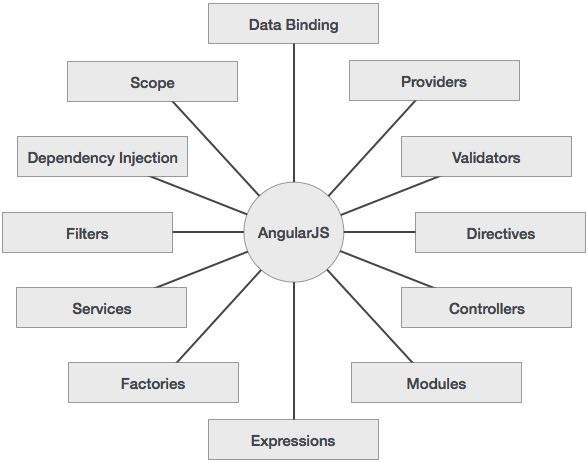
下圖描述了 AngularJS 的一些重要部分,我們將在後續章節中詳細討論。
AngularJS 的優勢
AngularJS 提供了以非常乾淨和可維護的方式建立單頁應用程式的功能。
AngularJS 為 HTML 提供資料繫結功能,從而為使用者提供豐富且響應迅速的體驗。
AngularJS 程式碼是單元可測試的。
AngularJS 使用依賴注入並利用關注點分離。
AngularJS 提供可重用的元件。
使用 AngularJS,開發人員可以編寫更少的程式碼並獲得更多功能。
在 AngularJS 中,檢視是純 HTML 頁面,而用 JavaScript 編寫的控制器執行業務處理。
最重要的是,AngularJS 應用程式可以在所有主流瀏覽器和智慧手機上執行,包括基於 Android 和 iOS 的手機和平板電腦。
AngularJS 的劣勢
雖然 AngularJS 具有很多優點,但同時我們也應該考慮以下幾點:
不安全 - 作為僅 JavaScript 框架,使用 AngularJS 編寫的應用程式是不安全的。必須進行伺服器端身份驗證和授權才能確保應用程式安全。
不可降級 - 如果您的應用程式使用者停用了 JavaScript,則使用者只會看到基本頁面,而不會看到更多內容。
AngularJS 元件
AngularJS 框架可以分為以下三個主要部分:
ng-app - 此指令定義並將 AngularJS 應用程式連結到 HTML。
ng-model - 此指令將 AngularJS 應用程式資料的 value 繫結到 HTML 輸入控制元件。
ng-bind - 此指令將 AngularJS 應用程式資料繫結到 HTML 標籤。
AngularJS - 環境搭建
在本章中,我們將討論如何在 Web 應用程式開發中設定 AngularJS 庫。我們還將簡要研究目錄結構及其內容。
當您開啟連結https://angularjs.org/時,您會看到有兩個選項可以下載 AngularJS 庫:
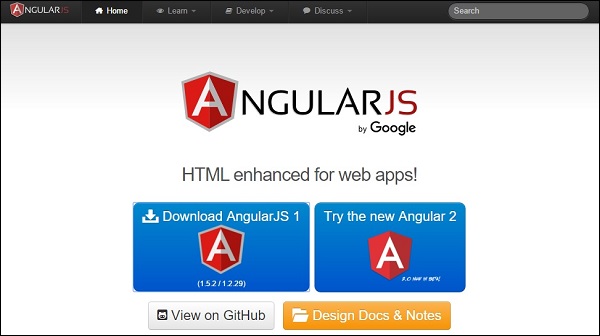
在 GitHub 上檢視 - 點選此按鈕轉到 GitHub 並獲取所有最新指令碼。
下載 AngularJS 1 - 或者點選此按鈕,將看到如下螢幕:

此螢幕提供瞭如下幾種使用 Angular JS 的選項:
下載和本地託管檔案
有兩個不同的選項傳統和最新。名稱本身具有自描述性。傳統的版本小於 1.2.x,最新的版本為 1.5.x。
我們還可以使用最小化、未壓縮或壓縮版本。
CDN 訪問 - 您還可以訪問 CDN。CDN 將為您提供全球範圍內區域資料中心的訪問許可權,在本例中,Google 託管。這意味著使用 CDN 將託管檔案的責任從您自己的伺服器轉移到一系列外部伺服器。這也提供了一個優勢,即如果您的網頁訪問者已從同一 CDN 下載了 AngularJS 的副本,則無需重新下載。
嘗試新的 angularJS 2 - 點選此按鈕下載 Angular JS beta 2 版本。與 AngularJS 1 的傳統和最新版本相比,此版本速度更快、支援移動裝置且更靈活。
在本教程中,我們使用庫的 CDN 版本。
示例
現在讓我們使用 AngularJS 庫編寫一個簡單的示例。讓我們建立一個名為myfirstexample.html的 HTML 檔案,如下所示:
<!doctype html>
<html>

   <head>
      <script src = "https://ajax.googleapis.com/ajax/libs/angularjs/1.5.2/angular.min.js"></script>
   </head>

   <body ng-app = "myapp">

      <div ng-controller = "HelloController" >
         <h2>Welcome {{helloTo.title}} to the world of Tutorialspoint!</h2>
      </div>

      <script>
         angular.module("myapp", [])

         .controller("HelloController", function($scope) {
            $scope.helloTo = {};
            $scope.helloTo.title = "AngularJS";
         });
      </script>

   </body>
</html>
以下部分詳細描述了上述程式碼:
包含 AngularJS
我們在 HTML 頁面中包含了 AngularJS JavaScript 檔案,以便我們可以使用 AngularJS:
<head>
   <script src = "https://ajax.googleapis.com/ajax/libs/angularjs/1.4.8/angular.min.js"></script>
</head>
如果要更新到 Angular JS 的最新版本,請使用以下指令碼源,否則請在他們的官方網站上檢查 AngularJS 的最新版本。
<head>
   <script src = "https://ajax.googleapis.com/ajax/libs/angularjs/1.5.2/angular.min.js"></script>
</head>
指向 AngularJS 應用
接下來,我們告訴 HTML 的哪個部分包含 AngularJS 應用。這是透過向 AngularJS 應用的根 HTML 元素新增ng-app屬性來完成的。您可以將其新增到html元素或body元素中,如下所示:
<body ng-app = "myapp">
</body>
檢視
檢視是這部分:
<div ng-controller = "HelloController" >
   <h2>Welcome {{helloTo.title}} to the world of Tutorialspoint!</h2>
</div>
ng-controller告訴 AngularJS 使用哪個控制器與此檢視一起使用。helloTo.title告訴 AngularJS 將名為 helloTo.title 的“模型”value 寫入此位置的 HTML。
控制器
控制器部分是:
<script>
   angular.module("myapp", [])

   .controller("HelloController", function($scope) {
      $scope.helloTo = {};
      $scope.helloTo.title = "AngularJS";
   });
</script>
此程式碼在名為myapp的 angular 模組中註冊了一個名為HelloController的控制器函式。我們將在各自的章節中進一步學習有關模組和控制器的資訊。控制器函式透過 angular.module(...).controller(...) 函式呼叫在 angular 中註冊。
傳遞給控制器函式的$scope引數是模型。控制器函式添加了一個helloTo JavaScript 物件,並在該物件中添加了一個title欄位。
執行
將上述程式碼儲存為myfirstexample.html並在任何瀏覽器中開啟它。您將看到如下輸出:
Welcome AngularJS to the world of Tutorialspoint!
當頁面在瀏覽器中載入時,會發生以下事情:
HTML 文件載入到瀏覽器中,並由瀏覽器評估。AngularJS JavaScript 檔案載入,建立 angular 全域性物件。接下來,執行註冊控制器函式的 JavaScript。
接下來,AngularJS 掃描 HTML 以查詢 AngularJS 應用和檢視。找到檢視後,它將該檢視連線到相應的控制器函式。
接下來,AngularJS 執行控制器函式。然後,它使用控制器填充的模型中的資料呈現檢視。頁面現在已準備就緒。
AngularJS - MVC 架構
Model View Controller 或簡稱 MVC,是一種用於開發 Web 應用程式的軟體設計模式。模型檢視控制器模式由以下三個部分組成:
模型 - 它是模式的最低級別,負責維護資料。
檢視 - 負責將所有或部分資料顯示給使用者。
控制器 - 它是控制模型和檢視之間互動的軟體程式碼。
MVC 很流行,因為它將應用程式邏輯與使用者介面層隔離開,並支援關注點分離。控制器接收應用程式的所有請求,然後與模型一起準備檢視所需的所有資料。然後,檢視使用控制器準備的資料生成最終的可呈現響應。MVC 抽象可以以圖形方式表示如下。
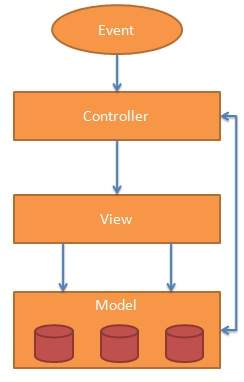
模型
模型負責管理應用程式資料。它響應來自檢視的請求以及來自控制器的更新自身指令。
檢視
以特定格式呈現資料,由控制器決定呈現資料。它們是基於指令碼的模板系統,例如 JSP、ASP、PHP,並且非常易於與 AJAX 技術整合。
控制器
控制器響應使用者輸入並在資料模型物件上執行互動。控制器接收輸入、驗證輸入,然後執行修改資料模型狀態的業務操作。
AngularJS 是一個基於 MVC 的框架。在接下來的章節中,我們將看到 AngularJS 如何使用 MVC 方法。
AngularJS - 第一個應用
在開始使用 AngularJS 建立實際的 HelloWorld 應用程式之前,讓我們先了解 AngularJS 應用程式的實際組成部分。一個 AngularJS 應用程式包含以下三個重要的部分:
ng-app - 此指令定義並將 AngularJS 應用程式連結到 HTML。
ng-model - 此指令將 AngularJS 應用程式資料的 value 繫結到 HTML 輸入控制元件。
ng-bind - 此指令將 AngularJS 應用程式資料繫結到 HTML 標籤。
建立 AngularJS 應用程式的步驟
步驟 1:載入框架
作為一個純 JavaScript 框架,它可以使用 <Script> 標籤新增。
<script src = "https://ajax.googleapis.com/ajax/libs/angularjs/1.3.14/angular.min.js">
</script>
步驟 2:使用 ng-app 指令定義 AngularJS 應用程式
<div ng-app = "">
   ...
</div>
步驟 3:使用 ng-model 指令定義模型名稱
<p>Enter your Name: <input type = "text" ng-model = "name"></p>
步驟 4:使用 ng-bind 指令繫結上面定義的模型的值。
<p>Hello <span ng-bind = "name"></span>!</p>
執行 AngularJS 應用程式的步驟
在 HTML 頁面中使用上述三個步驟。
testAngularJS.htm
<html>
   <head>
      <title>AngularJS First Application</title>
   </head>

   <body>
      <h1>Sample Application</h1>

      <div ng-app = "">
         <p>Enter your Name: <input type = "text" ng-model = "name"></p>
         <p>Hello <span ng-bind = "name"></span>!</p>
      </div>

      <script src = "https://ajax.googleapis.com/ajax/libs/angularjs/1.3.14/angular.min.js">
      </script>

   </body>
</html>
輸出
在 Web 瀏覽器中開啟 textAngularJS.htm。輸入您的姓名並檢視結果。
AngularJS 如何與 HTML 整合
ng-app 指令指示 AngularJS 應用程式的開始。
然後,ng-model 指令建立一個名為“name”的模型變數,該變數可用於 html 頁面以及具有 ng-app 指令的 div 中。
ng-bind 然後使用 name 模型在 html span 標籤中顯示,無論何時使用者在文字框中輸入內容。
關閉 </div> 標籤表示 AngularJS 應用程式的結束。
AngularJS - 指令
AngularJS 指令用於擴充套件 HTML。這些是特殊屬性,以 ng- 字首開頭。我們將討論以下指令:
ng-app - 此指令啟動 AngularJS 應用程式。
ng-init - 此指令初始化應用程式資料。
ng-model - 此指令將 AngularJS 應用程式資料的 value 繫結到 HTML 輸入控制元件。
ng-repeat - 此指令為集合中的每個專案重複 html 元素。
ng-app 指令
ng-app 指令啟動 AngularJS 應用程式。它定義根元素。當載入包含 AngularJS 應用程式的網頁時,它會自動初始化或引導應用程式。它還用於在 AngularJS 應用程式中載入各種 AngularJS 模組。在下面的示例中,我們使用 div 元素的 ng-app 屬性定義了一個預設的 AngularJS 應用程式。
<div ng-app = "">
   ...
</div>
ng-init 指令
ng-init 指令初始化 AngularJS 應用程式資料。它用於將值賦給要在應用程式中使用的變數。在下面的示例中,我們將初始化一個國家陣列。我們使用 JSON 語法來定義國家陣列。
<div ng-app = "" ng-init = "countries = [{locale:'en-US',name:'United States'},
   {locale:'en-GB',name:'United Kingdom'}, {locale:'en-FR',name:'France'}]">
   ...
</div>
ng-model 指令
此指令將 AngularJS 應用程式資料的的值繫結到 HTML 輸入控制元件。在下面的示例中,我們定義了一個名為“name”的模型。
<div ng-app = "">
   ...
   <p>Enter your Name: <input type = "text" ng-model = "name"></p>
</div>
ng-repeat 指令
ng-repeat 指令為集合中的每個專案重複 html 元素。在下面的示例中,我們遍歷了國家陣列。
<div ng-app = "">
   ...
   <p>List of Countries with locale:</p>

   <ol>
      <li ng-repeat = "country in countries">
         {{ 'Country: ' + country.name + ', Locale: ' + country.locale }}
      </li>
   </ol>
</div>
示例
以下示例將展示所有上述指令。
testAngularJS.htm
<html>
   <head>
      <title>AngularJS Directives</title>
   </head>

   <body>
      <h1>Sample Application</h1>

      <div ng-app = "" ng-init = "countries = [{locale:'en-US',name:'United States'},
         {locale:'en-GB',name:'United Kingdom'}, {locale:'en-FR',name:'France'}]">
         <p>Enter your Name: <input type = "text" ng-model = "name"></p>
         <p>Hello <span ng-bind = "name"></span>!</p>
         <p>List of Countries with locale:</p>

         <ol>
            <li ng-repeat = "country in countries">
               {{ 'Country: ' + country.name + ', Locale: ' + country.locale }}
            </li>
         </ol>
      </div>

      <script src = "https://ajax.googleapis.com/ajax/libs/angularjs/1.3.14/angular.min.js">
      </script>

   </body>
</html>
輸出
在 Web 瀏覽器中開啟 textAngularJS.htm。輸入您的姓名並檢視結果。
AngularJS - 表示式
表示式用於將應用程式資料繫結到 html。表示式寫在雙括號內,如 {{ expression }}。表示式的行為與 ng-bind 指令相同。AngularJS 應用程式表示式是純 javascript 表示式,並在使用它們的地方輸出資料。
使用數字
<p>Expense on Books : {{cost * quantity}} Rs</p>
使用字串
<p>Hello {{student.firstname + " " + student.lastname}}!</p>
使用物件
<p>Roll No: {{student.rollno}}</p>
使用陣列
<p>Marks(Math): {{marks[3]}}</p>
示例
以下示例將展示所有上述表示式。
testAngularJS.htm
<html>
   <head>
      <title>AngularJS Expressions</title>
   </head>

   <body>
      <h1>Sample Application</h1>

      <div ng-app = "" ng-init = "quantity = 1;cost = 30;
         student = {firstname:'Mahesh',lastname:'Parashar',rollno:101};
         marks = [80,90,75,73,60]">
         <p>Hello {{student.firstname + " " + student.lastname}}!</p>
         <p>Expense on Books : {{cost * quantity}} Rs</p>
         <p>Roll No: {{student.rollno}}</p>
         <p>Marks(Math): {{marks[3]}}</p>
      </div>

      <script src = "https://ajax.googleapis.com/ajax/libs/angularjs/1.3.14/angular.min.js">
      </script>

   </body>
</html>
輸出
在 Web 瀏覽器中開啟 textAngularJS.htm。檢視結果。
AngularJS - 控制器
AngularJS 應用程式主要依靠控制器來控制應用程式中資料流。控制器使用 ng-controller 指令定義。控制器是一個包含屬性/特性和函式的 JavaScript 物件。每個控制器都接受 $scope 作為引數,它指的是控制器要控制的應用程式/模組。
<div ng-app = "" ng-controller = "studentController">
   ...
</div>
在這裡,我們使用 ng-controller 指令聲明瞭一個控制器 studentController。下一步,我們將定義 studentController 如下:
<script>
   function studentController($scope) {
      $scope.student = {
         firstName: "Mahesh",
         lastName: "Parashar",

         fullName: function() {
            var studentObject;
            studentObject = $scope.student;
            return studentObject.firstName + " " + studentObject.lastName;
         }
      };
   }
</script>
studentController 定義為一個以 $scope 作為引數的 JavaScript 物件。
$scope 指的是要使用 studentController 物件的應用程式。
$scope.student 是 studentController 物件的屬性。
firstName 和 lastName 是 $scope.student 物件的兩個屬性。我們已將預設值傳遞給他們。
fullName 是 $scope.student 物件的函式,其任務是返回組合名稱。
在 fullName 函式中,我們獲取 student 物件,然後返回組合名稱。
需要注意的是,我們也可以在單獨的 JS 檔案中定義控制器物件,並在 html 頁面中引用該檔案。
現在,我們可以使用 ng-model 或表示式使用 studentController 的 student 屬性,如下所示。
Enter first name: <input type = "text" ng-model = "student.firstName"><br>
Enter last name: <input type = "text" ng-model = "student.lastName"><br>
<br>
You are entering: {{student.fullName()}}
我們將 student.firstName 和 student.lastname 繫結到兩個輸入框。
我們將 student.fullName() 繫結到 HTML。
現在,無論何時您在名字和姓氏輸入框中輸入任何內容,您都可以看到全名自動更新。
示例
以下示例將展示控制器的用法。
testAngularJS.htm
<html>
   <head>
      <title>Angular JS Controller</title>
      <script src = "https://ajax.googleapis.com/ajax/libs/angularjs/1.3.14/angular.min.js">
      </script>
   </head>

   <body>
      <h2>AngularJS Sample Application</h2>

      <div ng-app = "mainApp" ng-controller = "studentController">
         Enter first name: <input type = "text" ng-model = "student.firstName"><br>
         <br>
         Enter last name: <input type = "text" ng-model = "student.lastName"><br>
         <br>
         You are entering: {{student.fullName()}}
      </div>

      <script>
         var mainApp = angular.module("mainApp", []);

         mainApp.controller('studentController', function($scope) {
            $scope.student = {
               firstName: "Mahesh",
               lastName: "Parashar",

               fullName: function() {
                  var studentObject;
                  studentObject = $scope.student;
                  return studentObject.firstName + " " + studentObject.lastName;
               }
            };
         });
      </script>

   </body>
</html>
輸出
在 Web 瀏覽器中開啟 textAngularJS.htm。檢視結果。
AngularJS - 過濾器
過濾器用於更改修改資料,並且可以使用管道字元組合在表示式或指令中。以下是常用過濾器的列表。
| 序號 | 名稱和說明 |
|---|---|
| 1 | uppercase 將文字轉換為大寫文字。 |
| 2 | lowercase 將文字轉換為小寫文字。 |
| 3 | currency 將文字格式化為貨幣格式。 |
| 4 | filter 根據提供的條件過濾陣列到其子集。 |
| 5 | orderby 根據提供的條件對陣列進行排序。 |
uppercase 過濾器
使用管道字元將 uppercase 過濾器新增到表示式中。在這裡,我們添加了 uppercase 過濾器以全部大寫字母列印學生姓名。
Enter first name:<input type = "text" ng-model = "student.firstName">
Enter last name: <input type = "text" ng-model = "student.lastName">
Name in Upper Case: {{student.fullName() | uppercase}}
lowercase 過濾器
使用管道字元將 lowercase 過濾器新增到表示式中。在這裡,我們添加了 lowercase 過濾器以全部小寫字母列印學生姓名。
Enter first name:<input type = "text" ng-model = "student.firstName">
Enter last name: <input type = "text" ng-model = "student.lastName">
Name in Lower Case: {{student.fullName() | lowercase}}
currency 過濾器
使用管道字元將 currency 過濾器新增到返回數字的表示式中。在這裡,我們添加了 currency 過濾器以使用貨幣格式列印費用。
Enter fees: <input type = "text" ng-model = "student.fees">
fees: {{student.fees | currency}}
filter 過濾器
要僅顯示所需的科目,我們使用了 subjectName 作為過濾器。
Enter subject: <input type = "text" ng-model = "subjectName">
Subject:
<ul>
   <li ng-repeat = "subject in student.subjects | filter: subjectName">
      {{ subject.name + ', marks:' + subject.marks }}
   </li>
</ul>
orderby 過濾器
要按分數對科目進行排序,我們使用了 orderBy 分數。
Subject:
<ul>
   <li ng-repeat = "subject in student.subjects | orderBy:'marks'">
      {{ subject.name + ', marks:' + subject.marks }}
   </li>
</ul>
示例
以下示例將展示所有上述過濾器。
testAngularJS.htm
<html>
   <head>
      <title>Angular JS Filters</title>
      <script src = "https://ajax.googleapis.com/ajax/libs/angularjs/1.3.14/angular.min.js">
      </script>
   </head>

   <body>
      <h2>AngularJS Sample Application</h2>

      <div ng-app = "mainApp" ng-controller = "studentController">
         <table border = "0">
            <tr>
               <td>Enter first name:</td>
               <td><input type = "text" ng-model = "student.firstName"></td>
            </tr>
            <tr>
               <td>Enter last name: </td>
               <td><input type = "text" ng-model = "student.lastName"></td>
            </tr>
            <tr>
               <td>Enter fees: </td>
               <td><input type = "text" ng-model = "student.fees"></td>
            </tr>
            <tr>
               <td>Enter subject: </td>
               <td><input type = "text" ng-model = "subjectName"></td>
            </tr>
         </table>
         <br/>

         <table border = "0">
            <tr>
               <td>Name in Upper Case: </td><td>{{student.fullName() | uppercase}}</td>
            </tr>
            <tr>
               <td>Name in Lower Case: </td><td>{{student.fullName() | lowercase}}</td>
            </tr>
            <tr>
               <td>fees: </td><td>{{student.fees | currency}}
               </td>
            </tr>
            <tr>
               <td>Subject:</td>
               <td>
                  <ul>
                     <li ng-repeat = "subject in student.subjects | filter: subjectName |orderBy:'marks'">
                        {{ subject.name + ', marks:' + subject.marks }}
                     </li>
                  </ul>
               </td>
            </tr>
         </table>
      </div>

      <script>
         var mainApp = angular.module("mainApp", []);

         mainApp.controller('studentController', function($scope) {
            $scope.student = {
               firstName: "Mahesh",
               lastName: "Parashar",
               fees:500,

               subjects:[
                  {name:'Physics',marks:70},
                  {name:'Chemistry',marks:80},
                  {name:'Math',marks:65}
               ],

               fullName: function() {
                  var studentObject;
                  studentObject = $scope.student;
                  return studentObject.firstName + " " + studentObject.lastName;
               }
            };
         });
      </script>

   </body>
</html>
輸出
在 Web 瀏覽器中開啟 textAngularJS.htm。檢視結果。
AngularJS - 表格
表資料通常本質上是可重複的。ng-repeat 指令可用於輕鬆繪製表格。以下示例說明了使用 ng-repeat 指令繪製表格。
<table>
   <tr>
      <th>Name</th>
      <th>Marks</th>
   </tr>

   <tr ng-repeat = "subject in student.subjects">
      <td>{{ subject.name }}</td>
      <td>{{ subject.marks }}</td>
   </tr>
</table>
可以使用 CSS 樣式設定表格樣式。
<style>
   table, th , td {
      border: 1px solid grey;
      border-collapse: collapse;
      padding: 5px;
   }

   table tr:nth-child(odd) {
      background-color: #f2f2f2;
   }

   table tr:nth-child(even) {
      background-color: #ffffff;
   }
</style>
示例
以下示例將展示所有上述指令。
testAngularJS.htm
<html>
   <head>
      <title>Angular JS Table</title>
      <script src = "https://ajax.googleapis.com/ajax/libs/angularjs/1.3.14/angular.min.js"></script>

      <style>
         table, th , td {
            border: 1px solid grey;
            border-collapse: collapse;
            padding: 5px;
         }

         table tr:nth-child(odd) {
            background-color: #f2f2f2;
         }

         table tr:nth-child(even) {
            background-color: #ffffff;
         }
      </style>
   </head>

   <body>
      <h2>AngularJS Sample Application</h2>
      <div ng-app = "mainApp" ng-controller = "studentController">

         <table border = "0">
            <tr>
               <td>Enter first name:</td>
               <td><input type = "text" ng-model = "student.firstName"></td>
            </tr>
            <tr>
               <td>Enter last name: </td>
               <td>
                  <input type = "text" ng-model = "student.lastName">
               </td>
            </tr>
            <tr>
               <td>Name: </td>
               <td>{{student.fullName()}}</td>
            </tr>
            <tr>
               <td>Subject:</td>

               <td>
                  <table>
                     <tr>
                        <th>Name</th>.
                        <th>Marks</th>
                     </tr>
                     <tr ng-repeat = "subject in student.subjects">
                        <td>{{ subject.name }}</td>
                        <td>{{ subject.marks }}</td>
                     </tr>
                  </table>
               </td>
            </tr>
         </table>
      </div>

      <script>
         var mainApp = angular.module("mainApp", []);

         mainApp.controller('studentController', function($scope) {
            $scope.student = {
               firstName: "Mahesh",
               lastName: "Parashar",
               fees:500,

               subjects:[
                  {name:'Physics',marks:70},
                  {name:'Chemistry',marks:80},
                  {name:'Math',marks:65},
                  {name:'English',marks:75},
                  {name:'Hindi',marks:67}
               ],

               fullName: function() {
                  var studentObject;
                  studentObject = $scope.student;
                  return studentObject.firstName + " " + studentObject.lastName;
               }
            };
         });
      </script>

   </body>
</html>
輸出
在 Web 瀏覽器中開啟 textAngularJS.htm。檢視結果。
AngularJS - HTML DOM
以下指令可用於將應用程式資料繫結到 HTML DOM 元素的屬性。
| 序號 | 名稱和說明 |
|---|---|
| 1 | ng-disabled 停用給定的控制元件。 |
| 2 | ng-show 顯示給定的控制元件。 |
| 3 | ng-hide 隱藏給定的控制元件。 |
| 4 | ng-click 表示 AngularJS 點選事件。 |
ng-disabled 指令
將 ng-disabled 屬性新增到 HTML 按鈕並傳遞模型。將模型繫結到複選框並檢視變化。
<input type = "checkbox" ng-model = "enableDisableButton">Disable Button
<button ng-disabled = "enableDisableButton">Click Me!</button>
ng-show 指令
將 ng-show 屬性新增到 HTML 按鈕並傳遞模型。將模型繫結到複選框並檢視變化。
<input type = "checkbox" ng-model = "showHide1">Show Button
<button ng-show = "showHide1">Click Me!</button>
ng-hide 指令
將 ng-hide 屬性新增到 HTML 按鈕並傳遞模型。將模型繫結到複選框並檢視變化。
<input type = "checkbox" ng-model = "showHide2">Hide Button
<button ng-hide = "showHide2">Click Me!</button>
ng-click 指令
將 ng-click 屬性新增到 HTML 按鈕並更新模型。將模型繫結到 html 並檢視變化。
<p>Total click: {{ clickCounter }}</p>
<button ng-click = "clickCounter = clickCounter + 1">Click Me!</button>
示例
以下示例將展示所有上述指令。
testAngularJS.htm
<html>
   <head>
      <title>AngularJS HTML DOM</title>
   </head>

   <body>
      <h2>AngularJS Sample Application</h2>

      <div ng-app = "">
         <table border = "0">
            <tr>
               <td><input type = "checkbox" ng-model = "enableDisableButton">Disable Button</td>
               <td><button ng-disabled = "enableDisableButton">Click Me!</button></td>
            </tr>

            <tr>
               <td><input type = "checkbox" ng-model = "showHide1">Show Button</td>
               <td><button ng-show = "showHide1">Click Me!</button></td>
            </tr>

            <tr>
               <td><input type = "checkbox" ng-model = "showHide2">Hide Button</td>
               <td><button ng-hide = "showHide2">Click Me!</button></td>
            </tr>

            <tr>
               <td><p>Total click: {{ clickCounter }}</p></td>
               <td><button ng-click = "clickCounter = clickCounter + 1">Click Me!</button></td>
            </tr>
         </table>
      </div>

      <script src = "https://ajax.googleapis.com/ajax/libs/angularjs/1.3.14/angular.min.js">
      </script>

   </body>
</html>
輸出
在 Web 瀏覽器中開啟 textAngularJS.htm。檢視結果。
AngularJS - 模組
AngularJS 支援模組化方法。模組用於分離邏輯(例如服務、控制器、應用程式等)並保持程式碼整潔。我們在單獨的 js 檔案中定義模組,並根據模組的 js 檔案命名它們。在此示例中,我們將建立兩個模組。
應用程式模組 - 用於使用控制器初始化應用程式。
控制器模組 - 用於定義控制器。
應用程式模組
mainApp.js
var mainApp = angular.module("mainApp", []);
在這裡,我們使用 angular.module 函式聲明瞭一個應用程式 mainApp 模組。我們向它傳遞了一個空陣列。此陣列通常包含依賴模組。
控制器模組
studentController.js
mainApp.controller("studentController", function($scope) {
   $scope.student = {
      firstName: "Mahesh",
      lastName: "Parashar",
      fees:500,

      subjects:[
         {name:'Physics',marks:70},
         {name:'Chemistry',marks:80},
         {name:'Math',marks:65},
         {name:'English',marks:75},
         {name:'Hindi',marks:67}
      ],

      fullName: function() {
         var studentObject;
         studentObject = $scope.student;
         return studentObject.firstName + " " + studentObject.lastName;
      }
   };
});
在這裡,我們使用 mainApp.controller 函式聲明瞭一個控制器 studentController 模組。
使用模組
<div ng-app = "mainApp" ng-controller = "studentController">
   ...
   <script src = "mainApp.js"></script>
   <script src = "studentController.js"></script>

</div>
在這裡,我們使用 ng-app 指令使用了應用程式模組,使用 ng-controller 指令使用了控制器。我們在主 html 頁面中匯入了 mainApp.js 和 studentController.js。
示例
以下示例將展示所有上述模組。
testAngularJS.htm
<html>
   <head>
      <title>Angular JS Modules</title>
      <script src = "https://ajax.googleapis.com/ajax/libs/angularjs/1.3.14/angular.min.js"></script>
      <script src = "/angularjs/src/module/mainApp.js"></script>
      <script src = "/angularjs/src/module/studentController.js"></script>

      <style>
         table, th , td {
            border: 1px solid grey;
            border-collapse: collapse;
            padding: 5px;
         }

         table tr:nth-child(odd) {
            background-color: #f2f2f2;
         }

         table tr:nth-child(even) {
            background-color: #ffffff;
         }
      </style>
   </head>

   <body>
      <h2>AngularJS Sample Application</h2>
      <div ng-app = "mainApp" ng-controller = "studentController">

         <table border = "0">
            <tr>
               <td>Enter first name:</td>
               <td><input type = "text" ng-model = "student.firstName"></td>
            </tr>

            <tr>
               <td>Enter last name: </td>
               <td><input type = "text" ng-model = "student.lastName"></td>
            </tr>

            <tr>
               <td>Name: </td>
               <td>{{student.fullName()}}</td>
            </tr>

            <tr>
               <td>Subject:</td>

               <td>
                  <table>
                     <tr>
                        <th>Name</th>
                        <th>Marks</th>
                     </tr>
                     <tr ng-repeat = "subject in student.subjects">
                        <td>{{ subject.name }}</td>
                        <td>{{ subject.marks }}</td>
                     </tr>
                  </table>
               </td>
            </tr>
         </table>
      </div>

   </body>
</html>
mainApp.js
var mainApp = angular.module("mainApp", []);
studentController.js
mainApp.controller("studentController", function($scope) {
   $scope.student = {
      firstName: "Mahesh",
      lastName: "Parashar",
      fees:500,

      subjects:[
         {name:'Physics',marks:70},
         {name:'Chemistry',marks:80},
         {name:'Math',marks:65},
         {name:'English',marks:75},
         {name:'Hindi',marks:67}
      ],

      fullName: function() {
         var studentObject;
         studentObject = $scope.student;
         return studentObject.firstName + " " + studentObject.lastName;
      }
   };
});
輸出
在 Web 瀏覽器中開啟 textAngularJS.htm。檢視結果。
AngularJS - 表單
AngularJS 增強了表單填寫和驗證。我們可以使用 ng-click 處理按鈕上的 AngularJS 點選,並使用 $dirty 和 $invalid 標誌以無縫的方式進行驗證。在表單宣告中使用 novalidate 停用任何瀏覽器特定的驗證。表單控制元件大量使用 Angular 事件。讓我們先快速瞭解一下事件。
事件
AngularJS 提供了多個可以與 HTML 控制元件關聯的事件。例如,ng-click 通常與按鈕關聯。以下是 Angular JS 中支援的事件。
- ng-click
- ng-dbl-click
- ng-mousedown
- ng-mouseup
- ng-mouseenter
- ng-mouseleave
- ng-mousemove
- ng-mouseover
- ng-keydown
- ng-keyup
- ng-keypress
- ng-change
ng-click
使用按鈕的 on-click 指令重置表單資料。
<input name = "firstname" type = "text" ng-model = "firstName" required>
<input name = "lastname" type = "text" ng-model = "lastName" required>
<input name = "email" type = "email" ng-model = "email" required>
<button ng-click = "reset()">Reset</button>

<script>
   function studentController($scope) {
      $scope.reset = function() {
         $scope.firstName = "Mahesh";
         $scope.lastName = "Parashar";
         $scope.email = "MaheshParashar@tutorialspoint.com";
      }

      $scope.reset();
   }
</script>
驗證資料
以下可用於跟蹤錯誤。
$dirty - 表示值已更改。
$invalid - 表示輸入的值無效。
$error - 表示確切的錯誤。
示例
以下示例將展示所有上述指令。
testAngularJS.htm
<html>
   <head>
      <title>Angular JS Forms</title>
      <script src = "https://ajax.googleapis.com/ajax/libs/angularjs/1.3.14/angular.min.js"></script>

      <style>
         table, th , td {
            border: 1px solid grey;
            border-collapse: collapse;
            padding: 5px;
         }

         table tr:nth-child(odd) {
            background-color: #f2f2f2;
         }

         table tr:nth-child(even) {
            background-color: #ffffff;
         }
      </style>

   </head>
   <body>

      <h2>AngularJS Sample Application</h2>
      <div ng-app = "mainApp" ng-controller = "studentController">

         <form name = "studentForm" novalidate>
            <table border = "0">
               <tr>
                  <td>Enter first name:</td>
                  <td><input name = "firstname" type = "text" ng-model = "firstName" required>
                     <span style = "color:red" ng-show = "studentForm.firstname.$dirty && studentForm.firstname.$invalid">
                        <span ng-show = "studentForm.firstname.$error.required">First Name is required.</span>
                     </span>
                  </td>
               </tr>

               <tr>
                  <td>Enter last name: </td>
                  <td><input name = "lastname"  type = "text" ng-model = "lastName" required>
                     <span style = "color:red" ng-show = "studentForm.lastname.$dirty && studentForm.lastname.$invalid">
                        <span ng-show = "studentForm.lastname.$error.required">Last Name is required.</span>
                     </span>
                  </td>
               </tr>

               <tr>
                  <td>Email: </td><td><input name = "email" type = "email" ng-model = "email" length = "100" required>
                     <span style = "color:red" ng-show = "studentForm.email.$dirty && studentForm.email.$invalid">
                        <span ng-show = "studentForm.email.$error.required">Email is required.</span>
                        <span ng-show = "studentForm.email.$error.email">Invalid email address.</span>
                     </span>
                  </td>
               </tr>

               <tr>
                  <td>
                     <button ng-click = "reset()">Reset</button>
                  </td>
                  <td>
                     <button ng-disabled = "studentForm.firstname.$dirty &&
                        studentForm.firstname.$invalid || studentForm.lastname.$dirty &&
                        studentForm.lastname.$invalid || studentForm.email.$dirty &&
                        studentForm.email.$invalid" ng-click="submit()">Submit</button>
                  </td>
               </tr>

            </table>
         </form>
      </div>

      <script>
         var mainApp = angular.module("mainApp", []);

         mainApp.controller('studentController', function($scope) {
            $scope.reset = function() {
               $scope.firstName = "Mahesh";
               $scope.lastName = "Parashar";
               $scope.email = "MaheshParashar@tutorialspoint.com";
            }

            $scope.reset();
         });
      </script>

   </body>
</html>
輸出
在 Web 瀏覽器中開啟 textAngularJS.htm。檢視結果。
AngularJS - 包含
HTML 不支援在 html 頁面中嵌入 html 頁面。要實現此功能,可以使用以下方法:
使用 Ajax - 進行伺服器呼叫以獲取相應的 html 頁面,並將其設定為 html 控制元件的 innerHTML。
使用伺服器端包含 - JSP、PHP 和其他 Web 伺服器端技術可以在動態頁面中包含 html 頁面。
使用 AngularJS,我們可以使用 ng-include 指令在 HTML 頁面中嵌入 HTML 頁面。
<div ng-app = "" ng-controller = "studentController">
   <div ng-include = "'main.htm'"></div>
   <div ng-include = "'subjects.htm'"></div>
</div>
示例
tryAngularJS.htm
<html>
   <head>
      <title>Angular JS Includes</title>
      <script src = "https://ajax.googleapis.com/ajax/libs/angularjs/1.3.14/angular.min.js">
      </script>

      <style>
         table, th , td {
            border: 1px solid grey;
            border-collapse: collapse;
            padding: 5px;
         }

         table tr:nth-child(odd) {
            background-color: #f2f2f2;
         }

         table tr:nth-child(even) {
            background-color: #ffffff;
         }
      </style>
   </head>

   <body>
      <h2>AngularJS Sample Application</h2>

      <div ng-app = "mainApp" ng-controller = "studentController">
         <div ng-include = "'/angularjs/src/include/main.htm'"></div>
         <div ng-include = "'/angularjs/src/include/subjects.htm'"></div>
      </div>

      <script>
         var mainApp = angular.module("mainApp", []);

         mainApp.controller('studentController', function($scope) {
            $scope.student = {
               firstName: "Mahesh",
               lastName: "Parashar",
               fees:500,

               subjects:[
                  {name:'Physics',marks:70},
                  {name:'Chemistry',marks:80},
                  {name:'Math',marks:65},
                  {name:'English',marks:75},
                  {name:'Hindi',marks:67}
               ],

               fullName: function() {
                  var studentObject;
                  studentObject = $scope.student;
                  return studentObject.firstName + " " + studentObject.lastName;
               }
            };
         });
      </script>

   </body>
</html>
main.htm
<table border = "0">
   <tr>
      <td>Enter first name:</td>
      <td><input type = "text" ng-model = "student.firstName"></td>
   </tr>

   <tr>
      <td>Enter last name: </td>
      <td><input type = "text" ng-model = "student.lastName"></td>
   </tr>

   <tr>
      <td>Name: </td>
      <td>{{student.fullName()}}</td>
   </tr>
</table>
subjects.htm
<p>Subjects:</p>
<table>
   <tr>
      <th>Name</th>
      <th>Marks</th>
   </tr>

   <tr ng-repeat = "subject in student.subjects">
      <td>{{ subject.name }}</td>
      <td>{{ subject.marks }}</td>
   </tr>
</table>
輸出
要執行此示例,您需要將 textAngularJS.htm、main.htm 和 subjects.htm 部署到 Web 伺服器。使用伺服器的 URL 在 Web 瀏覽器中開啟 textAngularJS.htm。檢視結果。
AngularJS - Ajax
AngularJS 提供了 $https: 控制元件,它充當服務從伺服器讀取資料。伺服器進行資料庫呼叫以獲取所需記錄。AngularJS 需要 JSON 格式的資料。一旦資料準備就緒,就可以使用 $https: 以以下方式從伺服器獲取資料:
function studentController($scope,$https:) {
   var url = "data.txt";

   $https:.get(url).success( function(response) {
      $scope.students = response;
   });
}
這裡,檔案 data.txt 包含學生記錄。$https: 服務進行 ajax 呼叫並將響應設定為其屬性 students。students 模型可用於在 HTML 中繪製表格。
示例
data.txt
[
   {
      "Name" : "Mahesh Parashar",
      "RollNo" : 101,
      "Percentage" : "80%"
   },

   {
      "Name" : "Dinkar Kad",
      "RollNo" : 201,
      "Percentage" : "70%"
   },

   {
      "Name" : "Robert",
      "RollNo" : 191,
      "Percentage" : "75%"
   },

   {
      "Name" : "Julian Joe",
      "RollNo" : 111,
      "Percentage" : "77%"
   }
]
testAngularJS.htm
<html>
   <head>
      <title>Angular JS Includes</title>

      <style>
         table, th , td {
            border: 1px solid grey;
            border-collapse: collapse;
            padding: 5px;
         }

         table tr:nth-child(odd) {
            background-color: #f2f2f2;
         }

         table tr:nth-child(even) {
            background-color: #ffffff;
         }
      </style>
   </head>

   <body>
      <h2>AngularJS Sample Application</h2>
      <div ng-app = "" ng-controller = "studentController">

         <table>
            <tr>
               <th>Name</th>
               <th>Roll No</th>
               <th>Percentage</th>
            </tr>

            <tr ng-repeat = "student in students">
               <td>{{ student.Name }}</td>
               <td>{{ student.RollNo }}</td>
               <td>{{ student.Percentage }}</td>
            </tr>
         </table>
      </div>

      <script>
         function studentController($scope,$http) {
            var url = "data.txt";

            $http.get(url).then( function(response) {
               $scope.students = response.data;
            });
         }
      </script>

      <script src = "https://ajax.googleapis.com/ajax/libs/angularjs/1.2.15/angular.min.js">
      </script>

   </body>
</html>
輸出
要執行此示例,您需要將 testAngularJS.htm 和 data.txt 檔案部署到 Web 伺服器。使用伺服器的 URL 在 Web 瀏覽器中開啟檔案 testAngularJS.htm 並檢視結果。
AngularJS - 檢視
AngularJS 透過單個頁面上的多個檢視支援單頁應用程式。為此,AngularJS 提供了 ng-view 和 ng-template 指令和 $routeProvider 服務。
ng-view
ng-view 標籤僅建立一個佔位符,根據配置,可以在其中放置相應的檢視(html 或 ng-template 檢視)。
用法
在主模組中定義一個帶有 ng-view 的 div。
<div ng-app = "mainApp">
   ...
   <div ng-view></div>

</div>
ng-template
ng-template 指令用於使用 script 標籤建立 HTML 檢視。它包含一個 "id" 屬性,該屬性由 $routeProvider 用於將檢視與控制器對映。
用法
在主模組中定義一個型別為 ng-template 的 script 塊。
<div ng-app = "mainApp">
   ...

   <script type = "text/ng-template" id = "addStudent.htm">
      <h2> Add Student </h2>
      {{message}}
   </script>

</div>
$routeProvider
$routeProvider 是一個關鍵服務,它設定 URL 的配置,將它們與相應的 HTML 頁面或 ng-template 對映,並附加一個與其對應的控制器。
用法
定義一個包含主模組的 script 塊並設定路由配置。
var mainApp = angular.module("mainApp", ['ngRoute']);

mainApp.config(['$routeProvider', function($routeProvider) {
   $routeProvider

   .when('/addStudent', {
      templateUrl: 'addStudent.htm', controller: 'AddStudentController'
   })

   .when('/viewStudents', {
      templateUrl: 'viewStudents.htm', controller: 'ViewStudentsController'
   })

   .otherwise ({
      redirectTo: '/addStudent'
   });

}]);
以下是上述示例中需要考慮的重要事項。
$routeProvider 在 mainApp 模組的 config 下定義為一個函式,使用 '$routeProvider' 作為鍵。
$routeProvider.when 定義了一個 URL "/addStudent",然後將其對映到 "addStudent.htm"。addStudent.htm 應位於與主 HTML 頁面相同的路徑下。如果未定義 htm 頁面,則應使用 id="addStudent.htm" 的 ng-template。我們使用了 ng-template。
"otherwise" 用於設定預設檢視。
"controller" 用於為檢視設定相應的控制器。
示例
以下示例將展示所有上述指令。
testAngularJS.htm
<html>
   <head>
      <title>Angular JS Views</title>
      <script src = "https://ajax.googleapis.com/ajax/libs/angularjs/1.3.14/angular.min.js"></script>
      <script src = "https://ajax.googleapis.com/ajax/libs/angularjs/1.3.14/angular-route.min.js">
      </script>
   </head>

   <body>
      <h2>AngularJS Sample Application</h2>
      <div ng-app = "mainApp">
         <p><a href = "#addStudent">Add Student</a></p>
         <p><a href = "#viewStudents">View Students</a></p>
         <div ng-view></div>

         <script type = "text/ng-template" id = "addStudent.htm">
            <h2> Add Student </h2>
            {{message}}
         </script>

         <script type = "text/ng-template" id = "viewStudents.htm">
            <h2> View Students </h2>
            {{message}}
         </script>
      </div>

      <script>
         var mainApp = angular.module("mainApp", ['ngRoute']);
         mainApp.config(['$routeProvider', function($routeProvider) {
            $routeProvider

            .when('/addStudent', {
               templateUrl: 'addStudent.htm',
               controller: 'AddStudentController'
            })

            .when('/viewStudents', {
               templateUrl: 'viewStudents.htm',
               controller: 'ViewStudentsController'
            })

            .otherwise({
               redirectTo: '/addStudent'
            });
         }]);

         mainApp.controller('AddStudentController', function($scope) {
            $scope.message = "This page will be used to display add student form";
         });

         mainApp.controller('ViewStudentsController', function($scope) {
            $scope.message = "This page will be used to display all the students";
         });
      </script>

   </body>
</html>
結果
在 Web 瀏覽器中開啟 textAngularJS.htm。檢視結果。
AngularJS - 作用域
Scope 是一個特殊的 JavaScript 物件,它起著連線控制器和檢視的作用。Scope 包含模型資料。在控制器中,模型資料透過 $scope 物件訪問。
<script>
   var mainApp = angular.module("mainApp", []);

   mainApp.controller("shapeController", function($scope) {
      $scope.message = "In shape controller";
      $scope.type = "Shape";
   });
</script>
以下是上述示例中需要考慮的重要事項。
$scope 在控制器建構函式定義期間作為第一個引數傳遞給控制器。
$scope.message 和 $scope.type 是將在 HTML 頁面中使用的模型。
我們已將值設定為模型,這些值將反映在控制器為 shapeController 的應用程式模組中。
我們也可以在 $scope 中定義函式。
Scope 繼承
Scope 是控制器特定的。如果我們定義巢狀控制器,則子控制器將繼承其父控制器的 Scope。
<script>
   var mainApp = angular.module("mainApp", []);

   mainApp.controller("shapeController", function($scope) {
      $scope.message = "In shape controller";
      $scope.type = "Shape";
   });

   mainApp.controller("circleController", function($scope) {
      $scope.message = "In circle controller";
   });

</script>
以下是上述示例中需要考慮的重要事項。
我們已將值設定為 shapeController 中的模型。
我們已在子控制器 circleController 中覆蓋了 message。當在 circleController 的模組中使用 "message" 時,將使用覆蓋後的 message。
示例
以下示例將展示所有上述指令。
testAngularJS.htm
<html>
   <head>
      <title>Angular JS Forms</title>
   </head>

   <body>
      <h2>AngularJS Sample Application</h2>

      <div ng-app = "mainApp" ng-controller = "shapeController">
         <p>{{message}} <br/> {{type}} </p>

         <div ng-controller = "circleController">
            <p>{{message}} <br/> {{type}} </p>
         </div>

         <div ng-controller = "squareController">
            <p>{{message}} <br/> {{type}} </p>
         </div>

      </div>
      <script src = "https://ajax.googleapis.com/ajax/libs/angularjs/1.3.14/angular.min.js">
      </script>

      <script>
         var mainApp = angular.module("mainApp", []);

         mainApp.controller("shapeController", function($scope) {
            $scope.message = "In shape controller";
            $scope.type = "Shape";
         });

         mainApp.controller("circleController", function($scope) {
            $scope.message = "In circle controller";
         });

         mainApp.controller("squareController", function($scope) {
            $scope.message = "In square controller";
            $scope.type = "Square";
         });

      </script>

   </body>
</html>
結果
在 Web 瀏覽器中開啟 textAngularJS.htm。檢視結果。
AngularJS - 服務
AngularJS 使用服務架構支援“關注點分離”的概念。服務是 JavaScript 函式,僅負責執行特定任務。這使它們成為一個可維護和可測試的獨立實體。控制器、過濾器可以根據需要呼叫它們。服務通常使用 AngularJS 的依賴注入機制注入。
AngularJS 提供了許多內建服務,例如 $https:、$route、$window、$location 等。每個服務負責一項特定任務,例如,$https: 用於進行 Ajax 呼叫以獲取伺服器資料。$route 用於定義路由資訊,依此類推。內建服務始終以 $ 符號作為字首。
建立服務有兩種方法。
- 工廠
- 服務
使用工廠方法
使用工廠方法,我們首先定義一個工廠,然後為其分配方法。
var mainApp = angular.module("mainApp", []);
mainApp.factory('MathService', function() {
   var factory = {};

   factory.multiply = function(a, b) {
      return a * b
   }

   return factory;
});
使用服務方法
使用服務方法,我們定義一個服務,然後為其分配方法。我們還將一個已有的服務注入其中。
mainApp.service('CalcService', function(MathService) {
   this.square = function(a) {
      return MathService.multiply(a,a);
   }
});
示例
以下示例將展示所有上述指令。
testAngularJS.htm
<html>
   <head>
      <title>Angular JS Services</title>
      <script src = "https://ajax.googleapis.com/ajax/libs/angularjs/1.3.14/angular.min.js">
      </script>
   </head>

   <body>
      <h2>AngularJS Sample Application</h2>

      <div ng-app = "mainApp" ng-controller = "CalcController">
         <p>Enter a number: <input type = "number" ng-model = "number" /></p>
         <button ng-click = "square()">X<sup>2</sup></button>
         <p>Result: {{result}}</p>
      </div>

      <script>
         var mainApp = angular.module("mainApp", []);

         mainApp.factory('MathService', function() {
            var factory = {};

            factory.multiply = function(a, b) {
               return a * b
            }
            return factory;
         });

         mainApp.service('CalcService', function(MathService) {
            this.square = function(a) {
               return MathService.multiply(a,a);
            }
         });

         mainApp.controller('CalcController', function($scope, CalcService) {
            $scope.square = function() {
               $scope.result = CalcService.square($scope.number);
            }
         });
      </script>

   </body>
</html>
結果
在 Web 瀏覽器中開啟 textAngularJS.htm。檢視結果。
AngularJS - 依賴注入
依賴注入是一種軟體設計模式,其中元件被賦予它們的依賴項,而不是在元件內部硬編碼它們。這使元件免於查詢依賴項,並使依賴項可配置。這有助於使元件可重用、可維護和可測試。
AngularJS 提供了一種卓越的依賴注入機制。它提供以下核心元件,這些元件可以相互注入作為依賴項。
- 值
- 工廠
- 服務
- 提供程式
- 常量
值
值是簡單的 JavaScript 物件,它用於在配置階段將值傳遞給控制器。
//define a module
var mainApp = angular.module("mainApp", []);

//create a value object as "defaultInput" and pass it a data.
mainApp.value("defaultInput", 5);
...

//inject the value in the controller using its name "defaultInput"
mainApp.controller('CalcController', function($scope, CalcService, defaultInput) {
   $scope.number = defaultInput;
   $scope.result = CalcService.square($scope.number);

   $scope.square = function() {
      $scope.result = CalcService.square($scope.number);
   }
});
工廠
工廠是一個用於返回值的函式。它根據需要建立值,無論何時服務或控制器需要它。它通常使用工廠函式來計算和返回值。
//define a module
var mainApp = angular.module("mainApp", []);

//create a factory "MathService" which provides a method multiply to return multiplication of two numbers
mainApp.factory('MathService', function() {
   var factory = {};

   factory.multiply = function(a, b) {
      return a * b
   }
   return factory;
});

//inject the factory "MathService" in a service to utilize the multiply method of factory.
mainApp.service('CalcService', function(MathService) {
   this.square = function(a) {
      return MathService.multiply(a,a);
   }
});
...
服務
服務是一個包含一組函式以執行某些任務的單例 JavaScript 物件。服務使用 service() 函式定義,然後注入到控制器中。
//define a module
var mainApp = angular.module("mainApp", []);
...

//create a service which defines a method square to return square of a number.
mainApp.service('CalcService', function(MathService) {
   this.square = function(a) {
      return MathService.multiply(a,a);
   }
});

//inject the service "CalcService" into the controller
mainApp.controller('CalcController', function($scope, CalcService, defaultInput) {
   $scope.number = defaultInput;
   $scope.result = CalcService.square($scope.number);

   $scope.square = function() {
      $scope.result = CalcService.square($scope.number);
   }
});
提供程式
提供程式由 AngularJS 在內部用於在配置階段建立服務、工廠等(AngularJS 自舉的階段)。下面提到的指令碼可用於建立我們之前建立的 MathService。提供程式是一種特殊的工廠方法,它帶有一個 get() 方法,用於返回值/服務/工廠。
//define a module
var mainApp = angular.module("mainApp", []);
...

//create a service using provider which defines a method square to return square of a number.
mainApp.config(function($provide) {
   $provide.provider('MathService', function() {
      this.$get = function() {
         var factory = {};

         factory.multiply = function(a, b) {
            return a * b;
         }
         return factory;
      };
   });
});
常量
常量用於在配置階段傳遞值,考慮到值不能用於在配置階段傳遞。
mainApp.constant("configParam", "constant value");
示例
以下示例將展示所有上述指令。
testAngularJS.htm
<html>
   <head>
      <title>AngularJS Dependency Injection</title>
   </head>

   <body>
      <h2>AngularJS Sample Application</h2>

      <div ng-app = "mainApp" ng-controller = "CalcController">
         <p>Enter a number: <input type = "number" ng-model = "number" /></p>
         <button ng-click = "square()">X<sup>2</sup></button>
         <p>Result: {{result}}</p>
      </div>

      <script src = "https://ajax.googleapis.com/ajax/libs/angularjs/1.3.14/angular.min.js">
      </script>

      <script>
         var mainApp = angular.module("mainApp", []);

         mainApp.config(function($provide) {
            $provide.provider('MathService', function() {
               this.$get = function() {
                  var factory = {};

                  factory.multiply = function(a, b) {
                     return a * b;
                  }
                  return factory;
               };
            });
         });

         mainApp.value("defaultInput", 5);

         mainApp.factory('MathService', function() {
            var factory = {};

            factory.multiply = function(a, b) {
               return a * b;
            }
            return factory;
         });

         mainApp.service('CalcService', function(MathService) {
            this.square = function(a) {
               return MathService.multiply(a,a);
            }
         });

         mainApp.controller('CalcController', function($scope, CalcService, defaultInput) {
            $scope.number = defaultInput;
            $scope.result = CalcService.square($scope.number);

            $scope.square = function() {
               $scope.result = CalcService.square($scope.number);
            }
         });
      </script>

   </body>
</html>
結果
在 Web 瀏覽器中開啟 textAngularJS.htm。檢視結果。
AngularJS - 自定義指令
自定義指令用於在 AngularJS 中擴充套件 HTML 的功能。自定義指令使用 "directive" 函式定義。自定義指令簡單地替換啟用它的元素。AngularJS 應用程式在引導期間查詢匹配的元素,並使用自定義指令的 compile() 方法執行一次性活動,然後根據指令的 Scope 使用自定義指令的 link() 方法處理元素。AngularJS 支援為以下型別的元素建立自定義指令。
元素指令 - 當遇到匹配的元素時,指令被啟用。
屬性 - 當遇到匹配的屬性時,指令被啟用。
CSS - 當遇到匹配的 CSS 樣式時,指令被啟用。
註釋 - 當遇到匹配的註釋時,指令被啟用。
理解自定義指令
定義自定義 HTML 標籤。
<student name = "Mahesh"></student><br/>
<student name = "Piyush"></student>
定義自定義指令來處理上述自定義 HTML 標籤。
var mainApp = angular.module("mainApp", []);

//Create a directive, first parameter is the html element to be attached.
//We are attaching student html tag.
//This directive will be activated as soon as any student element is encountered in html

mainApp.directive('student', function() {
   //define the directive object
   var directive = {};

   //restrict = E, signifies that directive is Element directive
   directive.restrict = 'E';

   //template replaces the complete element with its text.
   directive.template = "Student: <b>{{student.name}}</b> ,
      Roll No: <b>{{student.rollno}}</b>";

   //scope is used to distinguish each student element based on criteria.
   directive.scope = {
      student : "=name"
   }

   //compile is called during application initialization. AngularJS calls
      it once when html page is loaded.

   directive.compile = function(element, attributes) {
      element.css("border", "1px solid #cccccc");

      //linkFunction is linked with each element with scope to get the element specific data.
      var linkFunction = function($scope, element, attributes) {
         element.html("Student: <b>"+$scope.student.name +"</b> ,
            Roll No: <b>"+$scope.student.rollno+"</b><br/>");
         element.css("background-color", "#ff00ff");
      }
      return linkFunction;
   }

   return directive;
});
定義控制器來更新指令的 Scope。這裡我們使用 name 屬性的值作為 Scope 的子項。
mainApp.controller('StudentController', function($scope) {
   $scope.Mahesh = {};
   $scope.Mahesh.name = "Mahesh Parashar";
   $scope.Mahesh.rollno  = 1;

   $scope.Piyush = {};
   $scope.Piyush.name = "Piyush Parashar";
   $scope.Piyush.rollno  = 2;
});
示例
<html>
   <head>
      <title>Angular JS Custom Directives</title>
   </head>

   <body>
      <h2>AngularJS Sample Application</h2>

      <div ng-app = "mainApp" ng-controller = "StudentController">
         <student name = "Mahesh"></student><br/>
         <student name = "Piyush"></student>
      </div>

      <script src = "https://ajax.googleapis.com/ajax/libs/angularjs/1.3.14/angular.min.js">
      </script>

      <script>
         var mainApp = angular.module("mainApp", []);

         mainApp.directive('student', function() {
            var directive = {};
            directive.restrict = 'E';
            directive.template = "Student: <b>{{student.name}}</b> ,
               Roll No: <b>{{student.rollno}}</b>";

            directive.scope = {
               student : "=name"
            }

            directive.compile = function(element, attributes) {
               element.css("border", "1px solid #cccccc");

               var linkFunction = function($scope, element, attributes) {
                  element.html("Student: <b>"+$scope.student.name +"</b> ,
                     Roll No: <b>"+$scope.student.rollno+"</b><br/>");
                  element.css("background-color", "#ff00ff");
               }
               return linkFunction;
            }

            return directive;
         });

         mainApp.controller('StudentController', function($scope) {
            $scope.Mahesh = {};
            $scope.Mahesh.name = "Mahesh Parashar";
            $scope.Mahesh.rollno  = 1;

            $scope.Piyush = {};
            $scope.Piyush.name = "Piyush Parashar";
            $scope.Piyush.rollno  = 2;
         });
      </script>

   </body>
</html>
結果
在 Web 瀏覽器中開啟 textAngularJS.htm。檢視結果。
AngularJS - 國際化
AngularJS 支援三種類型的內建國際化過濾器:貨幣、日期和數字。我們只需要根據國家/地區的語言環境合併相應的 js。預設情況下,它處理瀏覽器的語言環境。例如,要使用丹麥語語言環境,請使用以下指令碼。
<script src = "https://code.angularjs.org/1.2.5/i18n/angular-locale_da-dk.js">
</script>
使用丹麥語語言環境的示例
testAngularJS.htm
<html>
   <head>
      <title>Angular JS Forms</title>
   </head>

   <body>
      <h2>AngularJS Sample Application</h2>

      <div ng-app = "mainApp" ng-controller = "StudentController">
         {{fees | currency }}  <br/><br/>
         {{admissiondate | date }}  <br/><br/>
         {{rollno | number }}
      </div>

      <script src = "https://ajax.googleapis.com/ajax/libs/angularjs/1.3.14/angular.min.js">
      </script>
      <script src = "https://code.angularjs.org/1.3.14/i18n/angular-locale_da-dk.js">
      </script>

      <script>
         var mainApp = angular.module("mainApp", []);

         mainApp.controller('StudentController', function($scope) {
            $scope.fees = 100;
            $scope.admissiondate  = new Date();
            $scope.rollno = 123.45;
         });
      </script>

   </body>
</html>
結果
在 Web 瀏覽器中開啟 textAngularJS.htm。檢視結果。
使用瀏覽器語言環境的示例
testAngularJS.htm
<html>
   <head>
      <title>Angular JS Forms</title>
   </head>

   <body>
      <h2>AngularJS Sample Application</h2>

      <div ng-app = "mainApp" ng-controller = "StudentController">
         {{fees | currency }}  <br/><br/>
         {{admissiondate | date }}  <br/><br/>
         {{rollno | number }}
      </div>

      <script src = "https://ajax.googleapis.com/ajax/libs/angularjs/1.3.14/angular.min.js">
      </script>
      <!-- <script src = "https://code.angularjs.org/1.3.14/i18n/angular-locale_da-dk.js">
      </script> -->

      <script>
         var mainApp = angular.module("mainApp", []);

         mainApp.controller('StudentController', function($scope) {
            $scope.fees = 100;
            $scope.admissiondate  = new Date();
            $scope.rollno = 123.45;
         });
      </script>

   </body>
</html>
結果
在 Web 瀏覽器中開啟 textAngularJS.htm。檢視結果。
AngularJS - 國際化
AngularJS 支援三種類型的內建國際化過濾器:貨幣、日期和數字。我們只需要根據國家/地區的語言環境合併相應的 JavaScript。預設情況下,它會考慮瀏覽器的語言環境。例如,對於丹麥語語言環境,請使用以下指令碼 -
<script src = "https://code.angularjs.org/1.2.5/i18n/angular-locale_da-dk.js">
</script>
使用丹麥語語言環境的示例
testAngularJS.htm
<html>
   <head>
      <title>Angular JS Forms</title>
   </head>

   <body>
      <h2>AngularJS Sample Application</h2>

      <div ng-app = "mainApp" ng-controller = "StudentController">
         {{fees | currency }}  <br/><br/>
         {{admissiondate | date }}  <br/><br/>
         {{rollno | number }}
      </div>

      <script src = "https://ajax.googleapis.com/ajax/libs/angularjs/1.3.14/angular.min.js">
      </script>
      <script src = "https://code.angularjs.org/1.3.14/i18n/angular-locale_da-dk.js">
      </script>

      <script>
         var mainApp = angular.module("mainApp", []);

         mainApp.controller('StudentController', function($scope) {
            $scope.fees = 100;
            $scope.admissiondate  = new Date();
            $scope.rollno = 123.45;
         });
      </script>

   </body>
</html>
輸出
在 Web 瀏覽器中開啟 testAngularJS.htm 檔案,檢視結果。
使用瀏覽器語言環境的示例
testAngularJS.htm
<html>
   <head>
      <title>Angular JS Forms</title>
   </head>

   <body>
      <h2>AngularJS Sample Application</h2>

      <div ng-app = "mainApp" ng-controller = "StudentController">
         {{fees | currency }}  <br/><br/>
         {{admissiondate | date }}  <br/><br/>
         {{rollno | number }}
      </div>

      <script src = "https://ajax.googleapis.com/ajax/libs/angularjs/1.3.14/angular.min.js">
      </script>
      <!-- <script src = "https://code.angularjs.org/1.3.14/i18n/angular-locale_da-dk.js">
      </script> -->

      <script>
         var mainApp = angular.module("mainApp", []);

         mainApp.controller('StudentController', function($scope) {
            $scope.fees = 100;
            $scope.admissiondate  = new Date();
            $scope.rollno = 123.45;
         });
      </script>

   </body>
</html>
輸出
在 Web 瀏覽器中開啟 testAngularJS.htm 檔案,檢視結果。