
 資料結構
資料結構 網路
網路 關係型資料庫管理系統 (RDBMS)
 作業系統
作業系統 Java
Java MS Excel
 iOS
iOS HTML
HTML CSS
CSS Android
 Python
 C 程式設計
 C++
C++ C#
C# MongoDB
 MySQL
MySQL Javascript
 PHP
PHP 物理學
物理學 化學
化學 生物學
生物學 數學
數學 英語
英語 經濟學
經濟學 心理學
心理學 社會學
社會學 時尚研究
時尚研究 法律研究
法律研究PowerShell 的 Get-Error cmdlet 有什麼作用?
Get-Error cmdlet 是在 PowerShell v7 中引入的。它顯示當前會話中最近的錯誤訊息。
當你檢查此命令的 Get-Member 時,其輸出為 PSExtendedError 格式,因此此命令產生的任何輸出都非常詳細,因此此命令對排查錯誤訊息非常有幫助。
PS C:\> Get-Error | gm
TypeName: System.Management.Automation.ErrorRecord#PSExtendedError
我們將在 PowerShell 控制檯中編寫一個最終會生成錯誤的命令。
PS C:\> Get-ChildItem c:
otexist
Get-ChildItem: Cannot find path 'C:
otexist' because it does not exist.
上述目錄不存在。讓我們使用 Get-Error cmdlet 檢視此錯誤的詳細資訊。
PS C:\> Get-Error
Exception :
Type : System.Management.Automation.ItemNotFoundException
ErrorRecord :
Exception :
Type : System.Management.Automation.ParentContainsErrorRecordException
Message : Cannot find path 'C:
otexist' because it does not exist.
HResult : -2146233087
TargetObject : C:
otexist
CategoryInfo : ObjectNotFound: (C:
otexist:String) [],
ParentContainsErrorRecordException
FullyQualifiedErrorId : PathNotFound
ItemName : C:
otexist
SessionStateCategory : Drive
TargetSite :
Name : GetChildItems
DeclaringType : System.Management.Automation.SessionStateInternal,
System.Management.Automation, Version=7.0.3.0, Culture=neutral,
PublicKeyToken=31bf3856ad364e35
MemberType : Method
Module : System.Management.Automation.dll
StackTrace :
at System.Management.Automation.SessionStateInternal.GetChildItems(String path, Boolean
recurse, UInt32 depth, CmdletProviderContext context)
at Microsoft.PowerShell.Commands.GetChildItemCommand.ProcessRecord()
Message : Cannot find path 'C:
otexist' because it does not exist.
Source : System.Management.Automation
HResult : -2146233087
TargetObject : C:
otexist
CategoryInfo : ObjectNotFound: (C:
otexist:String) [Get-ChildItem],
ItemNotFoundException
FullyQualifiedErrorId :
PathNotFound,Microsoft.PowerShell.Commands.GetChildItemCommand
InvocationInfo :
MyCommand : Get-ChildItem
ScriptLineNumber : 1
OffsetInLine : 1
HistoryId : 94
Line : Get-ChildItem c:
otexist
PositionMessage : At line:1 char:1
+ Get-ChildItem c:
otexist
+ ~~~~~~~~~~~~~~~~~~~~~~~~~
InvocationName : Get-ChildItem
CommandOrigin : Internal
ScriptStackTrace : at <ScriptBlock>, <No file>: line 1
PipelineIterationInfo :
正如你在上述輸出中看到的,它包含錯誤訊息、異常詳細資訊、呼叫名稱、錯誤的行號等。你也可以單獨訪問每個部分。
例如
PS C:\> (Get-Error).InvocationInfo
MyCommand : Get-ChildItem
BoundParameters : {}
UnboundArguments : {}
ScriptLineNumber : 1
OffsetInLine : 1
HistoryId : 94
ScriptName :
Line : Get-ChildItem c:
otexist
PositionMessage : At line:1 char:1
+ Get-ChildItem c:
otexist
+ ~~~~~~~~~~~~~~~~~~~~~~~~~
PSScriptRoot :
PSCommandPath :
InvocationName : Get-ChildItem
PipelineLength : 0
PipelinePosition : 0
ExpectingInput : False
CommandOrigin : Internal
DisplayScriptPosition :
PS C:\> (Get-Error).InvocationInfo.PositionMessage At line:1 char:1 + Get-ChildItem c:
otexist + ~~~~~~~~~~~~~~~~~~~~~~~~~
你也可以使用 Get-Error 作為管道輸入,為此,你需要將錯誤輸入作為管道。最好的方法是將 $Error 變數作為輸入物件傳遞。無論錯誤以何種檢視(普通、類別或簡潔)顯示,Get-Error 命令都會將其轉換為精確的檢視。
例如
$error | Get-Error
你還可以使用 -Newest 引數獲取當前控制檯中最新錯誤的數量。例如:
Get-Error -Newest 2
每當我們使用上述命令時,你都可以看到錯誤由錯誤索引分隔。在上面的示例中,我們檢索了兩個最新的錯誤,因此將有兩個錯誤索引:**ErrorIndex 0** 和 **ErrorIndex 1**。
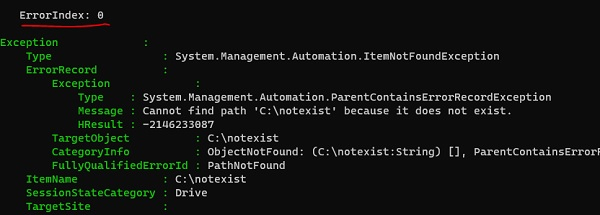


更新於:2020年9月19日
681 次瀏覽

廣告