
 資料結構
資料結構 網路
網路 關係型資料庫管理系統
 作業系統
作業系統 Java
Java MS Excel
 iOS
iOS HTML
HTML CSS
CSS Android
 Python
 C 程式設計
 C++
C++ C#
C# MongoDB
 MySQL
MySQL Javascript
 PHP
PHP 物理學
物理學 化學
化學 生物學
生物學 數學
數學 英語
英語 經濟學
經濟學 心理學
心理學 社會學
社會學 服裝設計
服裝設計 法律研究
法律研究Git 中的“分離 HEAD”狀態是什麼意思?
解釋 − 在 Git 中,HEAD 是一個引用指標,指向當前分支中的當前提交。下圖顯示有兩個提交“Commit#1”和“Commit#2”,其中“Commit#2”是最新的提交。Git 中的每個提交都會引用其之前的提交。這裡,“Commit#2”會引用“Commit#1”。當前分支是 master。master 指標指向最新的提交,即“Commit#2”。HEAD 指向master。換句話說,HEAD 透過master 指向最後一個提交。
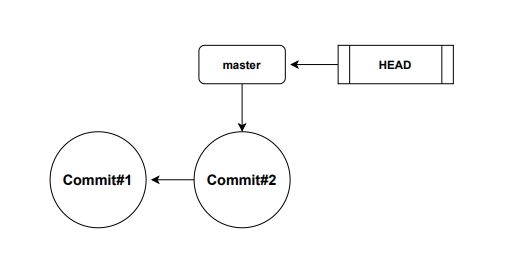
要檢查HEAD 指向哪裡,我們可以在 Git bash 中使用以下命令
$ cat .git/HEAD
輸出
ref: refs/heads/master
輸出清楚地表明 HEAD 指向 master。
什麼是分離的 HEAD?
在上面的示例中,HEAD 指向一個分支,該分支又指向一個提交。簡而言之,HEAD 間接指向提交。在這種情況下,HEAD 被稱為已連線。
當HEAD 指標從其預設位置移動時,我們會收到“分離 HEAD 狀態”的警告。這僅僅意味著HEAD 沒有指向任何分支,而是現在指向一個特定的提交。換句話說,如果HEAD 指向一個特定的提交,則稱其為分離的。
讓我們用一個例子來理解這一點。在 Git bash 終端中執行以下命令以檢視提交歷史 -
$ git log −−oneline
下面給出的輸出表明有 3 個提交,並且HEAD 指標當前指向 master
089ddf4 (HEAD −>master) new line
c81c9ab This is a short description 8a3d6ed first commit
現在讓我們將HEAD 指標從其預設位置移動,並使其指向輸出中顯示的提交雜湊之一。在這裡,我們將使用git checkout 命令使HEAD 指向提交雜湊“8a3d6ed”。
$ git checkout 8a3d6ed
輸出如以下螢幕截圖所示。
dell@DESKTOP−N961NR5 MINGw64 /e/tut_repo (master)
$ git checkout 8a3d6ed
Note: switching to '8a3d6ed' .

You are in 'detached HEAD' state. You can look around, make experimental
changes and commit them, and you can di scard any commits you make in this
state without impacting any branches by switching back to a branch.

If you want to create a new branch to retain commits you create, you may
do so (now or later) by using −c with the switch command. Example:

   git switch −c
Or undo this operation with:
   git switch −

Turn off this advice by setting config variable advice . detachedHead to fal se

HEAD is now at 8a3d6ed first commit
dell@DESKTop−N961NR5 MINGW64 /e/tut_repo ((8a3d6ed.. .))
警告表明HEAD 已分離。這意味著HEAD 現在指向提交“8a3d6ed”。讓我們透過執行以下命令來驗證這一點 -
$ cat .git/HEAD
以上命令將返回HEAD 指標的內容。
輸出
8a3d6ed9e95a94bc78d497fa20bc3d84a7e762fd

更新於: 2021年2月20日
1K+ 次瀏覽

廣告