
 資料結構
資料結構 網路
網路 關係型資料庫管理系統
 作業系統
作業系統 Java
Java MS Excel
 iOS
iOS HTML
HTML CSS
CSS Android
 Python
 C 程式設計
 C++
C++ C#
C# MongoDB
 MySQL
MySQL JavaScript
 PHP
PHP 物理
物理 化學
化學 生物
生物 數學
數學 英語
英語 經濟學
經濟學 心理學
心理學 社會學
社會學 時尚研究
時尚研究 法律研究
法律研究Python 中的網路攝像頭運動檢測程式 ?
在這項中,我們準備編寫一個 Python 程式,它將分析從網路攝像頭獲取的影像,嘗試檢測運動並以 CSV 檔案的形式儲存網路攝像頭影片的時間間隔。
所需庫
我們將使用 OpenCV 和 pandas 庫。如果尚未安裝,可以使用 pip 安裝它,如下所示
$pip install opencv2, pandas
程式碼示例
#Import required libraries
import cv2
import pandas as pd
import time
from datetime import datetime

#Initialise variables
stillImage = None
motionImage = [ None, None ]
time = []

# Initializing the DataFrame with start and end time
df = pd.DataFrame(columns = ["start", "end"])

# Capturing video
video = cv2.VideoCapture(0)

while True:
   # Start reading image from video
   check, frame = video.read()
   motion = 0

   # Convert color image to gray_scale image
   gray = cv2.cvtColor(frame, cv2.COLOR_BGR2GRAY)
   gray = cv2.GaussianBlur(gray, (21, 21), 0)
   if stillImage is None:
      stillImage = gray
      continue
   # Still Image and current image.
   diff_frame = cv2.absdiff(stillImage, gray)

   # change the image to white if static background and current frame is greater than 25.
   thresh_frame = cv2.threshold(diff_frame, 25, 255, cv2.THRESH_BINARY)[1]
   thresh_frame = cv2.dilate(thresh_frame, None, iterations = 2)
   # Finding contour and hierarchy from a moving object.
   contours,hierachy = cv2.findContours(thresh_frame.copy(),
      cv2.RETR_EXTERNAL, cv2.CHAIN_APPROX_SIMPLE)
   for contour in contours:
      if cv2.contourArea(contour) < 10000:
         continue
      motion = 1
      (x, y, w, h) = cv2.boundingRect(contour)
      cv2.rectangle(frame, (x, y), (x + w, y + h), (0, 255, 0), 3)
   # Append current status of motion
   motionImage.append(motion)
   motionImage = motionImage[-2:]
   # Append Start time of motion
   if motionImage[-1] == 1 and motionImage[-2] == 0:
      time.append(datetime.now())

   # Append End time of motion
   if motionImage[-1] == 0 and motionImage[-2] == 1:
      time.append(datetime.now())
   # Displaying image in gray_scale
   cv2.imshow("Gray_Frame", gray)

   # Display black and white frame & if the intensity difference is > 25, it turns white
   cv2.imshow("Threshold Frame", thresh_frame)
   # Display colored frame
   cv2.imshow("Colored_Frame", frame)

   key = cv2.waitKey(1)
   # Press q to stop the process
   if key == ord('q'):
      if motion == 1:
         time.append(datetime.now())
      break

# Append time of motion
for i in range(0, len(time), 2):
   df = df.append({"Start":time[i], "End":time[i + 1]}, ignore_index = True)

# Creating a csv file in which time of movements will be saved
df.to_csv("FrameInMotion_time.csv")

video.release()

# close window
cv2.destroyAllWindows()
輸出
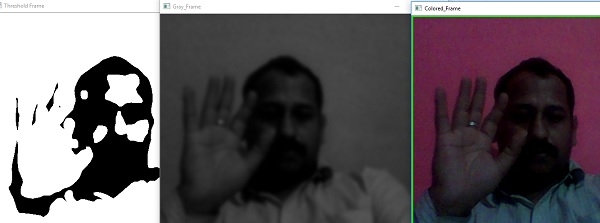
我們可以看到,我們將獲得 3 個不同的視窗,它們將以 3 種不同的模式(灰度、彩色和黑白)顯示我們網路攝像頭的當前運動。
它還將在 CSV 檔案中儲存網路攝像頭運動的時間,而且 CSV 的輸出類似於
FrameMotion_time.csv(輸出)
start     end      End                            Start
0                  2019-02-21 18:10:59.718005     2019-02-21 18:08:35.791487

更新於: 2019 年 7 月 30 日
290 次瀏覽

廣告