
 資料結構
資料結構 網路
網路 關係資料庫管理系統(RDBMS)
 作業系統
作業系統 Java
Java MS Excel
 iOS
iOS HTML
HTML CSS
CSS Android
 Python
 C語言程式設計
 C++
C++ C#
C# MongoDB
 MySQL
MySQL Javascript
 PHP
PHP 物理學
物理學 化學
化學 生物學
生物學 數學
數學 英語
英語 經濟學
經濟學 心理學
心理學 社會學
社會學 服裝設計
服裝設計 法學
法學基於閾值的影像分割在MATLAB中的實現
在基於計算機的影像分析和處理中,影像分割是一項重要的任務。影像分割允許我們從影像中提取特定的物體或區域。在數字影像處理中,最廣泛使用的影像分割技術是基於閾值的影像分割。這種影像分割技術根據畫素強度值將影像中的不同區域分離。
在本文中,我們將學習使用MATLAB程式設計實現基於閾值的影像分割。但在學習之前,讓我們先了解閾值的基本概念及其型別。
什麼是閾值化?
在數字影像處理中,閾值化是一種根據畫素強度將影像的前景和背景區域分離的方法。為此,我們必須指定一個畫素強度的閾值。然後,影像處理工具(在本例中為MATLAB)將畫素強度高於和低於指定閾值的區域分成兩個不同的區域。
閾值化的型別
基於影像和影像分割的不同需求,已經開發出幾種不同的閾值化技術。這些閾值化方法描述如下:
全域性閾值化 - 在全域性閾值化的情況下,為整個影像的分割指定一個常數或固定閾值。這種閾值化技術主要用於光照條件均勻的影像。
自適應閾值化 - 自適應閾值化技術用於分割光照條件不均勻且具有強度變化的影像。這種閾值化技術首先將影像分成較小的區域,然後區域性地對每個區域應用特定的閾值進行分割。
Otsu閾值化 - Otsu閾值化技術能夠根據影像自動確定最佳閾值進行分割。為此,它最大化影像前景和背景畫素值之間的類間方差。
在概述了閾值化及其型別之後,讓我們現在學習使用MATLAB程式設計實現基於閾值的影像分割。
示例
% MATLAB program for thresholding-based image segmentation using global thresholding
% Read the input image
img = imread('https://tutorialspoint.tw/assets/questions/media/14304-1687425236.jpg');
% Convert the RGB image to grayscale
gray_img = rgb2gray(img);
% Compute the global threshold value
GT_value = graythresh(gray_img);
% Perform global thresholding based image segmentation
binary_img = imbinarize(gray_img, GT_value);
% Display the original and globally segmented images
subplot(1, 2, 1); imshow(img); title('Original Image');
subplot(1, 2, 2); imshow(binary_img); title('Global Segmented Image');
輸出
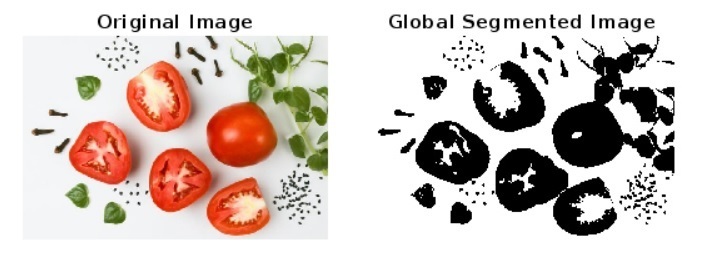
解釋
在這個MATLAB程式中,我們演示了使用全域性閾值化技術實現基於閾值的影像分割。
在這個程式碼中,我們首先讀取輸入影像,然後如果它不是灰度影像,則將其轉換為灰度影像。接下來,我們使用“graythresh”函式確定給定影像的全域性閾值。之後,我們使用全域性閾值和“imbinarize”函式對灰度影像執行全域性閾值化。最後,我們使用“imshow”函式顯示原始影像和全域性分割影像。
示例
% MATLAB program for thresholding-based image segmentation using adaptive thresholding
% Read the input image
img = imread('https://tutorialspoint.tw/assets/questions/media/14304-1687425236.jpg');
% Convert the RGB image to grayscale
gray_img = rgb2gray(img);
% Calculate the adaptive threshold value
AT_value = adaptthresh(gray_img, 0.5); % Set the sensitivity parameter if required
% Perform adaptive thresholding-based image segmentation
adaptive_img = imbinarize(gray_img, AT_value);
% Display the original and adaptive segmented images
subplot(1, 2, 1); imshow(img); title('Original Image');
subplot(1, 2, 2); imshow(adaptive_img); title('Adaptive Segmented Image');
輸出
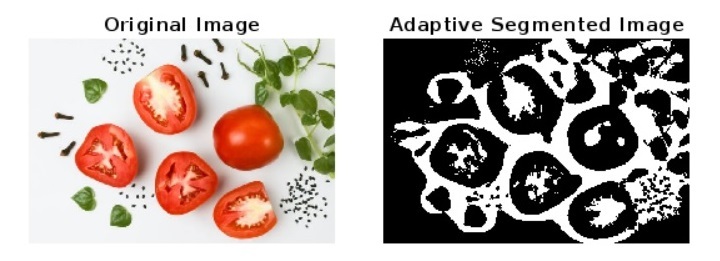
解釋
這個MATLAB程式演示了使用自適應閾值化方法實現基於閾值的影像分割。
在這個MATLAB程式碼中,我們首先使用“imread”函式讀取輸入影像,然後如果它不是灰度影像,則將其轉換為灰度影像。接下來,我們使用“adaptthresh”函式確定給定影像的自適應閾值。之後,我們使用自適應閾值和“imbinarize”函式對灰度影像執行自適應閾值化分割。最後,我們使用“imshow”函式顯示原始影像和自適應分割影像,並附帶合適的標題。
示例
% MATLAB program for thresholding-based image segmentation using Otsu’s thresholding
% Read the input image
img = imread('https://tutorialspoint.tw/assets/questions/media/14304-1687425236.jpg');
% Convert the image to grayscale if required
if size(img, 3) > 1
    gray_img = rgb2gray(img);
end
% Calculate the histogram for the image
[counts, x] = imhist(gray_img, 16);
% Calculate the Otsu's thresholding value
Otsu_value = otsuthresh(counts);
% Perform the Otsu's thresholding-based image segmentation
Otsu_img = imbinarize(gray_img, Otsu_value);
% Display the original and Otsu’s segmented image
subplot(1, 2, 1); imshow(img); title('Original Image');
subplot(1, 2, 2); imshow(Otsu_img); title('Otsu Segmented Image');
輸出
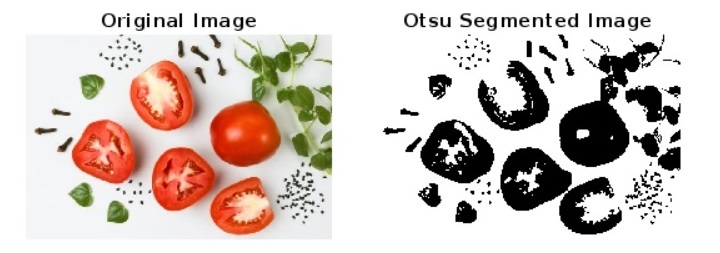
解釋
這個MATLAB程式使用Otsu閾值化方法執行基於閾值的影像分割。
在這個程式碼中,我們首先使用“imread”函式讀取輸入影像,然後根據需要將其轉換為灰度影像。接下來,我們使用“imhist”函式計算灰度影像的直方圖,以獲取影像中畫素強度的資訊。之後,我們使用“otsuthresh”函式計算Otsu閾值。
接下來,我們使用“imbinarize”函式執行基於Otsu閾值的輸入影像分割。最後,我們呼叫“imshow”函式顯示原始影像和Otsu分割影像。
結論
因此,這就是我們如何使用MATLAB程式設計執行基於閾值的影像分割的方法。MATLAB提供三種類型的閾值化,即全域性閾值化、自適應閾值化和Otsu閾值化,以執行影像分割。基於閾值的影像分割是基於計算機的影像分析中的一項重要任務。基於閾值的影像分割最常用,因為它提供了一種簡單有效的方法來從影像中提取物體/區域。此外,MATLAB提供了各種內建函式和簡單的程式設計環境來執行基於閾值的影像分割。

1000+ 瀏覽量
