
 資料結構
資料結構 網路
網路 關係資料庫管理系統 (RDBMS)
 作業系統
作業系統 Java
Java MS Excel
 iOS
iOS HTML
HTML CSS
CSS Android
 Python
 C 程式設計
 C++
C++ C#
C# MongoDB
 MySQL
MySQL Javascript
 PHP
PHP 物理學
物理學 化學
化學 生物學
生物學 數學
數學 英語
英語 經濟學
經濟學 心理學
心理學 社會學
社會學 服裝學
服裝學 法學
法學從 Node.js 伺服器向瀏覽器傳送響應
App.js −
const http = require('http');
const server = http.createServer((req, res)=>{
   console.log(req.url, req.method, req. headers);
});
server.listen(3000);
如上例所示,我們在 createServer 方法中將請求和響應引數物件作為引數。
Response (res) 物件將用於向客戶端傳送資料。它有很多屬性,下面解釋一些:
res.setHeader(‘Content-Type’, ‘text/html’); 這行程式碼將響應內容的格式設定為 text/html。
如何從 Node.js 傳送 html 內容
響應物件上的 write() 函式方法可用於傳送多行 html 程式碼,如下所示。
res.write(‘<html>’);
res.write(‘<head> <title> Hello TutorialsPoint </title> </head>’);
res.write(‘ <body> Hello Tutorials Point </body>’);
res.write(‘</html>’);
//write end to mark it as stop for node js response.
res.end();
//end () is function to mark a stop for node js write function.
一旦寫入 end(),之後就不能再對同一個響應物件進行寫入,否則會導致程式碼執行錯誤。
現在,我們將執行響應程式碼。
包含響應的完整 App.js:
const http = require('http');
const server = http.createServer((req, res)=>{
   console.log(req.url, req.method, req. headers);
   res.write('<html>');
   res.write('<head> <title> Hello TutorialsPoint </title> </head>');
   res.write(' <body> Hello Tutorials Point </body>');
   res.write('</html>');
   //write end to mark it as stop for node js response.
   res.end();
});
server.listen(3000);
在終端執行:node App.js
開啟瀏覽器並導航到 localhost:3000,我們將在瀏覽器上看到以下輸出。
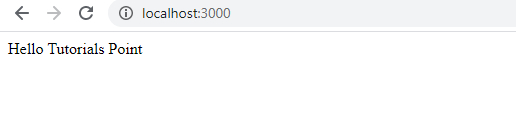
在接下來的文章中,我們將使用 express.js 簡化從 Node 傳送響應的過程。
標頭在 HTTP 請求和響應中都很重要。它們有助於識別伺服器和客戶端的正確內容型別和接受型別。Cache-control 就是這樣一個標頭,它決定伺服器和客戶端之間的快取機制。
在單頁應用程式中,令牌用於身份驗證請求。會話管理也使用 HTTP 會話進行處理。
請求和響應安全機制也根據所選擇的用於在客戶端和伺服器之間傳輸資料的 HTTP 方法而有所不同。

更新於:2020年5月13日
865 次瀏覽

廣告