
 資料結構
資料結構 網路
網路 RDBMS
RDBMS 作業系統
作業系統 Java
Java MS Excel
 iOS
iOS HTML
HTML CSS
CSS Android
 Python
 C 程式設計
 C++
C++ C#
C# MongoDB
 MySQL
MySQL Javascript
 PHP
PHP 物理
物理 化學
化學 生物
生物 數學
數學 英語
英語 經濟學
經濟學 心理學
心理學 社會學
社會學 服裝設計
服裝設計 法學
法學Bootstrap 中的彈出框,附帶示例
彈出框是一個簡單的工具提示外掛。彈出框是當用戶單擊特定元素時彈出的內容框。此外掛依賴於 popover.js。
在 HTML 中建立彈出框
屬性 data-toggle = "popover" 用於在 HTML 中建立彈出框。將此屬性新增到元素後,該元素將轉換為彈出框。
語法
<a href=”” data-toggle = "popover" title="popover title" data-content="popover content" >popover display</a>
示例
<!DOCTYPE html>
<html lang="en" >
<head>
<title>Bootstrap Example</title>
<meta charset="utf-8">
<meta name="viewport" content="width=device-width, initial-scale=1">
<link rel="stylesheet" href="https://maxcdn.bootstrapcdn.com/bootstrap/3.4.1/css/bootstrap.min.css">
<script src="https://ajax.googleapis.com/ajax/libs/jquery/3.4.1/jquery.min.js"></script>
<script src="https://maxcdn.bootstrapcdn.com/bootstrap/3.4.1/js/bootstrap.min.js"></script>
</head>
<body>
<div class="container">
<h3>Popover In BootStap</h3><br><br>
<a href="#" data-toggle="popover" title="Welcome Text" data-content="Learning Bootstrap from TutorialsPoint!">Learn BootStrap</a>
</div>
<script>
$(document).ready(function(){
   $('[data-toggle="popover"]').popover();
});
</script>
</body>
</html>
輸出
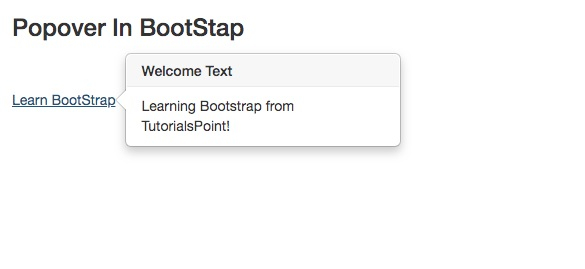
放置彈出框
你可以使用 data-placement 屬性放置彈出框。預設情況下,彈出框出現在元素右側。我們來看看不同方向的彈出框放置 −
示例
<!DOCTYPE html>
<html>
<head>
<title<Bootstrap Example</title<
<meta charset="utf-8"<
<meta name="viewport" content="width=device-width, initial-scale=1"<
<link rel="stylesheet" href="https://maxcdn.bootstrapcdn.com/bootstrap/3.4.1/css/bootstrap.min.css"<
<script src="https://ajax.googleapis.com/ajax/libs/jquery/3.4.1/jquery.min.js"<</script<
<script src="https://maxcdn.bootstrapcdn.com/bootstrap/3.4.1/js/bootstrap.min.js"<</script<
</head>
<body>
<div class="container">
<h3>Popover Example</h3>
<a href="#" data-toggle="popover" title="Popover Header" data-placement="right" data-content="Some content inside the popover">Toggle popover right</a><br><br><br><hr>
<a href="#" data-toggle="popover" title="Popover Header" data-placement="top" data-content="Some content inside the popover">Toggle popover Top</a><br><br><br><hr>
<a href="#" data-toggle="popover" title="Popover Header" data-placement="left" data-content="Some content inside the popover">Toggle popover left</a><br><br><br><hr>
<a href="#" data-toggle="popover" title="Popover Header" data-placement="bottom" data-content="Some content inside the popover">Toggle popover bottom</a><br><br><br><hr>
</div>
<script>
$(document).ready(function(){
   $('[data-toggle="popover"]').popover();
});
</script>
</body>
</html>
輸出
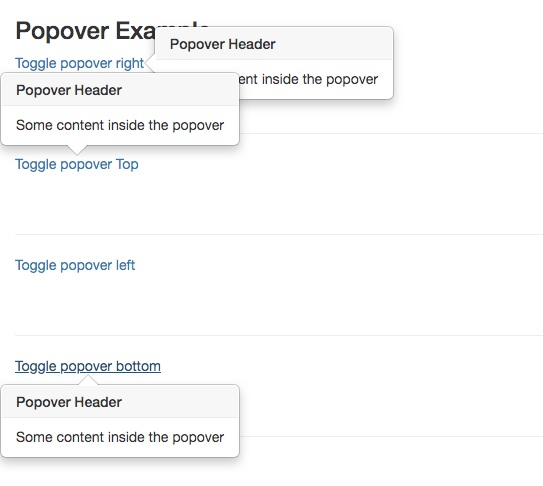

更新於: 2020 年 4 月 17 日
570 次瀏覽

廣告