
 資料結構
資料結構 網路
網路 關係資料庫管理系統 (RDBMS)
 作業系統
作業系統 Java
Java MS Excel
 iOS
iOS HTML
HTML CSS
CSS Android
 Python
 C語言程式設計
 C++
C++ C#
C# MongoDB
 MySQL
MySQL Javascript
 PHP
PHP 物理學
物理學 化學
化學 生物學
生物學 數學
數學 英語
英語 經濟學
經濟學 心理學
心理學 社會學
社會學 服裝設計
服裝設計 法學
法學使用Java合併PDF
PDFMergerUtility 類用於將多個 PDF 文件合併成單個 PDF 文件。PDFMergerUtility 類將接收多個 PDF 檔案並將它們合併,並將結果儲存為新文件。使用 Java 合併 PDF 需要安裝 Apache 庫。可能有多種方法可以使用 Java 合併 PDF 檔案。
定義:使用Java合併PDF
示例
輸入 - PDF1 = Alice.pdf,PDF2 = Bob.pdf
輸出 - newMerged.pdf // PDF1 和 PDF2 合併後的 PDF
程式程式碼
// Merging two pdf documents here

import org.apache.pdfbox.multipdf.PDFMergerUtility;
import org.apache.pdfbox.pdmodel.PDDocument;
import java.io.File;
import java.io.IOException;

public class GFG {
   public static void main(String[] args)
      throws IOException
      {

      // loading all the pdf files we wish to merge

      File file1 = new File( "/Users/abhilasha/Desktop/Merging Pdfs/file1.pdf");
      File file2 = new File("/Users/abhilasha/Desktop/Merging Pdfs/file2.pdf");

      // Instantiating PDFMergerUtility class
      PDFMergerUtility obj = new PDFMergerUtility();

      // Setting the destination file path
      obj.setDestinationFileName("/Users/abhilasha/Desktop/Merging Pdfs/newMerged.pdf");

      // Add all source files, to be merged
      obj.addSource(file1);
      obj.addSource(file2);

      // Merging documents
      obj.mergeDocuments();

      System.out.println( "PDF Documents merged to a single file");
   }
}
演算法
使用 Apache 庫,我們需要遵循以下步驟來合併多個 PDF 文件:
步驟 1 - 首先,我們需要安裝 PDFMergerUtility 類。
步驟 2 - 接下來,使用 setDestinationFileName() 方法設定目標檔案。
步驟 3 - 現在,使用 addSource() 方法設定原始檔。
步驟 4 - 最後一步,我們使用 PDFMergerUtility 類的 mergeDocuments() 方法來合併 PDF 文件。
輸出
程式碼執行前:
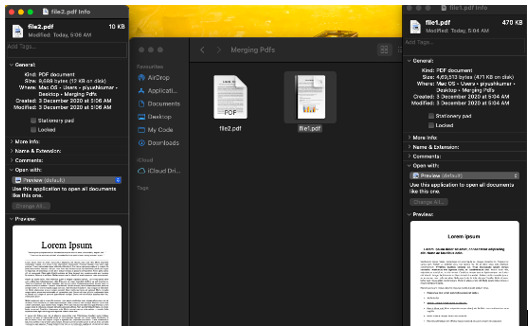
程式碼執行後:
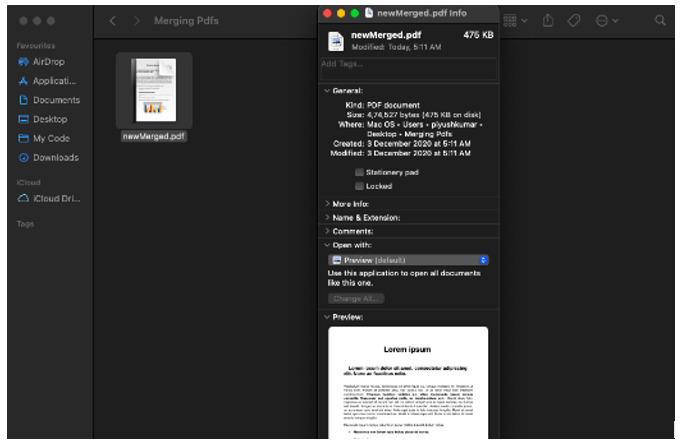
方法
方法 1 - 使用 Java 中的 Itext 合併兩個 PDF 檔案
方法 2 - 使用 Java 中的 InputStream 合併多個 PDF 檔案
方法 1:使用 Java 中的 Itext 合併兩個 PDF 檔案
程式碼
import java.io.FileInputStream;import java.io.FileOutputStream;
import java.io.InputStream;
import java.io.OutputStream;
import java.util.ArrayList;
import java.util.Iterator;
import java.util.List;
import com.itextpdf.text.Document;import com.itextpdf.text.pdf.PdfContentByte;
import com.itextpdf.text.pdf.PdfImportedPage;import com.itextpdf.text.pdf.PdfReader;
import com.itextpdf.text.pdf.PdfWriter;
/**
* This class is used to merge two or more
* existing pdf file using iText jar.
* @author w3spoint
*/public class PDFMergeExample {
   static void mergePdfFiles(List<InputStream> inputPdfList, OutputStream outputStream) throws Exception{

      //Create document and pdfReader objects.
	   Document document = new Document();
      List<PdfReader> readers = new ArrayList<PdfReader>();
      int totalPages = 0;

      //Create pdf Iterator object using inputPdfList.
      Iterator<InputStream> pdfIterator = inputPdfList.iterator();

      // Create reader list for the input pdf files.
      while (pdfIterator.hasNext()) {
         InputStream pdf = pdfIterator.next();
         PdfReader pdfReader = new PdfReader(pdf);
         readers.add(pdfReader);
         totalPages = totalPages + pdfReader.getNumberOfPages();
      }

      // Create writer for the outputStream
      PdfWriter writer = PdfWriter.getInstance(document, outputStream);

      //Open document.
      document.open();

      //Contain the pdf data.
      PdfContentByte pageContentByte = writer.getDirectContent();

      PdfImportedPage pdfImportedPage;
      int currentPdfReaderPage = 1;
      Iterator<pdfreader> iteratorPDFReader = readers.iterator();

      // Iterate and process the reader list.
      while (iteratorPDFReader.hasNext()) {
         PdfReader pdfReader = iteratorPDFReader.next();
         //Create page and add content.
         while (currentPdfReaderPage <= pdfReader.getNumberOfPages()) {
            document.newPage();
            pdfImportedPage = writer.getImportedPage(
            pdfReader,currentPdfReaderPage);
            pageContentByte.addTemplate(pdfImportedPage, 0, 0);
            currentPdfReaderPage++;
         }
         currentPdfReaderPage = 1;
      }

      //Close document and outputStream.
      outputStream.flush();
      document.close();
      outputStream.close();

      System.out.println("Pdf files merged successfully.");
   }
	public static void main(String args[]){
      try {
         //Prepare input pdf file list as list of input stream.
         List<InputStream> inputPdfList = new ArrayList<InputStream>();
         inputPdfList.add(new FileInputStream("D:\TestFile1.pdf"));
         inputPdfList.add(new FileInputStream("D:\TestFile2.pdf"));

         //Prepare output stream for merged pdf file.
         OutputStream outputStream = new FileOutputStream("D:\MergeFile.pdf");

         //call method to merge pdf files.
         mergePdfFiles(inputPdfList, outputStream);
	   } catch (Exception e) {
         e.printStackTrace();
	   }
   }
}
輸出
Pdf file merged successfully.
方法 2:使用 Java 中的 InputStream 合併兩個 PDF 檔案
要使用 InputStream 合併 PDF 檔案,我們需要使用另一個 mergeFiles() 方法,並傳入一個輸入流陣列。
程式,程式碼
import com.spire.pdf.PdfDocument
import com.spire.pdf.PdfDocumentBase;
import java.io.*;
public class MergePdfsUsingInputStreams {
   public static void main(String []args) throws FileNotFoundException {
      //Load the PDF files into FileInputStream objects
      FileInputStream stream1 = new FileInputStream("File1.pdf");
      FileInputStream stream2 = new FileInputStream("File2.pdf");
      FileInputStream stream3 = new FileInputStream("File3.pdf");
      //Create a InputStream array for the FileInputStream objects
      InputStream[] streams = new FileInputStream[]{stream1, stream2, stream3}; //Merge the PDF files
      PdfDocumentBase pdf = PdfDocument.mergeFiles(streams);
      //Create a OutputStream for the merged PDF
      OutputStream outputStream = new FileOutputStream("Merge.pdf");
      //Save the merged PDF file pdf.save(outputStream);
   }
}
輸出
Pdf file merged successfully.
結論
如果我們檢查提到的路徑,我們可以看到名為“newMerged”的新文件已包含兩個單獨的檔案。

更新於:2023年7月18日
2K+ 次檢視

廣告