
 資料結構
資料結構 網路
網路 關係資料庫管理系統 (RDBMS)
 作業系統
作業系統 Java
Java MS Excel
 iOS
iOS HTML
HTML CSS
CSS Android
 Python
 C語言程式設計
 C++
C++ C#
C# MongoDB
 MySQL
MySQL Javascript
 PHP
PHP 物理學
物理學 化學
化學 生物學
生物學 數學
數學 英語
英語 經濟學
經濟學 心理學
心理學 社會學
社會學 服裝學
服裝學 法學
法學Java程式開啟命令提示符並插入命令
本文使用多種方法來選擇透過Java程式碼插入到開啟的命令視窗中的命令。命令視窗使用“cmd”開啟。這裡,使用Java程式碼指定了執行相同操作的方法。命令視窗首先使用Java程式開啟。它作為子程序開啟。如果Java程式在現有的cmd視窗中執行,則另一個視窗將作為新程序開啟。此外,不同型別的命令透過Java程式碼插入並在此開啟的命令視窗中執行。
這些程式可能無法在線上程式設計環境中執行。本文的輸出部分詳細介紹瞭如何使用javac和java命令執行這些程式。
演算法
步驟1 - 使用Java程式碼開啟CMD視窗。
步驟2 - 選擇要執行的命令。選擇的命令用文字字串表示。
步驟3 - 透過Java程式在開啟的CMD視窗中執行選擇的命令。
步驟4 - 檢視結果。
多種方法
對於這些程式,命令的選擇使用兩種不同的方法。
使用更改cmd視窗屬性的命令。
使用可執行命令
讓我們逐一檢視程式及其輸出。
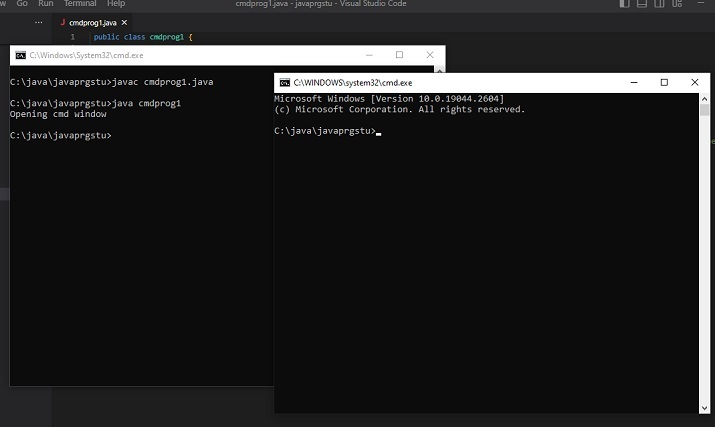
首先,給出啟動新的CMD視窗的Java程式碼。
Java程式碼(啟動新的CMD視窗)
public class cmdprog1 {
   public static void main(String[] args) {
      System.out.println("Opening cmd window");
      try{

         // cmd is a command that opens the command window
         //CMD /C is used to run commands and then terminate the existing window while CMD /K will run the command and then it returns you to the given prompt. Runtime.getRuntime().exec(new String[] {"cmd", "/K", "Start"});
         // the following line can also be used.....
         //Runtime.getRuntime().exec(new String[] {"cmd", "/C", "Start"});
      }
      catch (Exception e){
         System.out.println("Error: " + e);
      }
   }
}
輸出
C:\java\javaprgstu>javac cmdprog1.java
C:\java\javaprgstu>java cmdprog1
Opening cmd window
C:\java\javaprgstu>
方法1:使用更改cmd視窗屬性的命令。
在這種方法中,使用了兩個不同的示例。
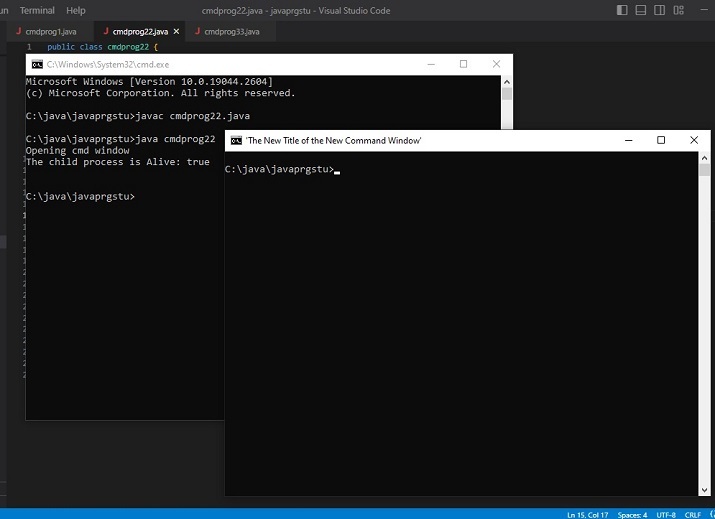
示例1:開啟時更改CMD視窗的標題。
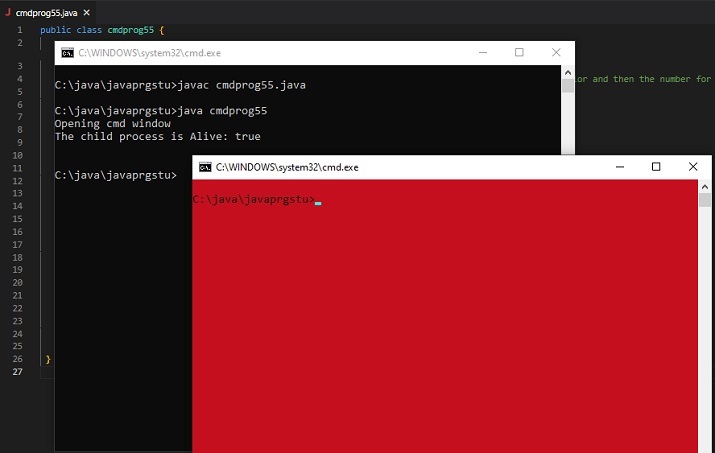
示例2:開啟時更改CMD視窗的背景和前景顏色。
示例1:開啟時更改CMD視窗的標題。
程式
public class cmdprog22 {
   public static void main(String[] args) {
      String command_to_playwith =" title 'The New Title of the New Command Window' ";
      System.out.println("Opening cmd window");
      try {
         String command = "cmd /c" + " start" + command_to_playwith;
         //Starting the new child process
         Process childprocess11 = Runtime.getRuntime().exec(command);
         System.out.println("The child process is Alive: " + childprocess11.isAlive());
         System.out.println();
      }
      catch (Exception e){
         System.out.println("Error: " + e);
      }
   }
}
輸出
C:\java\javaprgstu>javac cmdprog22.java
C:\java\javaprgstu>java cmdprog22
Opening cmd window
The child process is Alive: true
示例2:開啟時更改CMD視窗的背景和前景顏色。
public class cmdprog55 {
   public static void main(String[] args) {

      //the following command will change the color of the cmd window. First the number for bg color and then the number for fg color is added.
      // 4 means red color and 0 means black color
      String command_to_playwith =" COLOR 40";
      System.out.println("Opening cmd window");
      try {
         String command = "cmd /c" + " start" + command_to_playwith;

         // starting the child process ....
         Process childprocess11 = Runtime.getRuntime().exec(command);
         System.out.println("The child process is Alive: " + childprocess11.isAlive());
         System.out.println();
      }
      catch (Exception e){
         System.out.println("Error: " + e);
      }
   }
}
輸出(方法1:示例2)
C:\java\javaprgstu>javac cmdprog55.java
C:\java\javaprgstu>java cmdprog55
Opening cmd window
The child process is Alive: true
方法2:使用可執行命令
新的cmd視窗作為子程序開啟。插入的命令結果將僅在新的cmd視窗中顯示。在這種方法中,使用了三個不同的示例。
示例1 在開啟的CMD視窗中顯示訊息。
示例2 顯示txt檔案的內容。
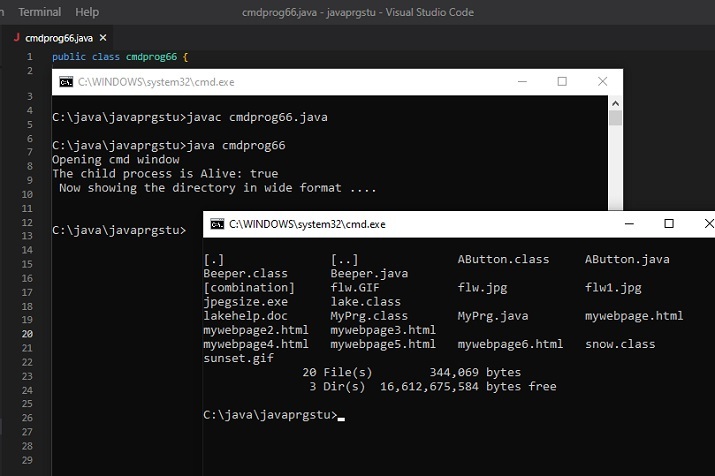
示例3 以寬格式顯示資料夾內容。
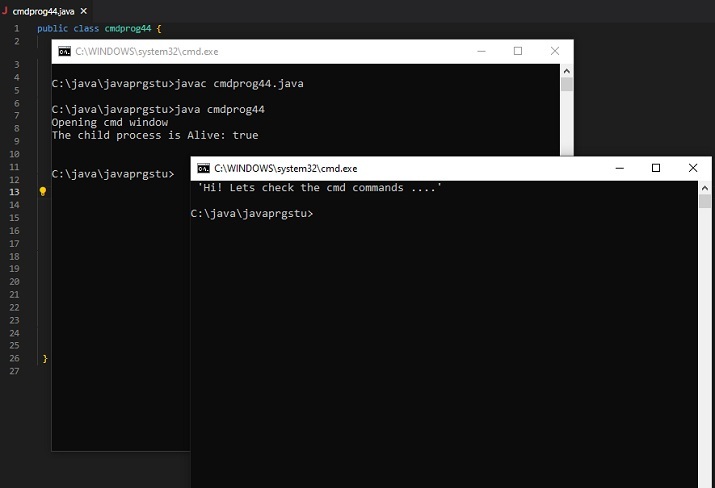
示例1:在開啟的CMD視窗中顯示訊息。
public class cmdprog44 {
   public static void main(String[] args) {

      // The following command will display the message specified.
      String command_to_playwith =" ECHO 'Hi! Lets check the cmd commands ....'";
      System.out.println("Opening cmd window");
      try {
         String command = "cmd /c" + " start" + command_to_playwith;
         // starting the child process....
         Process childprocess11 = Runtime.getRuntime().exec(command);
         System.out.println("The child process is Alive: " + childprocess11.isAlive());
         System.out.println();
      }
      catch (Exception e){
         System.out.println("Error: " + e);
      }
   }
}
System.out.println("Opening cmd window");
   try {
      String command = "cmd /c" + " start" + command_to_playwith;
      // starting the child process ....
      Process childprocess11 = Runtime.getRuntime().exec(command);
      System.out.println("The child process is Alive: " + childprocess11.isAlive());
      System.out.println();
   }
   catch (Exception e){
      System.out.println("Error: " + e);
   }
輸出(方法2:示例1)
C:\java\javaprgstu>javac cmdprog44.java
C:\java\javaprgstu>java cmdprog44
Opening cmd window
The child process is Alive: true
示例2:顯示txt檔案的內容。
public class cmdprog33 {
   public static void main(String[] args) {

      //The following command is the command that is needed to see the contents of the given text file
      String command_to_playwith =" TYPE testfile.txt";
      System.out.println("Opening cmd window");
      try {
         String command = "cmd /c" + " start" + command_to_playwith;

         //Starting the new child process
         Process childprocess11 = Runtime.getRuntime().exec(command);
         System.out.println("The child process is Alive: " + childprocess11.isAlive());
         System.out.println(" Now showing the content of testfile.txt ....\n");
      }
      catch (Exception e){
         System.out.println("Error: " + e);
      }
   }
}
輸出
C:\java\javaprgstu>javac cmdprog33.java
C:\java\javaprgstu>java cmdprog33
Opening cmd window
The child process is Alive: true
Now showing the content of testfile.txt ...
示例3:以寬格式顯示資料夾內容。
public class cmdprog66 {
   public static void main(String[] args) {

      // The following command will display the specified directory in wide format
      String command_to_playwith =" dir .\applettest /W";
      System.out.println("Opening cmd window");
      try {
         String command = "cmd /c" + " start" + command_to_playwith;

         //Starting the new child process
         Process childprocess11 = Runtime.getRuntime().exec(command);
         System.out.println("The child process is Alive: " + childprocess11.isAlive());
         System.out.println(" Now showing the directory in wide format ....\n");
      }
      catch (Exception e){
         System.out.println("Error: " + e);
      }
   }
}
輸出
C:\java\javaprgstu>javac cmdprog66.java
C:\java\javaprgstu>java cmdprog66
Opening cmd window
The child process is Alive: true
Now showing the directory in wide format ...
結論
在本文中,我們探討了透過Java程式開啟後插入到cmd視窗中的不同命令。命令的選擇基於不同的類別。第一組命令更改命令視窗的屬性,而第二組命令用於在顯示開啟的命令視窗後在其中顯示結果。在這兩種情況下,新的cmd視窗都作為子程序開啟。

更新於:2024年6月24日
6K+ 次瀏覽

廣告