
 資料結構
資料結構 網路
網路 關係型資料庫管理系統
 作業系統
作業系統 Java
Java MS Excel
 iOS
iOS HTML
HTML CSS
CSS Android
 Python
 C語言程式設計
 C++
C++ C#
C# MongoDB
 MySQL
MySQL Javascript
 PHP
PHP 物理學
物理學 化學
化學 生物學
生物學 數學
數學 英語
英語 經濟學
經濟學 心理學
心理學 社會學
社會學 服裝設計
服裝設計 法律研究
法律研究如何在Java中透過命令提示符執行JAR檔案?
為了打包類檔案,Java提供了一種稱為JAR(Java歸檔)的檔案格式。通常,JAR檔案包含.class檔案、影像、文字檔案以及執行應用程式或庫所需的庫。
此檔案格式用於分發Java中的應用程式軟體和庫。所有預定義的庫都以這種格式提供。
如果您有任何以這種格式提供的庫要在您的應用程式中使用它,您需要將其放在專案的當前(或lib)資料夾中,或者您需要為該特定的JAR檔案設定類路徑。
建立Jar檔案
Java提供jar命令來處理jar檔案,如果您在命令提示符中執行它,您將獲得此命令的執行語法和選項,如下所示:
C:\>jar
Usage: jar {ctxui}[vfmn0PMe] [jar-file] [manifest-file] [entry-point] [-C dir] files ...
Options:
   -c create new archive
   -t list table of contents for archive
   -x extract named (or all) files from archive
   -u update existing archive
   -v generate verbose output on standard output
   -f specify archive file name
   -m include manifest information from specified manifest file
   -n perform Pack200 normalization after creating a new archive
   -e specify application entry point for stand-alone application bundled into an executable jar file
   -0 store only; use no ZIP compression
   -P preserve leading '/' (absolute path) and ".." (parent directory) components from file names
   -M do not create a manifest file for the entries
   -i generate index information for the specified jar files
   -C change to the specified directory and include the following file
您可以使用帶選項c、v、f的命令來建立JAR檔案。以下是使用命令提示符建立JAR檔案的語法:
jar cvf jar_file_name output_path
示例
在路徑**D:/example**中建立一個名為Sample.java的Java檔案,並將以下程式複製貼上到其中:
public class Sample {
   public static void main(String args[]){
      System.out.println("Hi welcome to Tutorialspoint");
   }
}
使用javac命令編譯上述程式,如下所示:
javac Example.java
如果您的程式在沒有錯誤的情況下執行,則將在當前資料夾中生成.class檔案。現在,為生成的類建立一個jar檔案,如下所示:
C:\Sample>jar cvf sample.jar *.class
added manifest
adding: Sample.class(in = 434) (out= 302) (deflated 30%)
Once you execute a JAR file is generated with the specified name.
使用eclipse建立JAR檔案
您也可以使用IDE建立JAR檔案。要使用eclipse建立JAR檔案,請按照以下步驟操作:
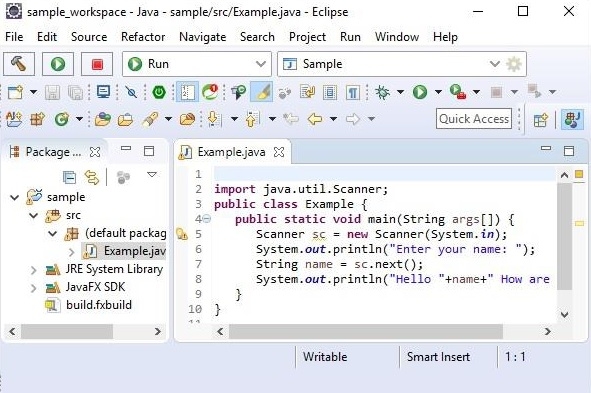
開啟eclipse,在其中建立一個專案,如下所示:
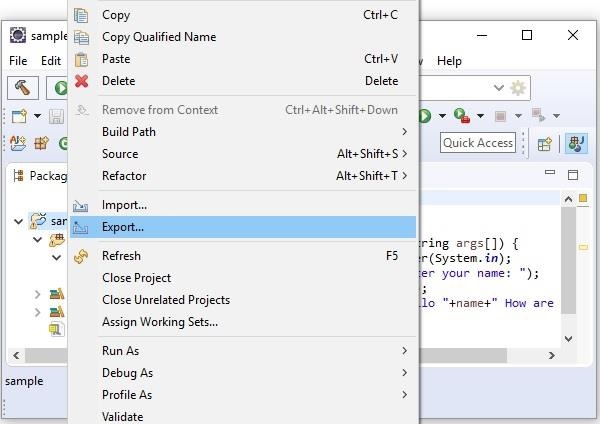
右鍵單擊專案資料夾,並選擇**匯出**選項,如下所示:
在Java類別下選擇JAR檔案。
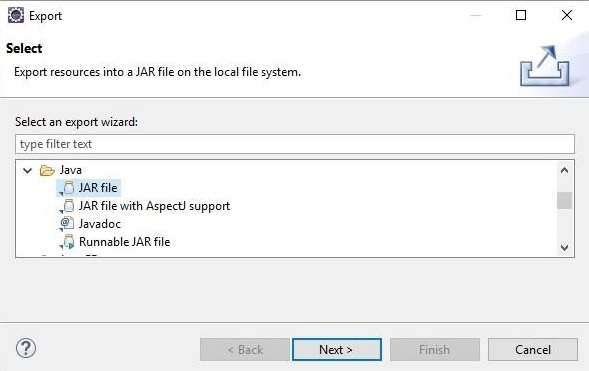
單擊**下一步**。
輸入JAR檔名和資料夾。
單擊**完成**。

更新時間: 2019年10月14日
3K+ 瀏覽量

廣告