
 資料結構
資料結構 網路
網路 關係資料庫管理系統(RDBMS)
 作業系統
作業系統 Java
Java MS Excel
 iOS
iOS HTML
HTML CSS
CSS Android
 Python
 C語言程式設計
 C++
C++ C#
C# MongoDB
 MySQL
MySQL Javascript
 PHP
PHP 物理學
物理學 化學
化學 生物學
生物學 數學
數學 英語
英語 經濟學
經濟學 心理學
心理學 社會學
社會學 服裝設計
服裝設計 法學
法學基於影像的隱寫術使用Python?
隱寫術是一種在幕後隱藏資訊的技術。它不像密碼學那樣專注於加密資料(透過SHA1、MD5等不同的演算法),隱寫術更側重於將資料(資料可以是檔案、影像、訊息或影片)隱藏在另一個檔案、影像、訊息或影片中,以避免引起注意。
因此,我們將嘗試建立一個簡單的Python程式,在影像中隱藏資訊,而不會明顯改變影像的外觀。程式主要分為兩部分:第一部分是一個解碼函式,可以從影像檔案中提取秘密資訊;第二部分是一個編碼函式,可以將秘密訊息編碼到影像中。
為此,我們使用Python Pillow庫(你也可以使用OpenCV或其他庫☺)。你可以使用pip安裝它,只需在命令提示符中執行`pip install pillow`即可。
$pip install pillow
畫素和顏色模型的基本概念
畫素是影像中最小的單個元素。因此,每個畫素代表原始影像的一部分。這意味著,畫素越高,對實際影像的表示就越準確。
在黑白影像(非灰度影像)中,黑色畫素的值為1,白色畫素的值為0。而在彩色影像中,它們具有三個主要顏色分量(RGB——紅、綠、藍),每個畫素的值為0-255。因此,(255, 255, 255)的畫素表示白色,(0,0,0)表示黑色。由於8位二進位制數可以表示的最大數是255,所以這是我們可以達到的最大值。
由於二進位制數的基數是2,我們可以很容易地將二進位制數轉換為十進位制數。例如,我們的二進位制數是01010101,那麼它等效的十進位制數(基數10)將是
26 +24 + 22 + 20 = 64 + 16 + 4 + 1 = 85
你也可以在你的Python終端測試上述二進位制到十進位制的轉換。
>>> print(0b01010101)
85
>>> type(0b01010101)
<class 'int'>
>>> 0b01010101
85
>>> 0b01010110
86
我們將如何實現它
Step 1: Import the required library/package.
Step 2: Open the file or Image
Step 3: Encode some text into the source Image & then save it.
Step 4: Check both the images (with and without hidden data file) and see if there is any visible changes.
Step 5: Decode the image- to extract data from the image
上述步驟的實現
示例程式碼
>>> #Import the required library
>>> from PIL import Image
>>> import stepic
>>>
我已經使用stepic庫進行編碼和解碼。你可以使用pip安裝stepic庫。

>>> #Open Image or file in which you want to hide your data
>>> im = Image.open('TajMahal.png')
>>>
>>> #Encode some text into your Image file and save it in another file
>>> im1 = stepic.encode(im, b'Hello Python')
>>> im1.save('TajMahal.png', 'PNG')
>>>
>>> #Now is the time to check both images and see if there is any visible changes
>>> im1 = Image.open('TajMahal.png')
>>> im1.show()
包含隱藏文字的影像
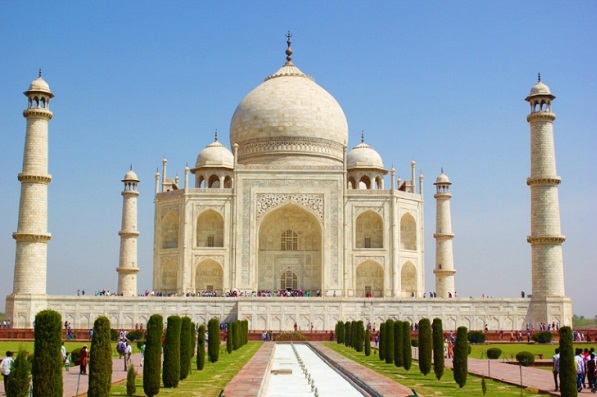
Actual image:
>>> im.show()
>>>'
>>>
>>> #Decode the image so as to extract the hidden data from the image
>>> im2 = Image.open('TajMahal.png')
>>> stegoImage = stepic.decode(im2)
>>> stegoImage
'Hello Python'
我們可以看到,在影像中隱藏文字是多麼容易。你可以使用其他輸入項,例如影片或其他格式,例如jpeg,並且可以使用其他庫來獲得相同的結果。祝你使用Python進行隱寫術愉快☺。
737 次瀏覽
