
 資料結構
資料結構 網路
網路 RDBMS
RDBMS 作業系統
作業系統 Java
Java MS Excel
 iOS
iOS HTML
HTML CSS
CSS Android
 Python
 C 程式設計
 C++
C++ C#
C# MongoDB
 MySQL
MySQL Javascript
 PHP
PHP 物理學
物理學 化學
化學 生物學
生物學 數學
數學 英語
英語 經濟學
經濟學 心理學
心理學 社會科學
社會科學 時尚研究
時尚研究 法律研究
法律研究HTML isTrusted 事件屬性
HTML isTrusted 事件屬性會返回一個布林值,該值表示事件是否受信任。
注意 − 如果透過指令碼呼叫,則 isTrusted 返回 false,如果透過使用者呼叫,則 isTrusted 返回 true。
讓我們來看一個 isTrusted 事件屬性的例子 -
示例
<!DOCTYPE html>
<html>
<head>
<title>HTML isTrusted</title>
<style>
   form {
      width:70%;
      margin: 0 auto;
      text-align: center;
   }
   * {
      padding: 2px;
      margin:5px;
   }
   input[type="button"] {
      border-radius: 10px;
   }
</style>
</head>
<body>
<form>
<fieldset>
<legend>HTML-isTrusted-attribute</legend>
<input type="email" id="emailSelect" placeholder="eg: xyz@abc.com">
<input type="password" id="passWordSelect">
<input id="loginbtn" type="button" value="Login" onclick="login(event)">
<div id="divDisplay">Attempt to login will take place in 2 seconds</div>
</fieldset>
</form>
<script>
   var emailSelect = document.getElementById("emailSelect");
   var passWordSelect = document.getElementById("passWordSelect");
   var loginbtn = document.getElementById("loginbtn");
   var divDisplay = document.getElementById("divDisplay");
   setTimeout(function() {
      emailSelect.value="paulaStanford@MNC.com";
      passWordSelect.value="hellopaula";
      loginbtn.click();
   }, 2000);
   function login(event) {
      if(event.isTrusted)
         divDisplay.textContent = 'Welcome '+emailSelect.value.split("@")[0];
      else
         divDisplay.textContent = 'Unauthorized attempt to login from a script';
   }
</script>
</body>
</html>
輸出
這會產生以下輸出 -
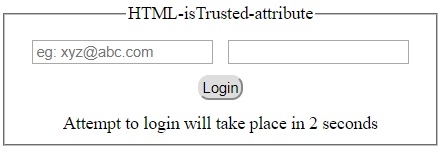
1) 在執行任何操作之前 -
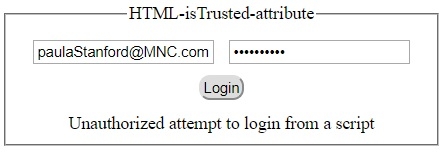
2) 透過指令碼單擊“登入”按鈕之後 -
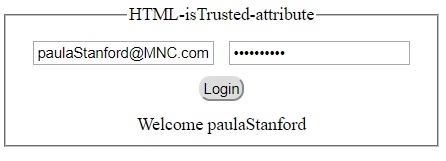
3) 透過使用者單擊“登入”按鈕之後 -

更新於: 19-Sep-2019
85 次瀏覽

廣告