
 資料結構
資料結構 網路
網路 RDBMS
RDBMS 作業系統
作業系統 Java
Java MS Excel
 iOS
iOS HTML
HTML CSS
CSS Android
 Python
 C 程式設計
 C++
C++ C#
C# MongoDB
 MySQL
MySQL Javascript
 PHP
PHP 物理學
物理學 化學
化學 生物學
生物學 數學
數學 英語
英語 經濟學
經濟學 心理學
心理學 社會學
社會學 時尚研究
時尚研究 法律研究
法律研究HTML DOM console.timeEnd() 方法
console.timeEnd() 方法用於停止計時器並顯示在 console.time() 和 console.timeEnd() 中程式碼完成執行所用的時間。這對於對程式碼部分進行計時以找出瓶頸所在非常有用。使用可選的 label 引數,我們可以指定要停止哪個計時器。
語法
以下是 console.timeEnd() 方法的語法 −
console.timeEnd(label);
其中,label 是用於指定要停止哪個計時器的可選引數。
示例
讓我們來看一個 console.timeEnd() 方法的示例 −
<!DOCTYPE html>
<html>
<body>
<h1>console.time() Method</h1>
<p>Click the below button to time the for,while and do-while loops for 100000 iterations </p>
<button type="button" onclick="LoopPerform()">TIMER</button>
<script>
   var i,j,k;
   i=0,j=0,k=0;
   function LoopPerform(){
      console.time("for-loop");
      for (; i < 100000; i++){}
         console.timeEnd("for-loop");
      console.time("while-loop");
      while(j<100000)
         j++;
      console.timeEnd("while-loop");
      console.time("do-while loop");
      do{k++;}
      while(k<100000);
      console.timeEnd("do-while loop");
   }
</script>
<p>Press F12 key to view the performance result in your console view</p>
</body>
</html>
輸出
這將生成以下輸出 −
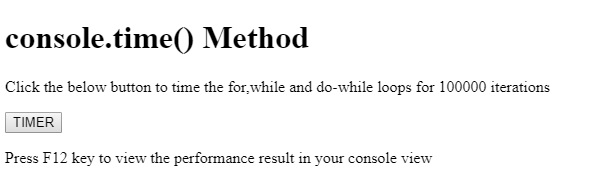
單擊計時器按鈕時 −
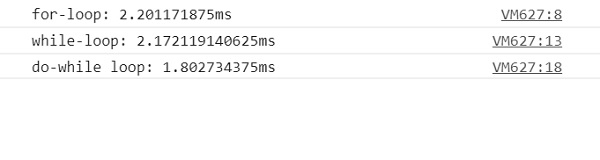
在以上的示例中 −
我們首先建立了一個計時器按鈕,當用戶單擊該按鈕時將執行 LoopPerform() 函式 −
</button type="button" onclick="LoopPerform()">TIMER</button>
函式 LoopPerform() 擁有在內部執行的 for、while 和 do-while 迴圈。總共有三個使用標籤“for 迴圈”、“while 迴圈”和“do-while 迴圈”建立的計時器,用於衡量三個迴圈的效能。
console.time() 方法啟動計時器,並獲取一個可選的標籤引數,以及計算在其內部執行程式碼時經過的時間。console.timeEnd() 方法用於停止計時器,並在控制檯中顯示結果。使用標籤作為 timeEnd() 方法中的引數,允許我們指定要停止哪個計時器 −
function LoopPerform(){
   console.time("for-loop");
   for (; i < 100000; i++){}
      console.timeEnd("for-loop");
   console.time("while-loop");
   while(j<100000)
      j++;
   console.timeEnd("while-loop");
   console.time("do-while loop");
   do{k++;}
   while(k<100000);
   console.timeEnd("do-while loop");
}

更新於: 2019 年 8 月 13 日
41 次瀏覽

廣告