
 資料結構
資料結構 網路
網路 關係資料庫管理系統
 作業系統
作業系統 Java
Java MS Excel
 iOS
iOS HTML
HTML CSS
CSS Android
 Python
 C 程式設計
 C++
C++ C#
C# MongoDB
 MySQL
MySQL Javascript
 PHP
PHP 物理學
物理學 化學
化學 生物學
生物學 數學
數學 英語
英語 經濟學
經濟學 心理學
心理學 社會學
社會學 時尚
時尚 法律
法律HTML DOM console.table() 方法
HTML DOM console.table() 方法用於將資料顯示在組織良好的表格格式中。此方法可以用於視覺化複雜陣列或物件。表的組織方式是陣列中的每個元素將成為表中的一行。它採用兩個引數 tabledata(必填)和 tablecolumns(可選)。
語法
以下是 console.table() 方法的語法 −
console.table( tabledata, tablecolumns );
此處 −
Tabledata 是必填的引數值。它表示用於填充表格的資料。它可以是物件型別或陣列型別。
Tablecolumns 是可選的引數值。它是一個數組引數,指定哪些列應顯示在表中。
示例
讓我們看一個 HTML DOM console.table() 方法的示例 −
<!DOCTYPE html>
<html>
<body>
<h1>console.table() Method</h1>
<p>Click on the below button to create a console table</p>
<button type="button" onclick="createTable()">TABLE</button>
<script>
   function createTable(){
      var fruit1 = { Name : "Mango", price : "100", color: "Yellow" }
      var fruit2 = { Name : "Guava", price : "50", color:"Green" }
      var fruit3 = { Name : "Strawberry", price : "150", color:"Red" }
      console.table([fruit1, fruit2, fruit3], ["Name","price"]);
   }
</script>
<p>View the table in the console tab</p>
</script>
</body>
</html>
輸出
這將生成以下輸出 −
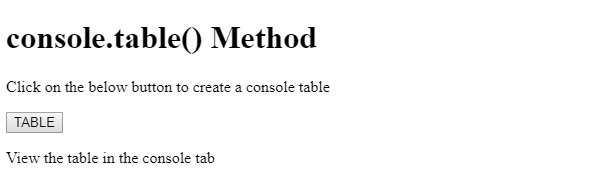
單擊 TABLE 按鈕並在控制檯選項卡中檢視 −
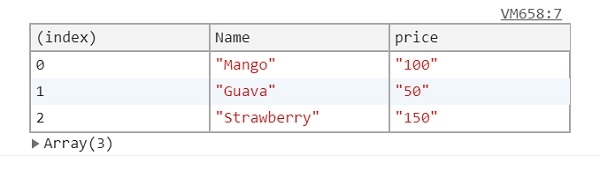
在上面的示例中 −
首先建立了一個按鈕 table,它會在使用者單擊後執行 createTable() 函式。
<button type="button" onclick="createTable()">TABLE</button>
createTable() 方法在其內部建立了三個物件陣列。這些物件陣列分別命名為 fruit1、fruit2 和 fruit3。然後,將這些物件陣列的名稱作為 table() 方法的第一個引數(tableData)傳遞給 console。
在第二個可選引數中,我們將要包含在表中的列的名稱作為陣列進行傳遞。由於我們指定了“Name”和“price”列,這些列將在表中顯示,並且不會有“color”列 −
function createTable(){
   var fruit1 = { Name : "Mango", price : "100", color: "Yellow" }
   var fruit2 = { Name : "Guava", price : "50", color:"Green" }
   var fruit3 = { Name : "Strawberry", price : "150", color:"Red" }
   console.table([fruit1, fruit2, fruit3], ["Name","price"]);
}

更新於: 08-Aug-2019
157 次瀏覽

廣告