
 資料結構
資料結構 網路
網路 關係資料庫管理系統 (RDBMS)
 作業系統
作業系統 Java
Java MS Excel
 iOS
iOS HTML
HTML CSS
CSS Android
 Python
 C語言程式設計
 C++
C++ C#
C# MongoDB
 MySQL
MySQL Javascript
 PHP
PHP 物理
物理 化學
化學 生物
生物 數學
數學 英語
英語 經濟學
經濟學 心理學
心理學 社會學
社會學 服裝設計
服裝設計 法學
法學如何在JavaFX中使文字在視窗寬度內換行?
在JavaFX中,文字節點由Javafx.scene.text.Text類表示。要在JavaFx視窗中插入/顯示文字,您需要:
例項化Text類。
使用setter方法或將它們作為引數傳遞給建構函式來設定基本屬性,例如位置和文字字串。
將建立的節點新增到Group物件。
如果傳遞的文字中行的長度超過視窗寬度,則部分文字將被截斷,如下所示:
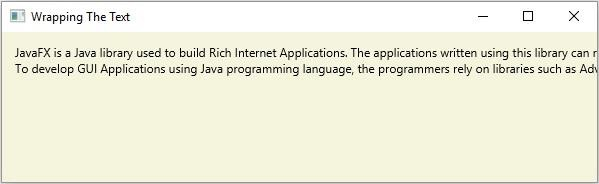
作為解決方案,您可以透過使用setWrappingWidth()方法為wrapping屬性設定值,從而在視窗寬度內換行。
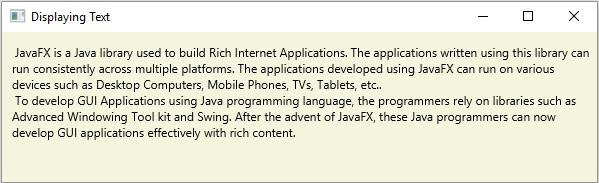
此方法接受一個雙精度值,表示文字的寬度(以畫素為單位)。如果您傳入的值小於視窗寬度,則文字將在其中(給定寬度)換行。
示例
import java.io.FileInputStream;
import java.io.FileNotFoundException;
import java.io.InputStream;
import java.util.Scanner;
import javafx.application.Application;
import javafx.scene.Group;
import javafx.scene.Scene;
import javafx.scene.paint.Color;
import javafx.stage.Stage;
import javafx.scene.text.Font;
import javafx.scene.text.FontPosture;
import javafx.scene.text.FontWeight;
import javafx.scene.text.Text;
public class WrappingTheText extends Application {
   public void start(Stage stage) throws FileNotFoundException {
      //Reading the contents of a text file.
      InputStream inputStream = new FileInputStream("D:\sample.txt");
      Scanner sc = new Scanner(inputStream);
      StringBuffer sb = new StringBuffer();
      while(sc.hasNext()) {
         sb.append(" "+sc.nextLine()+"\n");
      }
      //Creating a text object
      Text text = new Text(10.0, 25.0, sb.toString());
      //Wrapping the text
      text.setWrappingWidth(590);
      //Setting the stage
      Group root = new Group(text);
      Scene scene = new Scene(root, 595, 300, Color.BEIGE);
      stage.setTitle("Wrapping The Text");
      stage.setScene(scene);
      stage.show();
   }
   public static void main(String args[]){
      launch(args);
   }
}
sample.txt
假設以下是sample.txt檔案的內容:
JavaFX is a Java library used to build Rich Internet Applications. The applications written
using this library can run consistently across multiple platforms. The applications developed
using JavaFX can run on various devices such as Desktop Computers, Mobile Phones, TVs, Tablets, etc..
To develop GUI Applications using Java programming language, the programmers rely on libraries
such as Advanced Windowing Tool kit and Swing. After the advent of JavaFX, these Java programmers
can now develop GUI applications effectively with rich content.
輸出
Font Name: Brush Script MT
輸出

更新於:2020年4月14日
2K+瀏覽量

廣告