
 資料結構
資料結構 網路
網路 RDBMS
RDBMS 作業系統
作業系統 Java
Java MS Excel
 iOS
iOS HTML
HTML CSS
CSS Android
 Python
 C 程式設計
 C++
C++ C#
C# MongoDB
 MySQL
MySQL Javascript
 PHP
PHP 物理學
物理學 化學
化學 生物學
生物學 數學
數學 英語
英語 經濟學
經濟學 心理學
心理學 社會學
社會學 時尚學
時尚學 法學
法學如何等待 Selenium 中的元素不再存在?
我們可以在 Selenium webdriver 中等待一個元素不再存在。這可以透過 Selenium 中的同步來實現。我們將新增一個顯式等待條件,在那裡我們將停止或等待該元素不再存在於頁面上。
顯式等待時間過去後,如果元素的預期行為仍然不可用,將引發超時異常。要檢查一個元素是否不再存在於頁面上,我們可以藉助預期條件invisibilityOfElementLocated。
要實現顯式等待條件,我們必須藉助 WebDriverWait 和 ExpectedCondition 類。
示例
程式碼實現。
import org.openqa.selenium.By;
import org.openqa.selenium.WebDriver;
import org.openqa.selenium.WebElement;
import org.openqa.selenium.chrome.ChromeDriver;
import java.util.concurrent.TimeUnit;
import org.openqa.selenium.support.ui.ExpectedConditions;
import org.openqa.selenium.support.ui.WebDriverWait;
public class ElementInvisibleWait{
   public static void main(String[] args) {
      System.setProperty("webdriver.chrome.driver", "C:\Users\ghs6kor\Desktop\Java\chromedriver.exe");
      WebDriver driver = new ChromeDriver();
      driver.get("https://tutorialspoint.tw/index.htm");
      driver.manage().timeouts().implicitlyWait(3, TimeUnit.SECONDS);
      // identify element and click()
      driver.findElement(By.xpath("//*[text()='Library']")).click();
      // explicit wait of invisibility condition
      WebDriverWait w = new WebDriverWait(driver,5);
      // invisibilityOfElementLocated condition
      w.until(ExpectedConditions.
      invisibilityOfElementLocated(By.xpath("//*[@class='mui-btn']")));
      // get page title of next page
      System.out.println("Page title after click:" + driver.getTitle());
      driver.close()
   }
}
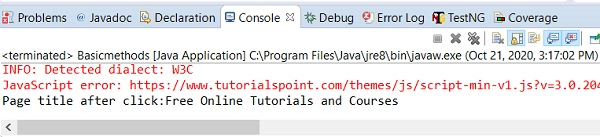
輸出

更新於:26-Oct-2020
7K+ 檢視

廣告