
 資料結構
資料結構 網路
網路 關係資料庫管理系統
 作業系統
作業系統 Java
Java MS Excel
 iOS
iOS HTML
HTML CSS
CSS Android
 Python
 C 程式設計
 C++
C++ C#
C# MongoDB
 MySQL
MySQL Javascript
 PHP
PHP 物理學
物理學 化學
化學 生物學
生物學 數學
數學 英語
英語 經濟學
經濟學 心理學
心理學 社會學
社會學 時尚研究
時尚研究 法律研究
法律研究如何使用 Python tkSimpleDialog.askstring?
在 Python 中,Tkinter 庫提供了一套強大的工具來構建 GUI,而 "tkSimpleDialog.askstring" 就是其中一個工具,它可以透過簡單的對話方塊來獲取使用者輸入。
瞭解 Tkinter 和簡單對話方塊
Tkinter 是 Python 的標準 GUI 工具包,它允許開發人員輕鬆建立桌面應用程式。它提供各種小部件,包括按鈕、標籤和輸入欄位,以構建互動式介面。Tkinter 的 tkSimpleDialog 模組專門專注於提供簡單的對話方塊以進行使用者互動,而 askstring 是它提供的函式之一。
開始使用 tkSimpleDialog.askstring
askstring 函式旨在透過對話方塊提示使用者輸入字串。讓我們從建立一個基本的 Tkinter 視窗並使用 askstring 獲取使用者輸入開始 -
示例
import tkinter as tk
from tkinter import simpledialog

# Create the main Tkinter window
root = tk.Tk()
root.title("tkSimpleDialog.askstring Example")
root.geometry("720x250")

# Function to show the string input dialog
def get_string_input():
   result = simpledialog.askstring("Input", "Enter a string:")
   if result:
      # Do something with the entered string
      print("Entered string:", result)

# Create a button that, when clicked, calls the get_string_input function
button = tk.Button(root, text="Get String Input", command=get_string_input)
button.pack(pady=20)

# Start the Tkinter event loop
root.mainloop()
輸出
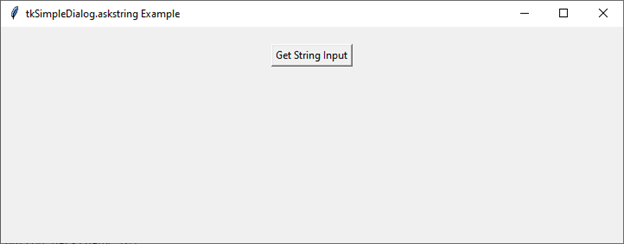
此程式碼設定了一個帶有按鈕的基本 Tkinter 視窗。當點選按鈕時,會呼叫 get_string_input 函式,該函式依次使用 askstring 顯示帶有指定提示(“輸入字串:”)的對話方塊。然後將輸入的字串列印到控制檯。
自定義對話方塊
askstring 函式允許您自定義對話方塊的各個方面,例如標題、提示和初始值。讓我們探討如何自定義這些引數 -
示例
import tkinter as tk
from tkinter import simpledialog

# Create the main Tkinter window
root = tk.Tk()
root.title("Customizing tkSimpleDialog.askstring")
root.geometry("720x250")

# Function to show the customized string input dialog
def get_custom_string_input():
   result = simpledialog.askstring(
      "Custom Input", "Enter your name:",
      initialvalue="TutorialsPoint.com"
   )
   if result:
      print("Entered name:", result)

# Create a button to call the get_custom_string_input function
button = tk.Button(
   root, text="Get Custom String Input",
   command=get_custom_string_input
)
button.pack(pady=20)

# Start the Tkinter event loop
root.mainloop()
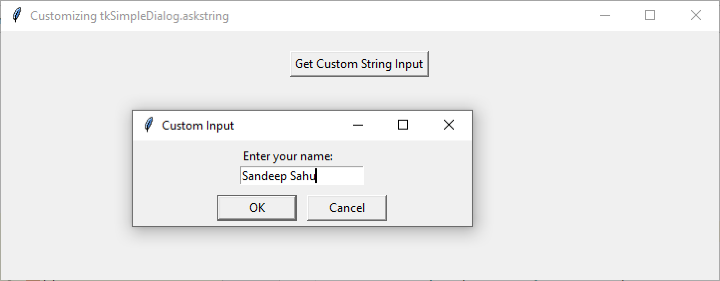
在此示例中,askstring 函式使用標題(“自定義輸入”)、提示(“輸入您的姓名:”)和初始值(“John Doe”)進行了自定義。這些自定義使對話方塊更符合應用程式的上下文。
輸出
執行此程式碼後,您將獲得以下輸出視窗 -
提供自定義字串輸入後,您可以將其列印到控制檯 -
Entered name: Sandeep Sahu
tkSimpleDialog.askstring 的實際應用
現在我們已經基本瞭解瞭如何使用 askstring,讓我們探討一下此函式的一些實際應用。
收集使用者憑據
請看以下示例 -
示例
import tkinter as tk
from tkinter import simpledialog

# Create the main Tkinter window
root = tk.Tk()
root.title("User Credentials Example")
root.geometry("720x250")

# Function to get username and password
def get_credentials():
   username = simpledialog.askstring(
      "Login",
      "Enter your username:"
   )
   if username:
      password = simpledialog.askstring(
         "Login", "Enter your password:",
         show="*"
      )
      if password:
         # Do something with the entered username and password
         print("Username:", username)
         print("Password:", password)

# Create a button to call the get_credentials function
button = tk.Button(root, text="Login", command=get_credentials)
button.pack(pady=20)

# Start the Tkinter event loop
root.mainloop()
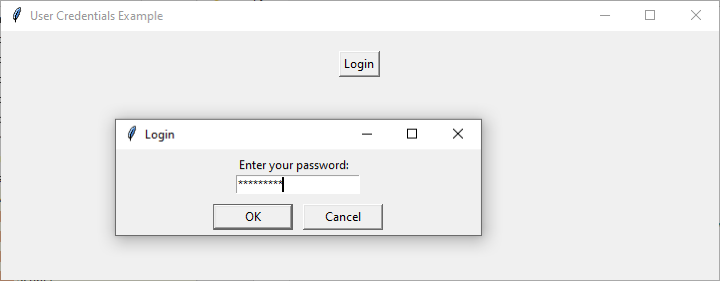
在此示例中,askstring 函式用於收集使用者名稱和密碼。show="*" 引數用於隱藏輸入的密碼字元,增強安全性。
輸出
執行此程式碼後,您將獲得以下輸出視窗 -
修改憑據後,您可以將修改後的詳細資訊列印到控制檯 -
Username: Arun Kumar
Password: HelloArun
接收使用者首選項或設定
請看以下示例 -
示例
import tkinter as tk
from tkinter import simpledialog

root = tk.Tk()
root.title("User Preferences Example")
root.geometry("720x250")

# Function to get user preferences
def get_preferences():
   # Get user's favorite color
   color = simpledialog.askstring(
      "Preferences", "Enter your favorite color:",
      initialvalue="Blue"
   )
   if color:
      # Get user's preferred font size
      font_size = simpledialog.askstring(
         "Preferences", "Enter your preferred font size:",
         initialvalue="12"
      )
      if font_size:
         # Do something with the entered preferences
         print("Favorite Color:", color)
         print("Preferred Font Size:", font_size)

# Create a button that, when clicked, calls the get_preferences function
button = tk.Button(root, text="Set Preferences", command=get_preferences)
button.pack(pady=20)

root.mainloop()
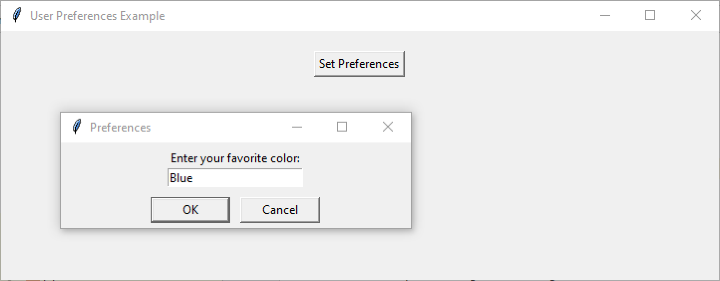
此示例演示瞭如何使用 askstring 收集使用者首選項,例如他們喜歡的顏色和首選字型大小。
輸出
執行此程式碼後,您將獲得以下輸出視窗 -
設定首選項後,您將在控制檯上列印修改後的設定 -
Favorite Color: Blue
Preferred Font Size: 20
結論
在本教程中,我們探討了 Python Tkinter 中 "tkSimpleDialog.askstring" 的用法。我們從基礎開始,瞭解如何建立簡單的字串輸入對話方塊,並逐步轉向自定義選項。
透過提供實際示例,我們展示了askstring在收集各種型別使用者輸入方面的多功能性,從簡單的字串到敏感資訊(如密碼)。

1K+ 閱讀量
