
 資料結構
資料結構 網路
網路 關係型資料庫管理系統
 作業系統
作業系統 Java
Java MS Excel
 iOS
iOS HTML
HTML CSS
CSS Android
 Python
 C 程式設計
 C++
C++ C#
C# MongoDB
 MySQL
MySQL Javascript
 PHP
PHP 物理學
物理學 化學
化學 生物學
生物學 數學
數學 英語
英語 經濟學
經濟學 心理學
心理學 社會學
社會學 時尚研究
時尚研究 法律研究
法律研究如何使用 C++ 在 OpenCV 中跟蹤面部位置?
當我們想要跟蹤面部位置時,最好用橢圓框住面部,因為橢圓有一箇中心。這個中心也是檢測面部的中心點。由此,跟蹤檢測面部的定位變得更準確。
以下程式會跟蹤檢測面部的中心,並在控制檯視窗中顯示位置 −
示例
#include<iostream>
#include<opencv2/highgui/highgui.hpp>
#include<opencv2/imgproc/imgproc.hpp>
//This header includes definition of 'rectangle()' function//
#include<opencv2/objdetect/objdetect.hpp>
//This header includes the definition of Cascade Classifier//
#include<string>
using namespace std;
using namespace cv;
int main(int argc, char** argv){
   Mat image_with_humanface;//Declaring a matrix to load image with human faces//
   image_with_humanface = imread("person.jpg");//loading an image that contains human face in it//
   namedWindow("Face Detection");//Declaring an window to show the result//
   string trained_classifier_location = "C:/opencv/sources/data/haarcascades/haarcascade_frontalface_alt.xml";//Defining the location our XML Trained Classifier in a string//
   CascadeClassifier faceDetector;//Declaring an object named 'face detector' of CascadeClassifier class//
   faceDetector.load(trained_classifier_location);//loading the XML trained classifier in the object//
   vector<Rect>faces;//Declaring a rectangular vector named faces//
   faceDetector.detectMultiScale(image_with_humanface, faces, 1.1, 4, CASCADE_SCALE_IMAGE,Size(20,20));//Detecting the faces in 'image_with_humanfaces' matrix//
   for (int i = 0; i < faces.size(); i++){ //Initiating for loop to detect the largest face//
      Point center(faces[i].x + faces[i].width * 0.5, faces[i].y + faces[i].height * 0.5);//getting the center of the face//
      ellipse(image_with_humanface, center, Size(faces[i].width * 0.5, faces[i].height * 0.5), 0, 0, 360, Scalar(255, 0, 255), 4, 8, 0);//draw an ellipse on the face//
      int horizontal = (faces[i].x + faces[i].width * 0.5);//Getting the horizontal value of coordinate//
      int vertical = (faces[i].y + faces[i].width * 0.5);//Getting the vertical value of coordinate//
   }
   cout << "Position of the face is at(x,y)=" << " ("<<CAP_PROP_XI_DECIMATION_HORIZONTAL<<","<<CAP_PROP_XI_DECIMATION_VERTICAL<<")"<< endl;//
   imshow("Face Detection", image_with_humanface);//Showing the largest face face//
   waitKey(0);//To wait for keystroke to terminate the program
   return 0;
}
輸出
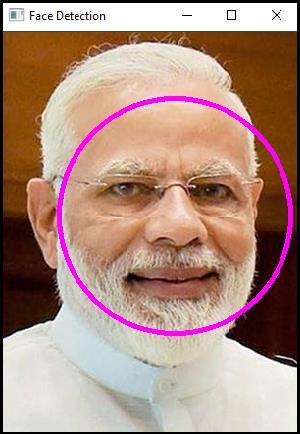

更新於: 10-Mar-2021
289 瀏覽

廣告