
 資料結構
資料結構 網路
網路 關係型資料庫管理系統
 作業系統
作業系統 Java
Java MS Excel
 iOS
iOS HTML
HTML CSS
CSS Android
 Python
 C程式設計
C程式設計 C++
C++ C#
C# MongoDB
 MySQL
MySQL Javascript
 PHP
PHP 物理學
物理學 化學
化學 生物學
生物學 數學
數學 英語
英語 經濟學
經濟學 心理學
心理學 社會學
社會學 服裝學
服裝學 法學
法學如何使用C++在OpenCV獲取FPS值?
為了獲取FPS值,我們使用了'get()'命令和'CAP_PROP_FPS'作為'get()'的引數。此引數以整數形式返回FPS。
在程式開始時,我們定義了一個名為'FPS'的整型變數。然後我們使用 FPS = cap.get(CAP_PROP_FPS); 將FPS值儲存在該變數中。
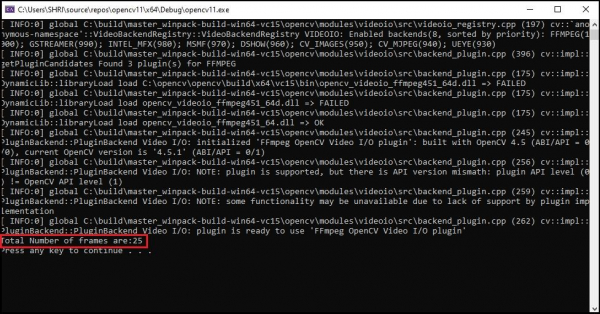
以下程式獲取影片的FPS並將其顯示在控制檯視窗中。
範例
#include<opencv2/opencv.hpp>//OpenCV header to use VideoCapture class//
#include<iostream>
using namespace std;
using namespace cv;
int main() {
   int FPS;//Declaring an integer variable to store the number of total frames//
   VideoCapture cap("video1.mp4");//Declaring an object to capture stream of frames from default camera//
   FPS = cap.get(CAP_PROP_FPS);//Getting the total number of frames//
   cout << "Total Number of frames are:" << FPS << endl;//Showing the number in console window//
   system("pause");//Pausing the system to see the result
   cap.release();//Releasing the buffer memory//
   return 0;
}
啟動此程式後,我們將在控制檯視窗中獲取FPS值。
輸出

更新於:10-Mar-2021
1k+ 瀏覽

廣告