
 資料結構
資料結構 網路
網路 關係資料庫管理系統
 作業系統
作業系統 Java
Java MS Excel
 iOS
iOS HTML
HTML CSS
CSS Android
 Python
 C 程式設計
 C++
C++ C#
C# MongoDB
 MySQL
MySQL Javascript
 PHP
PHP 物理學
物理學 化學
化學 生物學
生物學 數學
數學 英語
英語 經濟學
經濟學 心理學
心理學 社會學
社會學 服裝設計
服裝設計 法律研究
法律研究如何在 Ubuntu 上使用 Pydio 設定自己的檔案伺服器
在本文中,我們將學習如何使用 Pydio 託管檔案共享伺服器,它可以在沒有強大硬體的情況下執行良好。我們將安裝社群版,但如果我們使用企業許可證,則對於少於 10 人的團隊是免費的。
Pydio 是一款類似 Dropbox 的實用程式,允許檔案共享。Pydio 與其他檔案同步服務一樣,擁有良好的功能,包括 Web 介面、Mac、Windows 和 Linux 的原生客戶端、IOS 和 Android 的移動客戶端。它能夠與公眾中的其他 Pydio 使用者共享檔案。
先決條件
- 無 root 許可權的使用者
- 已安裝 Apache 以及 LAMP,併為訪問設定了 https
- 如果公開暴露,則需要一個 FQDN。
- 已安裝 Postfix。
安裝 Pydio
我們將使用以下命令安裝所有依賴項和 Pydio,在此之前,我們需要更新機器。下載 Pydio 並解壓縮它,然後將程式碼移動到 Apache 中的預設資料夾。
$ sudo apt-get update
$ sudo apt-get install php5 libapache2-mod-php5
sudo apt-get install php5 libapache2-mod-php5
Reading package lists... Done
Building dependency tree
Reading state information... Done
libapache2-mod-php5 is already the newest version.
php5 is already the newest version.
The following packages were automatically installed and are no longer required:
libntdb1 python-ntdb
Use 'apt-get autoremove' to remove them.
0 upgraded, 0 newly installed, 0 to remove and 3 not upgraded.
root@ubuntu:~# sudo apt-get remove php5 libapache2-mod-php5
Reading package lists... Done
Building dependency tree
Reading state information... Done
The following packages were automatically installed and are no longer required:
libntdb1 python-ntdb
Use 'apt-get autoremove' to remove them.
The following extra packages will be installed:
libapache2-mod-php5filter
Suggested packages:
php-pear
The following packages will be REMOVED:
libapache2-mod-php5 php5
The following NEW packages will be installed:
libapache2-mod-php5filter
0 upgraded, 1 newly installed, 2 to remove and 3 not upgraded.
Need to get 2,205 kB of archives.
After this operation, 33.8 kB disk space will be freed.
Do you want to continue? [Y/n] y
Get:1 http://us.archive.ubuntu.com/ubuntu/ trusty-updates/universe libapache2-mod-php5filter amd64 5.5.9+dfsg-1ubuntu4.17 [2,205 kB]
Fetched 2,205 kB in 5s (370 kB/s)
(Reading database ... 201552 files and directories currently installed.)
Removing php5 (5.5.9+dfsg-1ubuntu4.17) ...
dpkg: libapache2-mod-php5: dependency problems, but removing anyway as you requested:
phpmyadmin depends on libapache2-mod-php5 | libapache2-mod-php5filter | php5-cgi | php5-fpm | php5; however:
Package libapache2-mod-php5 is to be removed.
Package libapache2-mod-php5filter is not installed.
Package php5-cgi is not installed.
Package php5-fpm is not installed.
Package php5 is not installed.
apache2_invoke prerm: Disable module php5
* Restarting web server apache2 AH00558: apache2: Could not reliably determine the server's fully qualified domain name, using 127.0.1.1. Set the 'ServerName' directive globally to suppress this message
[ OK ]
Selecting previously unselected package libapache2-mod-php5filter.
(Reading database ... 201540 files and directories currently installed.)
Preparing to unpack .../libapache2-mod-php5filter_5.5.9+dfsg-1ubuntu4.17_amd64.deb ...
Unpacking libapache2-mod-php5filter (5.5.9+dfsg-1ubuntu4.17) ...
Setting up libapache2-mod-php5filter (5.5.9+dfsg-1ubuntu4.17) ...
..
..
Creating config file /etc/php5/apache2filter/php.ini with new version
..
..
* Restarting web server apache2 AH00558: apache2: Could not reliably determine the server's fully qualified domain name, using 127.0.1.1. Set the 'ServerName' directive globally to suppress this message
[ OK ]
root@ubuntu:~# sudo apt-get install php5 libapache2-mod-php5
Reading package lists... Done
Building dependency tree
Reading state information... Done
The following packages were automatically installed and are no longer required:
libntdb1 python-ntdb
Use 'apt-get autoremove' to remove them.
Suggested packages:
php-pear
The following packages will be REMOVED:
libapache2-mod-php5filter
The following NEW packages will be installed:
libapache2-mod-php5 php5
0 upgraded, 2 newly installed, 1 to remove and 3 not upgraded.
Need to get 0 B/2,213 kB of archives.
After this operation, 33.8 kB of additional disk space will be used.
Do you want to continue? [Y/n] y
Selecting previously unselected package php5.
(Reading database ... 201551 files and directories currently installed.)
Preparing to unpack .../php5_5.5.9+dfsg-1ubuntu4.17_all.deb ...
Unpacking php5 (5.5.9+dfsg-1ubuntu4.17) ...
dpkg: libapache2-mod-php5filter: dependency problems, but removing anyway as you requested:
phpmyadmin depends on libapache2-mod-php5 | libapache2-mod-php5filter | php5-cgi | php5-fpm | php5; however:
Package libapache2-mod-php5 is not installed.
Package libapache2-mod-php5filter is to be removed.
Package php5-cgi is not installed.
Package php5-fpm is not installed.
Package php5 is not configured yet.
apache2_invoke prerm: Disable module php5filter
* Restarting web server apache2 AH00558: apache2: Could not reliably determine the server's fully qualified domain name, using 127.0.1.1. Set the 'ServerName' directive globally to suppress this message
[ OK ]
Selecting previously unselected package libapache2-mod-php5.
(Reading database ... 201548 files and directories currently installed.)
Preparing to unpack .../libapache2-mod-php5_5.5.9+dfsg-1ubuntu4.17_amd64.deb ...
Unpacking libapache2-mod-php5 (5.5.9+dfsg-1ubuntu4.17) ...
Setting up libapache2-mod-php5 (5.5.9+dfsg-1ubuntu4.17) ...
* Restarting web server apache2 AH00558: apache2: Could not reliably determine the server's fully qualified domain name, using 127.0.1.1. Set the 'ServerName' directive globally to suppress this message
[ OK ]
Setting up php5 (5.5.9+dfsg-1ubuntu4.17) ...
$ wget https://download.pydio.com/641qt8npdernapoevdm/pydio-enterprise-6.4.1.tar.gz
wget -P ~/ http://vorboss.dl.sourceforge.net/project/ajaxplorer/pydio/stable-channel/6.2.2/pydio-core-6.2.2.tar.gz
--2016-06-02 09:17:35-- http://vorboss.dl.sourceforge.net/project/ajaxplorer/pydio/stable-channel/6.2.2/pydio-core-6.2.2.tar.gz
Resolving vorboss.dl.sourceforge.net (vorboss.dl.sourceforge.net)... 5.10.152.194
Connecting to vorboss.dl.sourceforge.net (vorboss.dl.sourceforge.net)|5.10.152.194|:80... connected.
HTTP request sent, awaiting response... 200 OK
Length: 15735734 (15M) [application/x-gzip]
Saving to: ‘/root/pydio-core-6.2.2.tar.gz.1’
100%[======================================>] 1,57,35,734 917KB/s in 28s
2016-06-02 09:18:03 (549 KB/s) - ‘/root/pydio-core-6.2.2.tar.gz.1’ saved [15735734/15735734]
$ tar -xvzf ~/pydio-enterprise-6.4.1.tar.gz
$ sudo mv ~/pydio-core-6.4.1 /var/www/pydio
更改資料夾許可權為 Apache,以便我們可以儲存資料並更新配置檔案
$ sudo chown -R www-data:www-data /var/www/pydio
設定 PHP 模組以執行 Pydio
安裝一些 PHP 模組以工作
$ sudo apt-get install php5-mcrypt php5-gd php5-sqlite
預設情況下,mcrypt 未啟用,可以使用 phpenmod 啟用它
$ sudo php5enmod mcrypt
為了使同步客戶端工作,我們需要啟用並安裝 a2enmod
$ sudo a2enmod rewrite
我們需要修改 php.ini 檔案,並且需要更新這些行
$ sudo vi /etc/php5/apache2/php.ini
找到 output_buffering = 4096 的行,並將其更改為 off
; Default Value: Off
; Development Value: 4096
; Production Value: 4096
; https://php.net.tw/output-buffering
output_buffering = Off
我們還需要修改 upload_max_filesize = 2M,並將 2M 更改為任何較大的數字,例如 1G
; Maximum allowed size for uploaded files.
; https://php.net.tw/upload-max-filesize
upload_max_filesize = 1G
此外,我們還需要更改 post_max_size
; Maximum size of POST data that PHP will accept.
; Its value may be 0 to disable the limit. It is ignored if POST data reading
; is disabled through enable_post_data_reading.
; https://php.net.tw/post-max-size
post_max_size = 1G
儲存檔案並重新啟動。
為 Pydio 配置 Apache
在 /etc/apache2/sites-available 中建立一個新檔案 pydio.conf
$ sudo nano /etc/apache2/sites-available/pydio.conf
<VirtualHost *:80>
   ServerAdmin pydio@localhost.localdomain.com
   ServerName 192.168.100.111
   DocumentRoot /var/www/pydio
   ErrorLog ${APACHE_LOG_DIR}/pydio-error.log
   CustomLog ${APACHE_LOG_DIR}/pydio-access.log combined
   <Directory /var/www/pydio/>
      AllowOverride All
   </Directory>
</VirtualHost>
我們將停用預設的 Apache 配置。
$ sudo a2dissite 000-default
我們需要啟用兩個配置檔案
$ sudo a2ensite pydio
重新啟動 apache 服務
$ sudo service apache2 restart
自定義 PHP 郵件傳送器以支援 Pydio。
我們需要編輯 Postfix 配置檔案 /etc/postfix/main.cf
$ sudo nano /etc/postfix/main.cf
搜尋 inet_interfaces,並使用你的本地主機更新所有內容
mailbox_size_limit = 0
recipient_delimiter = +
inet_interfaces = all
inet_protocols = all
重新啟動 Postifx 服務
$ sudo service postfix restart
完成 Pydio 設定
在我們完成 Pydio 設定後,我們將透過瀏覽器使用 https://伺服器系統的 IP 地址訪問它。第一個頁面將使用診斷工具對機器進行診斷,然後點選“點選此處繼續到 Pydio”

它將啟動 Pydio 歡迎螢幕

點選“開始嚮導”按鈕,並在欄位中提供資訊

應用程式標題,它將顯示在瀏覽器的標題欄中
歡迎訊息,顯示在登入螢幕上。
管理員登入,管理員的登入使用者名稱。
管理員顯示名稱,這將是管理員的顯示名稱。
管理員密碼,提供管理員密碼。
點選螢幕底部的“>>”按鈕繼續。
在進入資料庫連線之前,我們需要在 MySql 中為 Pydio 建立一個數據庫和使用者
$ sudo mysql -uroot -p
mysql> create database pydio;
Query OK, 1 row affected (0.00 sec)
mysql> CREATE user 'pydio'@'localhost' IDENTIFIED BY 'pydio1234';
Query OK, 0 rows affected (0.00 sec)
mysql> GRANT ALL privileges ON pydio.* TO 'pydio'@'localhost';
Query OK, 0 rows affected (0.01 sec)
mysql> \q
下一頁將找到資料庫連線設定,從資料庫下拉選單中選擇 Sqlite 3。點選“測試連線”按鈕以測試一切是否正常。
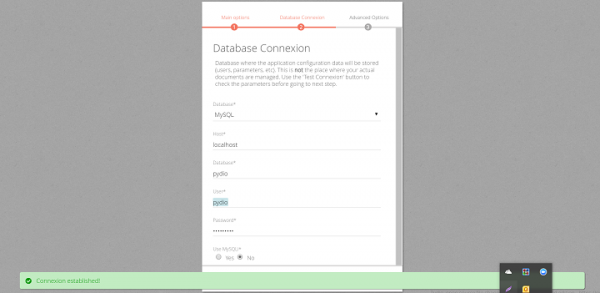
然後點選“>”按鈕繼續。
在頁面上的高階選項中,我們需要啟用電子郵件支援。
要啟用電子郵件,我們從選單中選擇“是”。
要使用 PHP 郵件傳送器,請選擇“郵件”。
提供管理員電子郵件的電子郵件地址。
我們可以使用“嘗試使用配置的資料傳送電子郵件”按鈕檢查傳送配置資料的電子郵件,以確保配置正常工作。

最後,點選“安裝 Pydio”按鈕。
訪問 Pydio
我們可以使用 http://IP 地址從瀏覽器訪問 Pydio。

我們可以使用以下連結下載客戶端。
IOS 客戶端:https://itunes.apple.com
Android 客戶端:https://play.google.com
當我們安裝 Pydio 客戶端時,它允許你分別選擇和同步每個工作區。當我們第一次執行客戶端設定時,可以選擇與本地資料夾同步的內容。設定同步後,我們以後可以新增工作區。
透過此設定和配置,我們可以擁有自己的檔案伺服器,例如 Dropbox 或任何其他線上儲存等,使用 Pydio 透過原生客戶端和主要桌面控制你的資料,資料可以在我們任何需要的時候訪問。

95 次瀏覽
