
 資料結構
資料結構 網路
網路 關係型資料庫管理系統
 作業系統
作業系統 Java
Java MS Excel
 iOS
iOS HTML
HTML CSS
CSS Android
 Python
 C 程式設計
 C++
C++ C#
C# MongoDB
 MySQL
MySQL Javascript
 PHP
PHP 物理學
物理學 化學
化學 生物學
生物學 數學
數學 英語
英語 經濟學
經濟學 心理學
心理學 社會學
社會學 時尚研究
時尚研究 法律研究
法律研究如何在 Ubuntu 16.04 上安裝和設定 Cacti
Cacti 是一款網路監控裝置,可以建立伺服器效率的個性化圖表。可以透過線上入口-終點進行訪問和管理。本文介紹瞭如何在 Ubuntu 上安裝和設定 Cacti。
先決條件
- LAMP
- SNMP、SNMPD 和 RRDtools
要安裝 LAMP,請新增以下儲存庫,如下所示:
$ sudo add-apt-repository 'deb http://archive.ubuntu.com/ubuntu trusty universe'
要更新軟體包,請使用以下命令:
$ sudo apt-get update
要安裝 LAMP,請使用以下命令:
$ sudo apt-get install apache2 mysql-server-5.6 php libapache2-mod-php
示例輸出應如下所示:
Reading package lists... Done
Building dependency tree
Reading state information... Done
libapache2-mod-php is already the newest version (1:7.0+35ubuntu6).
php is already the newest version (1:7.0+35ubuntu6).
apache2 is already the newest version (2.4.18-2ubuntu3.1).
The following packages were automatically installed and are no longer required:
   libevent-core-2.0-5 linux-headers-4.4.0-31 linux-headers-4.4.0-31-generic
   linux-image-4.4.0-31-generic linux-image-extra-4.4.0-31-generic
   linux-signed-image-4.4.0-31-generic
Use 'sudo apt autoremove' to remove them.
The following additional packages will be installed:
   libdbd-mysql-perl libdbi-perl libmysqlclient20 libterm-readkey-perl
   mysql-client-5.6 mysql-client-core-5.6 mysql-server-core-5.6
Suggested packages:
   libmldbm-perl libnet-daemon-perl libsql-statement-perl mailx tinyca
The following packages will be REMOVED:
........................................................................
安裝過程中,將提示您設定 MySQL 伺服器 root 密碼,如下所示:

要安裝 SNMP、SNMPD 和 RRDtools,請使用以下命令:
$ sudo apt-get install snmp snmpd rrdtool
示例輸出應如下所示:
Building dependency tree
Reading state information... Done
The following packages were automatically installed and are no longer required:
   libaio1 libdbd-mysql-perl libdbi-perl libevent-core-2.0-5 libmysqlclient20
   libterm-readkey-perl linux-headers-4.4.0-31 linux-headers-4.4.0-31-generic
   linux-image-4.4.0-31-generic linux-image-extra-4.4.0-31-generic
   linux-signed-image-4.4.0-31-generic mysql-client-5.6 mysql-client-core-5.6
   mysql-server-core-5.6
Use 'sudo apt autoremove' to remove them.
The following additional packages will be installed:
   libdbi1 librrd4
Suggested packages:
   librrds-perl snmptrapd
The following NEW packages will be installed:
   libdbi1 librrd4 rrdtool snmp snmpd
0 upgraded, 5 newly installed, 0 to remove and 19 not upgraded.
7 not fully installed or removed.
Need to get 775 kB of archives.
After this operation, 2,464 kB of additional disk space will be used.
Do you want to continue? [Y/n] y
Get:1 http://in.archive.ubuntu.com/ubuntu xenial/main amd64 libdbi1 amd64 0.9.0-4 [27.8 kB]
Get:2 http://in.archive.ubuntu.com/ubuntu xenial/main amd64 librrd4 amd64 1.5.5-4 [180 kB]
Get:3 http://in.archive.ubuntu.com/ubuntu xenial/main amd64 snmp amd64 5.7.3+dfsg-1ubuntu4 [154 kB]
Get:4 http://in.archive.ubuntu.com/ubuntu xenial/main amd64 snmpd amd64 5.7.3+dfsg-1ubuntu4 [57.1 kB]
Get:5 http://in.archive.ubuntu.com/ubuntu xenial/main amd64 rrdtool amd64 1.5.5-4 [356 kB]
.....................................................................................
要安裝 Cacti,請使用以下命令:
$sudo apt-get install snmpd cacti cacti-spine
在安裝過程中,將提示您設定 Web 伺服器,如下面的螢幕截圖所示。

選擇 Apache2 並透過按 Enter 鍵單擊確定按鈕。要配置資料庫配置,它將顯示如下螢幕。

單擊“是”按鈕後,它將提示您輸入資料庫密碼,如下所示。

輸入您在安裝 LAMP 時提供的先前資料庫密碼,然後單擊“確定”按鈕。現在開啟您喜歡的瀏覽器並輸入以下 URL,如下所示。
https:///cacti/install/
示例輸出應如下所示。

單擊“下一步”按鈕,繼續進行 **cacti** 安裝。接下來的步驟應如下所示
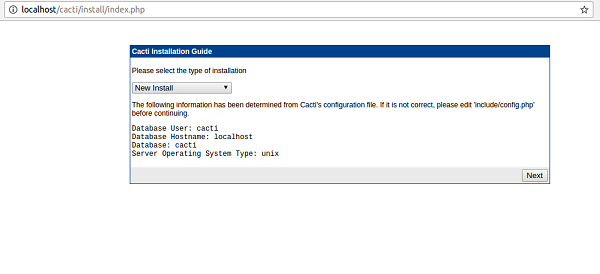
如果您是新安裝程式,請單擊“下一步”按鈕,否則更改配置並單擊“下一步”按鈕。接下來的步驟應如下所示。

在上述步驟中,它包含有關檔案路徑的資訊。現在單擊“完成”按鈕。接下來的步驟應如下所示。
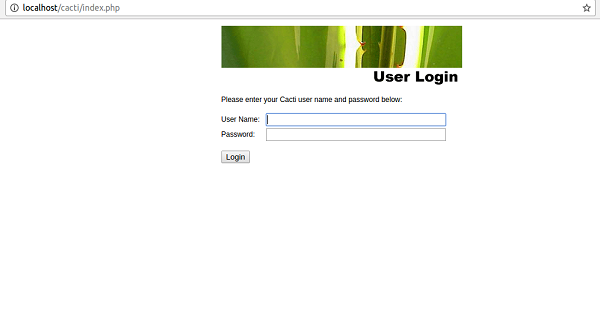
現在輸入預設使用者名稱和密碼,如下所示
User name :admin
Password: admin
現在單擊登入按鈕,然後它將提示您更改密碼,如下所示:

現在輸入新密碼並單擊儲存按鈕。以下是作為下一步出現的螢幕截圖,看起來如下所示:
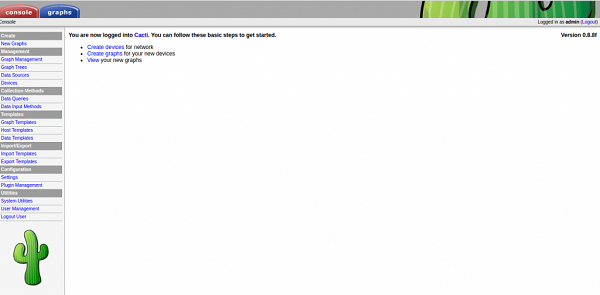
要建立圖表,請單擊“新建圖表”按鈕,如下所示:
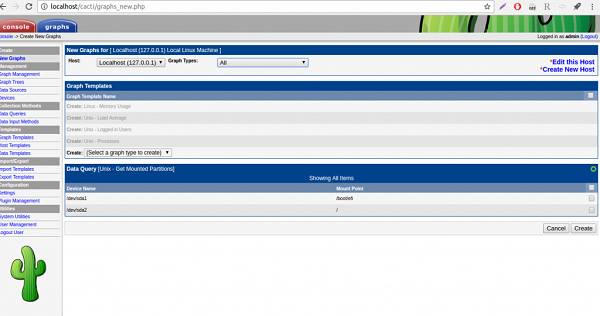
根據需求選擇選項並單擊“建立”按鈕。
在本文中,我們學習瞭如何在 Ubuntu 16.04 上安裝和設定 Cacti,我們將推出更多基於 Linux 的技巧和提示。請繼續關注!

319 次瀏覽
