
 資料結構
資料結構 網路
網路 關係資料庫管理系統
 作業系統
作業系統 Java
Java MS Excel
 iOS
iOS HTML
HTML CSS
CSS Android
 Python
 C 程式設計
 C++
C++ C#
C# MongoDB
 MySQL
MySQL Javascript
 PHP
PHP 物理學
物理學 化學
化學 生物學
生物學 數學
數學 英語
英語 經濟學
經濟學 心理學
心理學 社會科學
社會科學 時裝研究
時裝研究 法律研究
法律研究如何在 JTextPane 中為不同的單詞設定前景顏色
要為不同的單詞設定前景顏色,請使用 SimpleAttributeSet 和 StyleConstants 類。同時,還使用 StyledDocument 類來設定不同的單詞樣式。對於不同的單詞,請使用 insertString()。
首先,建立一個新的 JTextPane -
At first, create a new JTextPane:
JTextPane pane = new JTextPane();
現在,使用這些類為某些單詞設定樣式和顏色 −
StyledDocument doc = textPane.getStyledDocument();
Style style = textPane.addStyle("", null);
StyleConstants.setForeground(style, Color.red);
StyleConstants.setBackground(style, Color.white);
doc.insertString(doc.getLength(), "Game of Thrones ", style);
現在,以不同的方式調整其他一些單詞的樣式 −
StyleConstants.setForeground(style, Color.yellow);
StyleConstants.setBackground(style, Color.gray);
doc.insertString(doc.getLength(), "Season 8", style);
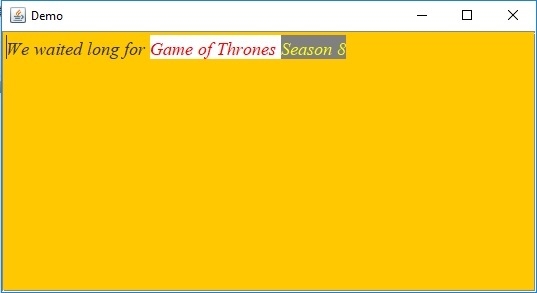
以下是一個示例,說明如何在 JTextPane 中為不同的單詞設定前景顏色 −
示例
package my;
import java.awt.BorderLayout;
import java.awt.Color;
import java.awt.Container;
import java.awt.Font;
import javax.swing.JFrame;
import javax.swing.JScrollPane;
import javax.swing.JTextPane;
import javax.swing.text.BadLocationException;
import javax.swing.text.SimpleAttributeSet;
import javax.swing.text.Style;
import javax.swing.text.StyleConstants;
import javax.swing.text.StyledDocument;
public class SwingDemo {
   public static void main(String args[]) throws BadLocationException {
      JFrame frame = new JFrame("Demo");
      frame.setDefaultCloseOperation(JFrame.EXIT_ON_CLOSE);
      Container container = frame.getContentPane();
      JTextPane textPane = new JTextPane();
      textPane.setBackground(Color.orange);
      SimpleAttributeSet attributeSet = new SimpleAttributeSet();
      StyleConstants.setItalic(attributeSet, true);
      textPane.setCharacterAttributes(attributeSet, true);
      textPane.setText("We waited long for ");
      Font font = new Font("Serif", Font.ITALIC, 18);
      textPane.setFont(font);
      StyledDocument doc = textPane.getStyledDocument();
      Style style = textPane.addStyle("", null);
      StyleConstants.setForeground(style, Color.red);
      StyleConstants.setBackground(style, Color.white);
      doc.insertString(doc.getLength(), "Game of Thrones ", style);
      StyleConstants.setForeground(style, Color.yellow);
      StyleConstants.setBackground(style, Color.gray);
      doc.insertString(doc.getLength(), "Season 8", style);
      JScrollPane scrollPane = new JScrollPane(textPane);
      container.add(scrollPane, BorderLayout.CENTER);
      frame.setSize(550, 300);
      frame.setVisible(true);
   }
}
輸出

更新於:2019 年 7 月 30 日
1000+ 瀏覽量

廣告