
 資料結構
資料結構 網路
網路 關係型資料庫管理系統
 作業系統
作業系統 Java
Java MS Excel
 iOS
iOS HTML
HTML CSS
CSS Android
 Python
 C 語言程式設計
 C++
C++ C#
C# MongoDB
 MySQL
MySQL Javascript
 PHP
PHP 物理
物理 化學
化學 生物
生物 數學
數學 英語
英語 經濟學
經濟學 心理學
心理學 社會學
社會學 時尚研究
時尚研究 法學
法學如何在 Java 中設定 JTextPane 的樣式?
如要設定 JTextPane 中文字的樣式,請使用 setItalic() 或 setBold(),分別設定字型為斜體或粗體樣式。
以下為我們的 JTextPane 元件 -
JTextPane pane = new JTextPane();
現在,使用 StyleConstants 類設定我們在上面建立的 JTextPane 的樣式。我們還設定了背景色和前景色 -
SimpleAttributeSet attributeSet = new SimpleAttributeSet();
StyleConstants.setItalic(attributeSet, true);
StyleConstants.setForeground(attributeSet, Color.black);
StyleConstants.setBackground(attributeSet, Color.orange);
pane.setCharacterAttributes(attributeSet, true);
以下是一個設定 JTextPane 樣式的示例 -
示例
package my;
import java.awt.BorderLayout;
import java.awt.Color;
import java.awt.Container;
import javax.swing.JFrame;
import javax.swing.JScrollPane;
import javax.swing.JTextPane;
import javax.swing.text.BadLocationException;
import javax.swing.text.SimpleAttributeSet;
import javax.swing.text.StyleConstants;
public class SwingDemo {
   public static void main(String args[]) throws BadLocationException {
      JFrame frame = new JFrame("Demo");
      frame.setDefaultCloseOperation(JFrame.EXIT_ON_CLOSE);
      Container container = frame.getContentPane();
      JTextPane pane = new JTextPane();
      SimpleAttributeSet attributeSet = new SimpleAttributeSet();
      StyleConstants.setItalic(attributeSet, true);
      StyleConstants.setForeground(attributeSet, Color.black);
      StyleConstants.setBackground(attributeSet, Color.orange);
      pane.setCharacterAttributes(attributeSet, true);
      pane.setText("We are learning Java and this is a demo text!");
      JScrollPane scrollPane = new JScrollPane(pane);
      container.add(scrollPane, BorderLayout.CENTER);
      frame.setSize(550, 300);
      frame.setVisible(true);
   }
}
輸出
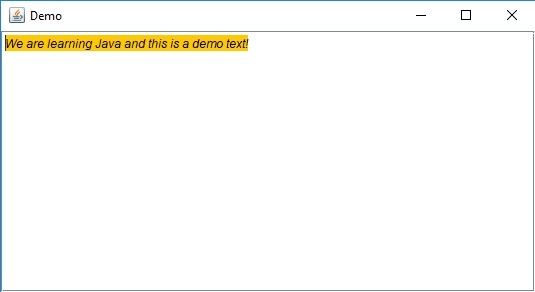

更新時間: 2019-07-30
837 次瀏覽

廣告