
 資料結構
資料結構 網路
網路 RDBMS
RDBMS 作業系統
作業系統 Java
Java MS Excel
 iOS
iOS HTML
HTML CSS
CSS Android
 Python
 C 程式設計
 C++
C++ C#
C# MongoDB
 MySQL
MySQL Javascript
 PHP
PHP 物理學
物理學 化學
化學 生物學
生物學 數學
數學 英語
英語 經濟學
經濟學 心理學
心理學 社會學
社會學 時尚研究
時尚研究 法律研究
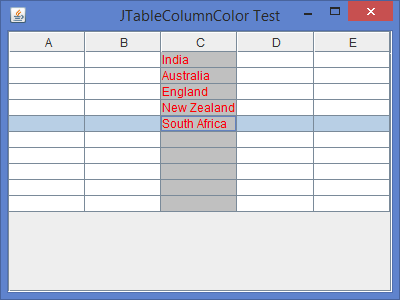
法律研究如何在 Java 中為 JTable 的各列設定背景/前景顏色?
JTable 是 JComponent 類的子類,用於展示覆雜資料結構。JTable 元件可以遵循 模型檢視控制器(MVC)設計模式,將資料呈現在行和列中。JTable 可以生成 TableModelListener、TableColumnModelListener、ListSelectionListener、CellEditorListener、RowSorterListener 介面。我們可以透過自定義 DefaultTableCellRenderer 類來更改 JTable 各列的背景色和前景色,並且這個類只有一個方法 getTableCellRendererComponent() 來執行它。
示例
import java.awt.*;
import javax.swing.*;
import javax.swing.table.*;
public class JTableColumnColorTest extends JFrame {
   private JTable table;
   private TableColumn tColumn;
   public JTableColumnColorTest() {
      setTitle("JTableColumnColor Test");
      table = new JTable(10, 5);
      tColumn = table.getColumnModel().getColumn(2);
      tColumn.setCellRenderer(new ColumnColorRenderer(Color.lightGray, Color.red));
      add(new JScrollPane(table), BorderLayout.CENTER);
      setSize(400, 300);
      setDefaultCloseOperation(JFrame.EXIT_ON_CLOSE);
      setLocationRelativeTo(null);
      setVisible(true);
   }
   public static void main(String [] args) {
      new JTableColumnColorTest();
   }
}
// Customize the code to set the background and foreground color for each column of a JTable
class ColumnColorRenderer extends DefaultTableCellRenderer {
   Color backgroundColor, foregroundColor;
   public ColumnColorRenderer(Color backgroundColor, Color foregroundColor) {
      super();
      this.backgroundColor = backgroundColor;
      this.foregroundColor = foregroundColor;
   }
   public Component getTableCellRendererComponent(JTable table, Object value, boolean isSelected,   boolean hasFocus, int row, int column) {
      Component cell = super.getTableCellRendererComponent(table, value, isSelected, hasFocus, row, column);
      cell.setBackground(backgroundColor);
      cell.setForeground(foregroundColor);
      return cell;
   }
}
輸出

更新於:2020-02-10
3K+ 瀏覽量

廣告