
 資料結構
資料結構 網路
網路 關係型資料庫管理系統
 作業系統
作業系統 Java
Java MS Excel
 iOS
iOS HTML
HTML CSS
CSS Android
 Python
 C 程式設計
 C++
C++ C#
C# MongoDB
 MySQL
MySQL Javascript
 PHP
PHP 物理學
物理學 化學
化學 生物學
生物學 數學
數學 英語
英語 經濟學
經濟學 心理學
心理學 社會學
社會學 時尚研究
時尚研究 法律研究
法律研究如何設定 Seaborn 圖表大小?
Seaborn 是一個基於 Matplotlib 的 Python 資料視覺化庫。它提供了美觀的預設樣式和調色盤,使統計圖更具吸引力。它也與 Pandas 中的資料結構緊密整合。Seaborn 的目標是使視覺化成為探索和理解資料的核心部分。
這種型別的圖表允許使用者在同一變數的不同視覺表示之間切換,以便更好地理解資料集。Seaborn 用於各種應用,例如視覺化變數之間的關係、檢查單變數和雙變數分佈等等。單變數分佈顯示單個變數的分佈,而雙變數分佈顯示兩個變數的聯合分佈。例如,您可以使用直方圖檢視單個變數的分佈,或使用聯合圖檢視兩個變數的聯合分佈。
語法
以下語法在示例中使用 -
pie()
這是一個內建函式,它遵循 Seaborn 繪製用於資料視覺化的餅圖。
figure()
Python 中的 figure 方法用於根據不同的內建函式(如 pie()、lineplot() 等)設定不同圖形的圖形大小。
hist()
hist() 是 Python 中的內建方法,用於建立直方圖。它在名為 numpy 和 matplotlib 的模組中可用。
lineplot()
使用 line plot() 方法繪製具有許多語義組的線圖。它可以在 Seaborn 庫中訪問,Seaborn 庫是一個基於 matplotlib 的 Python 資料視覺化庫。
barplot()
這是一個 Python 中的內建函式,可用於表示條形圖。
pointplot()
此內建方法遵循 Seaborn 和 Matplotlib 模組,在 x 和 y 座標在特定點相遇時設定圓形點。
set()
此方法收集唯一元素的無序集合,並在其中設定一些屬性。
示例 1
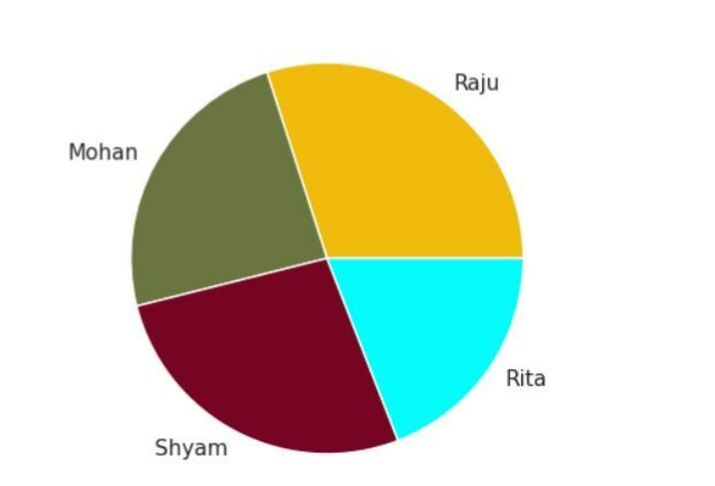
在以下示例中,此程式使用 matplotlib 和 seaborn 庫建立餅圖。然後使用 sns.set() 設定樣式。接下來,定義餅圖的資料,包括每個扇區的標籤和值以及每個區域的顏色。使用 plt.figure() 設定餅圖的大小,然後使用 plt.pie() 繪製餅圖,並使用指定的資料和顏色。使用 plt.axis() 將軸設定為相等,以確保餅圖顯示為圓形。最後,使用 plt.show() 顯示繪圖。
import matplotlib.pyplot as plt
import seaborn as sns

# Set the style and color palette
sns.set(style='white')

# Data Plotting
student = 'Raju', 'Mohan', 'Shyam', 'Rita'
weight = [80, 64, 72, 51]
color_region = ['#f0bb0c', '#6a7542', '#780423',
'#03fcfc']

# Set the size of the pie chart
plt.figure(figsize=(4,4))

# Plot to set the different color region to each student
plt.pie(weight, labels = student, colors = color_region )
plt.axis('equal')
plt.show()
輸出
示例 2
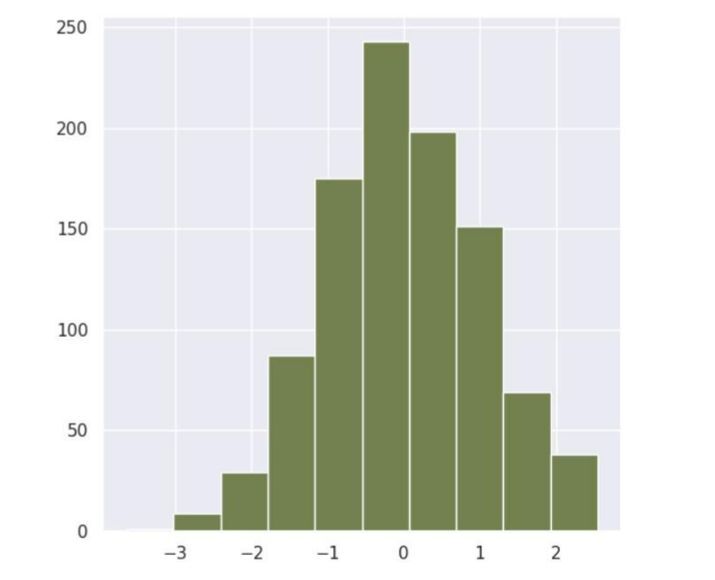
在以下示例中,我們將根據名為直方圖的圖形設定 Seaborn 圖表大小。此程式碼使用 matplotlib、numpy 和 seaborn 庫生成直方圖。使用 sns.set() 設定樣式。接下來,使用 np.random.randn() 方法生成隨機資料。使用 plt.figure() 設定直方圖的大小。然後使用 plt.hist() 繪製直方圖,並使用指定的資料、bin 數和顏色。最後,使用 plt.show() 顯示繪圖。
import matplotlib.pyplot as plt
import numpy as np
import seaborn as sns
sns.set(style='darkgrid')

# To generate the random data by using a random method
data = np.random.randn(1000)

# Set the size of the histogram
plt.figure(figsize=(6,6))

# Plot
plt.hist(data, bins=10, color='#738050')
plt.show()
輸出
示例 3
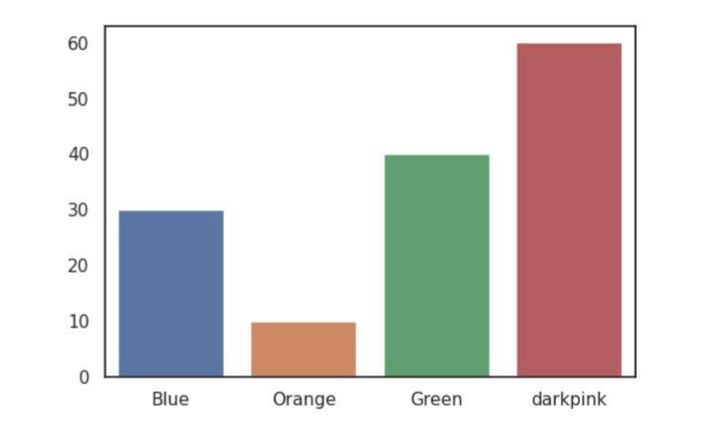
在以下示例中,我們將根據 barplot() 顯示 Seaborn 圖表大小。首先,提及必要的庫。然後為水平和垂直軸建立資料。接下來,使用 subplot 設定所需圖形大小,並將其儲存在變數 fig、ax 中。然後使用遵循 Seaborn 模組並接受三個引數(x、y 和 ax)的 barplot。最後,使用 show() 方法列印結果。
import seaborn as sns
import matplotlib.pyplot as plt

# create data
color = ['Blue', 'Orange', 'Green','darkpink']
color_percentage = [30, 10, 40, 60]

# Create a figure and axes with the desired size
fig, ax = plt.subplots(figsize=(6, 4))

# Plot the data
sns.barplot(x=color, y=color_percentage, ax=ax)
plt.show()
輸出
示例 4
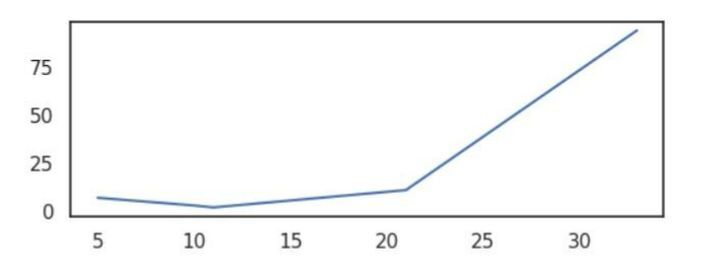
在以下示例中,我們將顯示 lineplot() 圖表的大小。首先,提及必要的模組,然後為在圖形中滿足特定點的 x 和 y 軸建立資料。接下來,使用內建方法 subplots 設定圖形大小,該方法設定名為 figsize 的引數,該引數將寬度設定為 6,高度設定為 2。然後將圖形設定為 lineplot,該圖形接受引數 - x、y 和 ax。此方法在圖形上構建繪圖線。最後,使用名為 show() 的方法獲取結果。
import seaborn as sns
import matplotlib.pyplot as plt

# Data
x_axes = [10, 21, 33, 5, 11]
y_axes = [3, 11, 94, 7, 2]

# Create a figure and axes with the desired size
fig, ax = plt.subplots(figsize=(6, 2))

# Plot the data
sns.lineplot(x=x_axes, y=y_axes, ax=ax)
plt.show()
輸出
示例 5
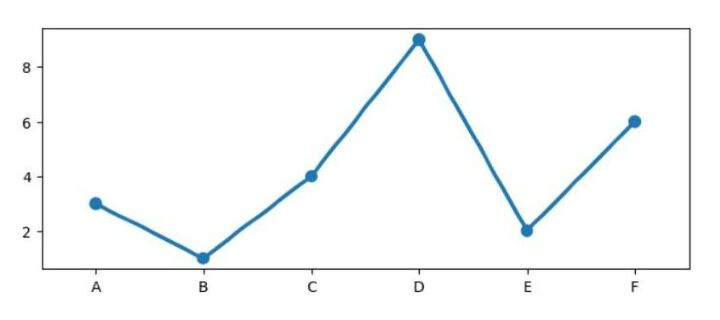
在以下示例中,我們將使用 seaborn 和 matplotlib 庫生成一個 **pointplot**。定義 x 和 y 軸的資料,並使用 plt.subplots() 建立具有所需大小的圖形和軸。然後使用 sns.pointplot() 和指定的軸物件繪製資料。最後,使用 plt.show() 顯示繪圖。
import seaborn as sns
import matplotlib.pyplot as plt

# Data
x_ax = ['A', 'B', 'C', 'D', 'E', 'F']
y_ax = [3, 1, 4, 9, 2, 6]

# Create a figure and axes with the desired size
fig, ax = plt.subplots(figsize=(8, 3))

# Plot the data
sns.pointplot(x=x_ax, y=y_ax, ax=ax)
plt.show()
輸出
結論
在本文中,我們討論了基於 seaborn 庫的不同型別的圖表,例如 pie()、histogram()、barplot()、lineplot() 和 pointplot()。根據資料集的要求,所有繪圖都有不同的含義。這種型別的圖形通常用於分析任何公司或組織的資料。

369 次檢視
