
 資料結構
資料結構 網路
網路 RDBMS
RDBMS 作業系統
作業系統 Java
Java MS Excel
 iOS
iOS HTML
HTML CSS
CSS Android
 Python
 C 程式設計
 C++
C++ C#
C# MongoDB
 MySQL
MySQL Javascript
 PHP
PHP 物理學
物理學 化學
化學 生物學
生物學 數學
數學 英語
英語 經濟學
經濟學 心理學
心理學 社會學
社會學 時尚研究
時尚研究 法律研究
法律研究如何在 OpenCV 中使用迭代器方法減輕色彩?
OpenCV 有與 C++ STL 相容的“Mat 迭代器”類。使用此“Mat 迭代器”類,我們可以非常容易地訪問畫素。我們必須建立一個“Mat 迭代器”類的物件。我們可以將其作為“Mat_<Vec3b>: : 迭代器示例”來實現。我們必須在“Mat”之後使用下劃線,例如“Mat_”,因為它是一種模板方法。在此方法中,必須在建立“迭代器”類的物件時指定返回型別。這就是我們宣告資料型別 <Vec3b> 的原因。
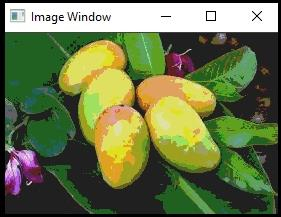
以下程式演示如何在 OpenCV 中使用迭代器方法減輕色彩。
示例
#include<iostream>
#include<opencv2/highgui/highgui.hpp>
using namespace std;//Declaring std namespace
using namespace cv;//Declaring cv namespace
void reducing_Color(Mat& image, int div = 64){ //Declaring the function//
   Mat_<Vec3b>::iterator iterator_start;//Declaring starting iterator//
   iterator_start = image.begin<Vec3b>();//Obtain iterator at initial position//
   Mat_<Vec3b>::iterator iterator_end;//Declaring ending iterator//
   iterator_end = image.end<Vec3b>();//Obtain iterator an end position//
   for (; iterator_start != iterator_end; iterator_start++){ //Loop for all pixels//
      (*iterator_start)[0] = (*iterator_start)[0] / div * div + div / 2;//Process pixels of first channel//
      (*iterator_start)[1] = (*iterator_start)[1] / div * div + div / 2;//Process pixels of second channel//
      (*iterator_start)[2] = (*iterator_start)[2] / div * div + div / 2;//Process pixels of third channel//
   }
}
int main() {
   Mat image;//taking an image matrix//
   image = imread("mango.jpg");//loading an image//
   namedWindow("Image Window");//Declaring another window//
   reducing_Color(image);//calling the function//
   imshow("Image Window", image);//showing the image with reduced color//
   waitKey(0);
   return 0;
}
輸出

更新日期:10 月 3 日,2021 年
210 人瀏覽

廣告