
 資料結構
資料結構 網路
網路 關係資料庫管理系統 (RDBMS)
 作業系統
作業系統 Java
Java MS Excel
 iOS
iOS HTML
HTML CSS
CSS Android
 Python
 C語言程式設計
 C++
C++ C#
C# MongoDB
 MySQL
MySQL Javascript
 PHP
PHP 物理學
物理學 化學
化學 生物學
生物學 數學
數學 英語
英語 經濟學
經濟學 心理學
心理學 社會學
社會學 服裝設計
服裝設計 法學
法學如何在OpenCV中使用指標方法減少顏色?
在影像處理中,我們對影像進行計算。更具體地說,我們對畫素進行計算,因此畫素數量越多,計算時間就越長。為了減少計算時間,我們需要高效地掃描影像。我們將學習如何使用指標實現高效的影像掃描迴圈。
在這裡,我們將看到一個顏色減少策略的畫素掃描過程示例。彩色影像(如RGB影像)由3個通道組成。這些通道中的每一個都具有相同數量的畫素,但具有相應的值。每個值都是一個8位無符號字元值。
因此,可能的顏色總數為256 x 256 x 256 = 16,777,216。我們可以將每個畫素的值除以大小相等的立方體來減少這個巨大的可能顏色數。如果我們使用8 x 8 x 8的立方體進行劃分,則可能的顏色數變為32 x 32 x 32 = 32,768。
當顏色數量減少時,系統速度就會加快。為了執行此減少操作,我們需要掃描每個畫素,這是一個耗時的任務。這就是為什麼我們需要一種高效的影像掃描方法。
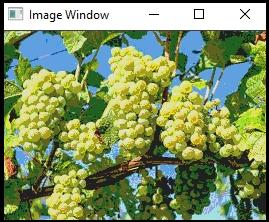
以下程式演示瞭如何在OpenCV中使用指標方法減少顏色。
示例
#include<iostream>
#include<opencv2/highgui/highgui.hpp>
using namespace cv;//Declaring cv namespace
using namespace std;//Declaring std namespace
void reducing_Color(Mat &image, int div=64){ //Declaring the function//
   int   total_rows = image.rows;//getting the number of lines//
   int total_columns = image.cols * image.channels();//getting the number of columns per line//
   for (int j = 0; j < total_rows; j++){ //initiating a for loop for rows
      uchar* data = image.ptr<uchar>(j);
      for (int i = 0; i < total_columns; i++){ //initiating a for loop for columns//
         data[i] = data[i] / div * div + div / 2;//processing the pixels//
      }
   }
}
int main() {
   Mat image;//taking an image matrix//
   image = imread("grapes.jpg");//loading an image//
   namedWindow("Image Window");//Declaring another window//
   reducing_Color(image);//calling the function//
   imshow("Image Window", image);//showing the image with reduced color//
   waitKey(0);
   return 0;
}
輸出

更新於:2021年3月10日
408 次檢視

廣告