
 資料結構
資料結構 網路
網路 RDBMS
RDBMS 作業系統
作業系統 Java
Java MS Excel
 iOS
iOS HTML
HTML CSS
CSS Android
 Python
 C 程式設計
 C++
C++ C#
C# MongoDB
 MySQL
MySQL Javascript
 PHP
PHP 物理
物理 化學
化學 生物
生物 數學
數學 英語
英語 經濟學
經濟學 心理學
心理學 社會學
社會學 時尚研究
時尚研究 法律研究
法律研究如何在 android 文字檢視中列印單詞數?
此示例說明如何在 android 文字檢視中列印單詞數。
步驟 1 − 在 Android Studio 中建立一個新專案,轉到檔案 ⇒ 新專案,然後填寫所有必需的詳細資訊以建立一個新專案。
步驟 2 − 將以下程式碼新增到 res/layout/activity_main.xml。
<?xml version="1.0" encoding="utf-8"?>
<LinearLayout xmlns:android="http://schemas.android.com/apk/res/android"
   xmlns:tools="http://schemas.android.com/tools"
   android:layout_width="match_parent"
   android:layout_height="match_parent"
   android:orientation="vertical"
   android:gravity="center_horizontal"
   android:layout_marginTop="100dp"
   tools:context=".MainActivity">
   <TextView
      android:id="@+id/text"
      android:gravity="center"
      android:layout_width="wrap_content"
      android:layout_height="wrap_content">
   </TextView>
</LinearLayout>
在上述程式碼中,我們已獲取文字檢視以顯示段落,吐司將顯示有關單詞數的資訊。
步驟 3 − 將以下程式碼新增到 src/MainActivity.java
package com.example.myapplication;

import android.os.Bundle;
import android.support.v7.app.AppCompatActivity;
import android.widget.TextView;
import android.widget.Toast;

public class MainActivity extends AppCompatActivity {
   TextView text;
   @Override
   protected void onCreate(Bundle savedInstanceState) {
      super.onCreate(savedInstanceState);
      setContentView(R.layout.activity_main);
      text = findViewById(R.id.text);
      text.setText("Lorem Ipsum is simply dummy text of the printing and typesetting industry.
                    Lorem Ipsum has been the industry's standard dummy text ever since the
                    1500s, when an unknown printer took a galley of type and scrambled it to
                    make a type specimen book. It has survived not only five centuries, but
                    also the leap into electronic typesetting, remaining essentially unchanged.
                    It was popularised in the 1960s with the release of Letraset sheets
                    containing Lorem Ipsum passages, and more recently with desktop publishing
                    software like Aldus PageMaker including versions of Lorem Ipsum.");
      String[] para = text.getText().toString().split("\s+");
      Toast.makeText(MainActivity.this, "" + para.length, Toast.LENGTH_LONG).show();
   }
}
讓我們嘗試執行您的應用程式。我假設您已將實際 Android 移動裝置連線到計算機。要從安卓工作室執行應用,請開啟您的其中一個專案活動檔案,單擊工具欄上的執行  圖示。選擇您的移動裝置作為選項,然後檢查將顯示預設螢幕的移動裝置 –
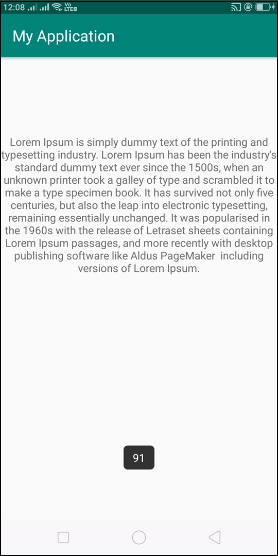
單擊 此處 下載專案程式碼

更新日期:2020 年 6 月 26 日
531 次瀏覽

廣告